
In Pricefx, the folder tree organizes items on listing pages, such as Price Lists, Quotes, Rebate Agreements, and Dashboards, into folders and subfolders. The folder tree is displayed in the folder sidebar on the left side of the listing. In the application, the folder sidebar is labeled Folders. This page describes the folder sidebar elements, the folder sort options, the Folder column, and the pages that support folders.
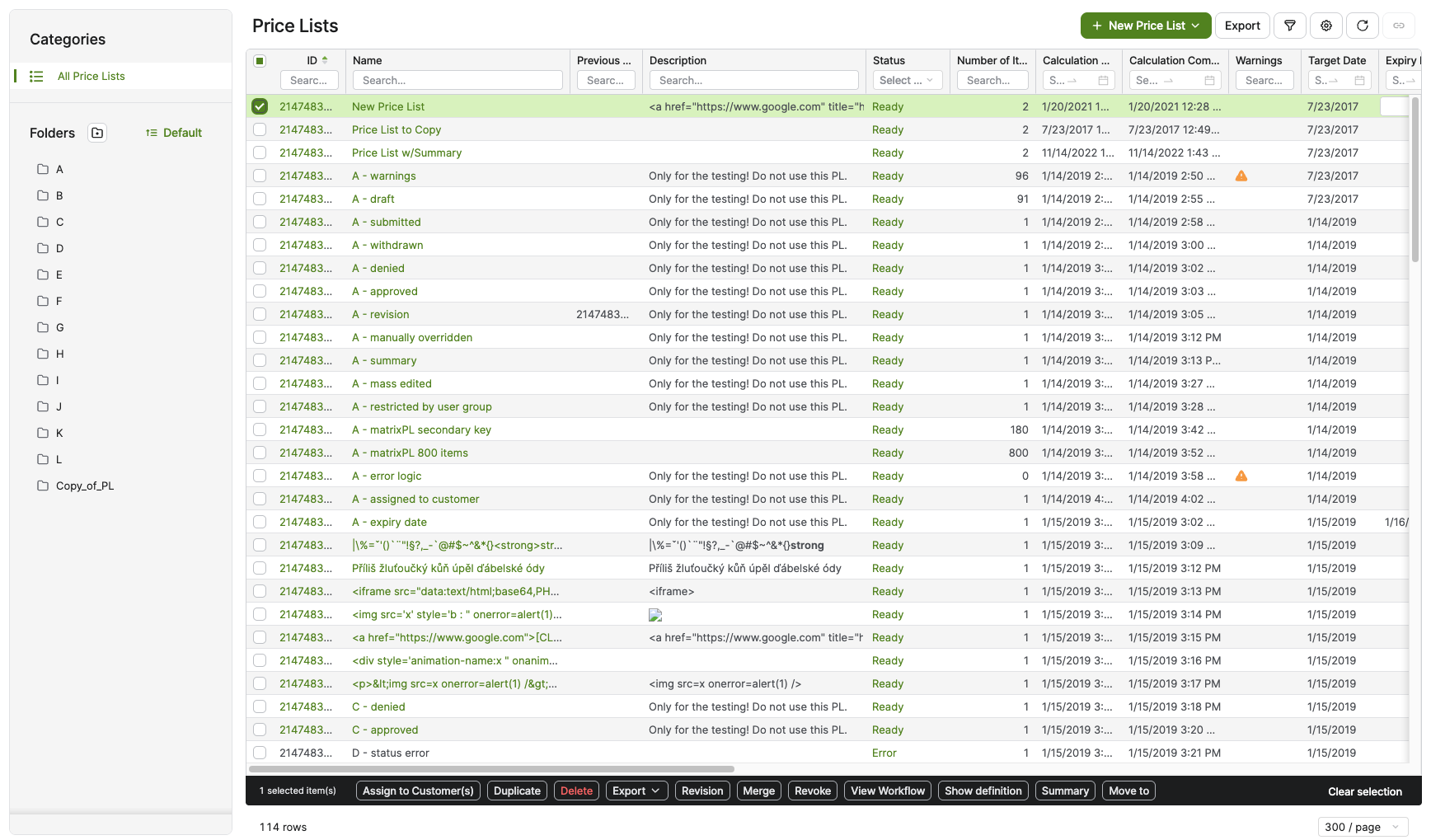
For step-by-step instructions to create, rename, delete, sort, and filter folders, see Folders.
Folder Sidebar Elements
The following table describes the elements of the folder sidebar.
|
Element |
Description |
|---|---|
|
All [Item Type] section |
The first entry in the folder sidebar. It lists all items on the page regardless of folder. The label matches the page, for example All Dashboards, All Price Lists, or All Quotes. Selecting All [Item Type] removes an active folder filter. |
|
Create Folder |
Opens the Add Folder dialog. If no folder is selected, the new folder is created at the top level. If a folder is selected, the new folder is created as a subfolder of the selected folder. |
|
Sort control |
Opens the list of folder sort options. The selected option changes the order of folders in the folder sidebar. |
|
⋯ icon |
Appears when you hover over a folder in the folder sidebar. It contains the Rename and Delete actions for that folder. |
|
Rename |
Opens the Rename Folder dialog, where you enter a new name for the folder. |
|
Delete |
Opens a confirmation dialog. After you confirm, the folder is removed from the folder sidebar. |
|
Move to |
Moves the selected item in the table to a different folder. |

Folder Sort Options
The following table lists the sort options available in the folder sidebar sort control.
|
Sort Option |
Description |
|---|---|
|
Default |
Keeps the current folder order until you select a different sort option. |
|
Name (A-Z) |
Sorts folders alphabetically from A to Z. |
|
Name (Z-A) |
Sorts folders alphabetically from Z to A. |
|
Created (Newest - Oldest) |
Sorts folders by creation date, from newest to oldest. |
|
Created (Oldest - Newest) |
Sorts folders by creation date, from oldest to newest. |
Folder Column
Tables on pages with folders include a Folder column. The Folder column shows the folder that contains each item. For an item in a subfolder, the Folder column shows the name of the deepest folder. When you hover over the folder name, a tooltip shows the full folder path. The segments of the folder path are not clickable. You can sort and filter the table by the Folder column with the standard table controls.
For information about table controls, see Common Table Actions.
Pages with Folder Tree
The folder tree is available on the following pages.
|
Page Name |
URL Path |
|---|---|
|
Dashboards |
|
|
Dashboards Admin |
|
|
Data Analyzer (All Charts) |
|
|
Portlets |
|
|
Queries |
|
|
Price Lists |
|
|
Manual Price Lists |
|
|
Live Price Grids |
|
|
Quotes |
|
|
Agreements & Promotions |
|
|
Rebate Agreements |
|
|
Compensation Plans |
|
|
Customers |
|
|
Custom Forms |
|
|
Company Parameters |
|