
The preferred way to install the extension is through the built-in VS Code Extension Marketplace, as it allows you to receive fresh updates automatically.
The link to the official MS VS Code marketplace for Pricefx Code is: https://marketplace.visualstudio.com/items?itemName=PriceFx.pricefx-code&ssr=false#overview
Install Extension through Extensions Marketplace
Updates will be installed automatically based on you VS Code version.
-
Open VS Code or any other VS Code based IDE.
-
Open Extensions and type into search “Pricefx Code“.
-
Click Install.
Install from VSIX File
-
Install VSIX file from https://open-vsx.org/extension/pricefx/pricefx-code.
-
Open VS Code or any other VS Code based IDE.
-
Open Extensions and click Views and more Actions. There you will find option Install from VSIX.
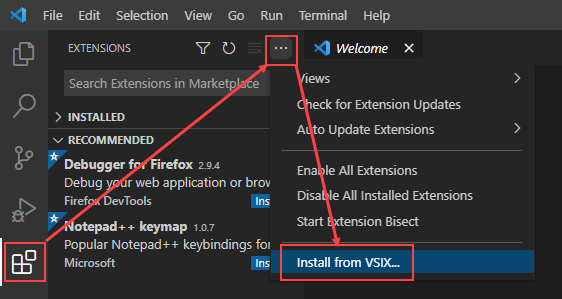
-
Select VSIX file you installed from open-vsx.