From version 10.0 Bee’s Knees Configuration Engineers are able to create and send Notifications.
This article will show you how to do it.
Each notification has one of four statuses (info, success, warning, error) and will end up in Notification center.
Take a look at Notification (Technical User Reference) for API reference and at Context Linking to use full potential of Notifications.
Notification Center
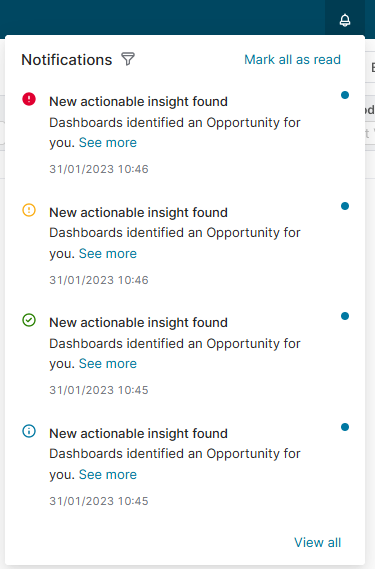
.withErrorStatus()
.withWarningStatus()
.withSuccessStatus()
.withInfoStatus()
Here you can see a couple of examples
Notice methods of Notifications API and usage of builder pattern.
Java
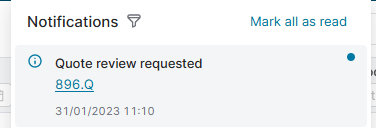
// Info notification with a link to the quote and download action
def user = api.user("admin")
def quoteTypedId = "896.Q"

api.notificationApi()
        .withRecipient(api.user("loginName"))
        .withTitle("Quote review requested ")
        .withSuccessStatus()
        .withSource(quoteTypedId)
        .withContextLink("Go to P-896", AppPages.QC_DETAILS_PAGE, quoteTypedId)
        .withDownloadAction("asyncdownloadmanager.download/whatever.zip")
        .withMessage("Quote created by $user needs your attention.")
        .send()
Java
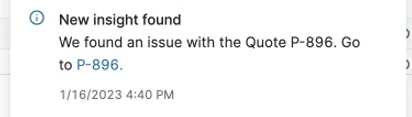
// Creates a notifications with a deep-link to a specific Quote to a particular tab. E.g. P-896, tab: dashboard.
api.notificationApi()
      .withRecipient(api.user("loginName"))
      .withTitle("New insight found")
      .withInfoStatus()
      .withSource("896.Q")
      .withContextLink("P-896.", AppPages.QC_DETAILS_PAGE, [id: "896", tpTab: 'dashboard'])
      .withMessage("We found an issue with the Quote P-896. Go to")
      .send()
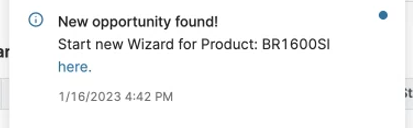
Java
// Creates a notification for current user with a link to a an existing Configuration Wizard with some inputs prefilled
api.notificationApi()
      .withRecipient(api.user("loginName"))
      .withTitle("New opportunity found!")
      .withInfoStatus()
      .withSource("392.DB")
      .withContextLink("here.", AppPages.MD_WIZARD_PAGE, [
              id: 48,
              targetPageInputs: [
                        TextUserEntry: "Hello World!",
                        Margin       : 10,
                        Products     : "BR1600SI",
                        InputMatrix  : [
                                [name: "CONTEXT", RACI: "R", comment: "no comment"],
                                [name: "LINKING", RACI: "A,C", comment: "no comment"],
                                [name: "EXPERIMENT", RACI: "A", comment: "With comment", selected: true],
                                [name: "WITH", RACI: "I", comment: "Without comment"],
                                [name: "INPUT", RACI: "I, A", comment: "no comment", selected: true],
                                [name: "MATRIX", RACI: "I", comment: "All comments", selected: true]]
                        ]
                ])
        .withMessage("Start new Wizard for Product: BR1600SI")
        .send()