
Default Conversions
Per Unit Fields
In the Datamart query, a field with a Per Unit measure is extended by multiplying it by the Datamart’s Per Unit basis and converting it to the base Unit of Measure (UOM). A Per Unit field is assumed to be expressed in the unit specified in the UOM (Unit of measure) field of the Data Source from which the field is sourced. The Base UOM is determined in the following order:
-
The Datamart’s Base UOM.
-
The partition’s Base UOM attribute (configured when the partition is initially created).
-
The
currency.defaultBaseUOMCodeinstance parameter (which is only configurable by the Support Team).
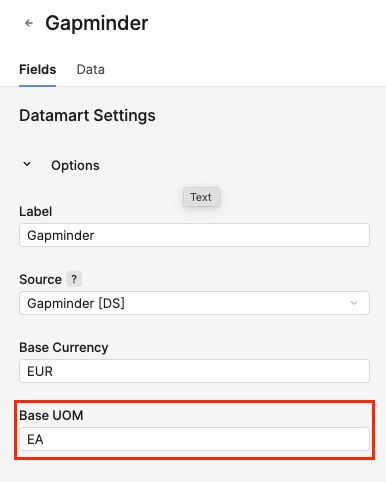
Quantity Fields
In the Datamart query, the value of a Quantity field is converted to the number of units in the Base UOM. Similar to the Per Unit fields, a Quantity field is assumed to be expressed in the unit specified in the UOM field of the Data Source from which the field is sourced.
Money Fields
In the Datamart query, a Money field value is converted to the target currency specified in the query’s options map. If no target currency is set, it defaults to the Base Currency, determined in the following order:
-
The Datamart’s Base Currency.
-
The partition’s Base Currency attribute (configured when the partition is first created).
-
The
currency.defaultBaseCurrencyCodeinstance parameter (which is only configurable by the Support Team).
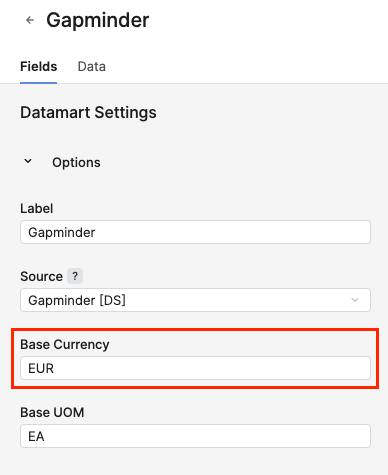
A Money field is assumed to be expressed in the currency specified in the Currency field of the Data Source from which the field is sourced. The date used to determine the applicable exchange rate is set by the Datamart’s Pricing Date field. If this field is not configured, no currency conversion is performed.
Product Specific Conversions
Available from version 15.0
Experimental Feature
In addition to the Default Conversions, a Product Specific UOM conversion option has been introduced, along with a more explicit method for specifying conversions. This allows overriding the default behavior described in the previous section.
Note that, currently, the configuration of the Product Specific Conversions can only be performed within the Datamart's Import & Export Definitions (JSON).
(Analytics > Data Manager > Datamarts > Import & Export > Import & Export Definitions (JSON))
Per Unit Field with Configurable UomFrom Field
In this example, the ListPrice field is expressed in the unit specified in the Ordered_UOM field. This field does not need to be of the UOM type but must be a text field.
{
    "uniqueName": "MyDM",
    "fields": [
        {
            "name": "ListPrice",
            "type": "MONEY",
            "measureType": "PERUNIT",
            "conversion": {
                "uomField": "Ordered_UOM"
            }
        }, ...
    ]
    , ...
}
Per Unit Field with Configurable UomFrom Code
In this example, the ListPrice field is always expressed in the price per KG.
"fields": [
        {
            "name": "ListPrice",
            "type": "MONEY",
            "measureType": "PERUNIT",
            "conversion": {
                "uomCode": "KG"
            }
        }, ...
    ]
Per Unit Field with Configurable Product Specific UomFrom Field
In this example, the ListPrice field is dependent on the product, with its unit determined by a product specific UOM from field.
"fields": [
        {
            "name": "ListPrice",
            "type": "MONEY",
            "measureType": "PERUNIT",
            "conversion": {
                "skuField": "MaterialNumber",
                "uomField": "Ordered_UOM"
            }
        }, ...
    ]
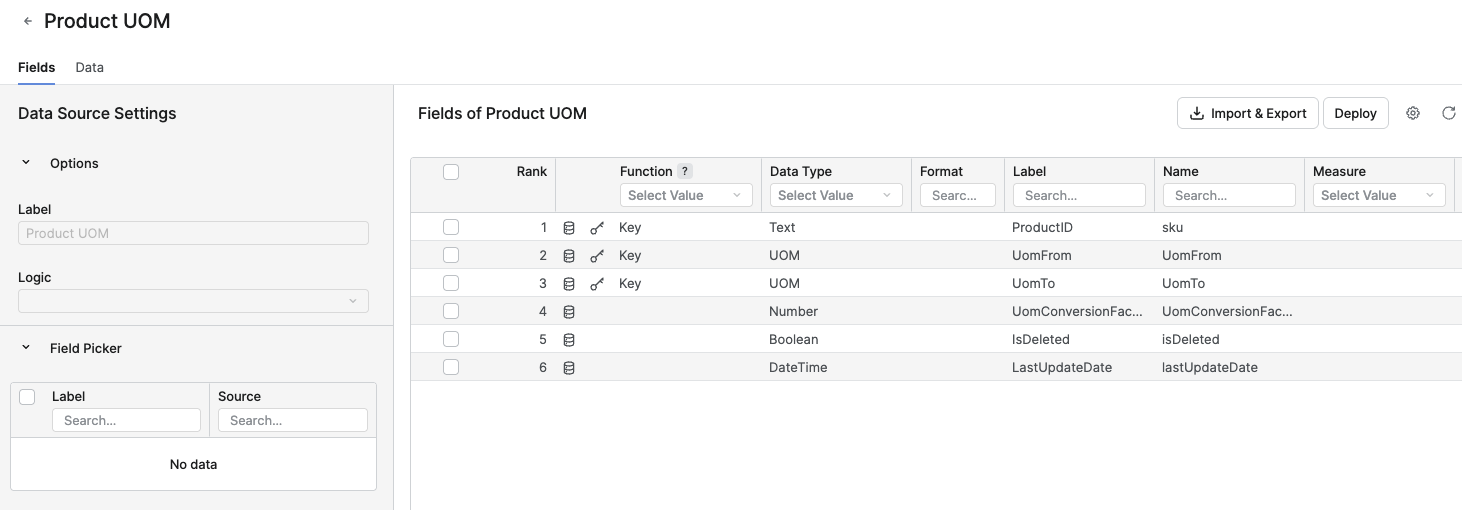
This configuration instructs the Datamart query to retrieve the conversion rate from the new Product UOM Data Source. This Data Source is similar to the Units of Measures Data Source but includes one additional key field: sku.
To utilize product specific UOMs, a conversion rate must be provided for each individual product. If a conversion rate is missing, it will not fall back to the globally defined UOMs from the Units of Measures Data Source.
Per Unit Field with Configurable Product Specific UomFrom Code
Instead of referencing a field that contains the product specific UOM from code, a fixed 'literal' code can also be specified.
 "fields": [
        {
            "name": "ListPrice",
            "type": "MONEY",
            "measureType": "PERUNIT",
            "conversion": {
                "skuField": "MaterialNumber",
                "uomCode": "KG"
            }
        }, ...
    ]
Configurable Quantity Field for All Per Unit Conversions
This feature applies to all Per Unit fields and allows the override of the default quantity field used for extension. As mentioned in the previous section, any Per Unit value is multiplied by the Datamart’s Per Unit Basis in a Datamart query. However, with this configuration, a different quantity field can be selected.
"fields": [
        {
            "name": "ListPrice",
            "type": "MONEY",
            "measureType": "PERUNIT",
            "conversion": {
                "qtyField": "Ordered_Quantity",
                "uomField": "Ordered_UOM"
            }
        }, ...
    ]
The chosen qtyField field must be the Quantity type.
Quantity Field with Configurable UomFrom Field
As a Quantity is per definition a number of units, it can also be configured to have either a specific source field that holds the UOM value, or a fixed UOM code.
"fields": [
        {
            "name": "Ordered_Quantity",
            "type": "QUANTITY",
            "conversion": {
                "uomField": "Ordered_UOM"
            }
        }, ...
    ]
Money Field with Configurable FromCurrency Field
Similar to the UOM conversion examples, this allows specifying a specific field that contains the currency in which the ListPrice field is denominated.
 "fields": [
        {
            "name": "ListPrice",
            "type": "MONEY",
            "conversion": {
                "ccyField": "Ordered_Currency"
            }
        }, ...
    ]
Money Field with Configurable FromCurrency Code
Or when the field is denominated in a fixed currency.
 "fields": [
        {
            "name": "ListPrice",
            "type": "MONEY",
            "conversion": {
                "ccyCode": "CHF"
            }
        }, ...
    ]
Combining Multiple Conversion Parameters in a Money Field Configuration
Where it makes sense, the above conversions can be combined.
{
            "name": "ListPrice",
            "type": "MONEY",
            "measureType": "PERUNIT",
            "conversion": {
                "skuField": "MaterialNumber",
                "uomField": "Ordered_UOM",
                "qtyField": "Ordered_Quantity",
                "ccyCode": "CHF"
            }