
Tables display information in a way that makes it easy for end users to visually scan the data. Data series that cannot be aggregated are especially suited for tables. An example can be a list of prices.
Simple Table
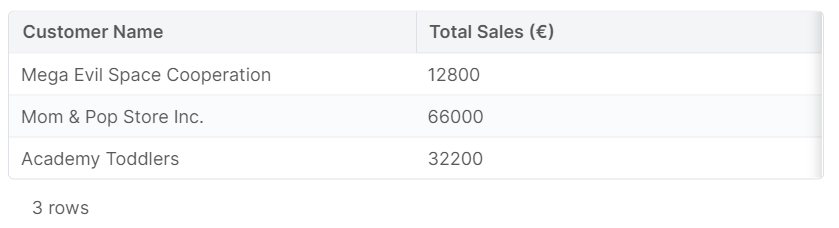
Dashboard Chart Example Groovy
ResultMatrix simpleTable(
        List<Map> data,
        Map<String, String> labels
) {
    def table = api.newMatrix()

    table.withColumns(labels.keySet())
    table.withRows(data)

    // Add labels to the columns
    labels.each { name, label ->
        table.withColumnTranslation(name, ['': label])
    }

    return table
}
Dashboard Chart Simple Table Groovy
ResultMatrix data = [
        [
                customerId: 'CD-00001',
                label     : 'Mega Evil Space Cooperation',
                totalSales: 12.8e3,
        ], [
                customerId: 'CD-00001',
                label     : 'Mom & Pop Store Inc.',
                totalSales: 66.0e3,
        ], [
                customerId: 'CD-00001',
                label     : 'Academy Toddlers',
                totalSales: 32.2e3,
        ]
]

def labels = [
        // Do not include the customerId
        label     : 'Customer Name',
        totalSales: 'Total Sales (€)',
]

return simpleTable(data, labels)
Cell Formatting
You can specify exactly how the cells in a column should be formatted with the FielFormatType enumeration.
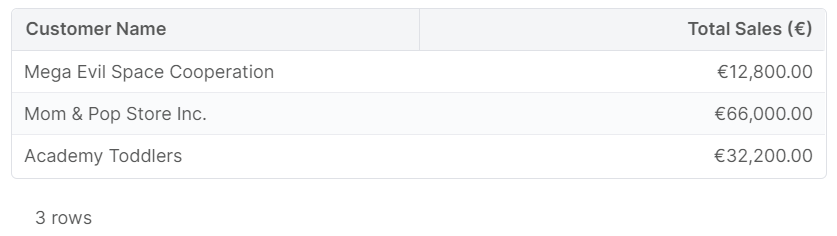
Dashboard Chart Table with Formatting Groovy
ResultMatrix tableWithFormatting(
        List<Map> data,
        Map<String, String> labels,
        Map<String, FieldFormatType> formatting
) {
    def table = api.newMatrix()

    table.withColumns(labels.keySet())
    table.withRows(data)
    table.withColumnFormats(formatting)

    // Add labels to the columns
    labels.each { name, label ->
        table.withColumnTranslation(name, ['': label])
    }

    return table
}
Filtering & Sorting
A table header can allow the end user to filter and sort rows according to their field values. Both these features must be switched on by method calls.
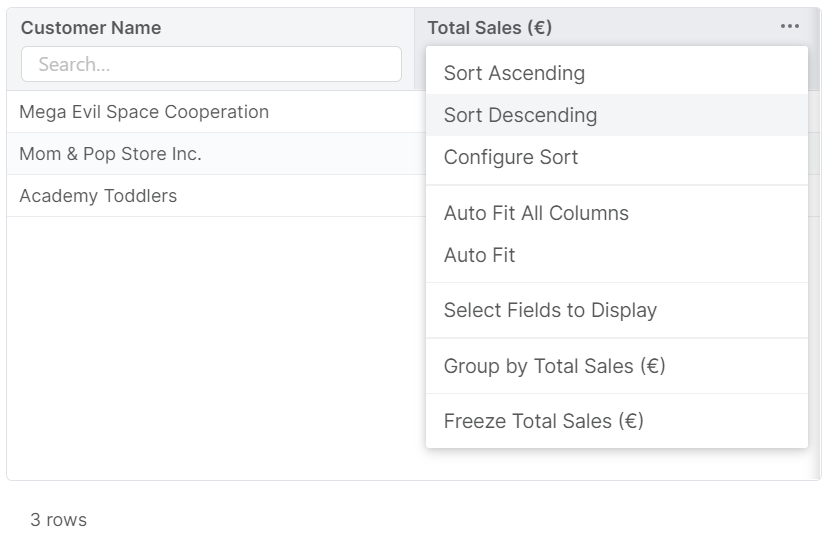
Dashboard Chart Table with Sort and Search Groovy
ResultMatrix simpleTableWithSortAndSearch(
        List<Map> data,
        Map<String, String> labels
) {
    def table = api.newMatrix()

    table.withColumns(labels.keySet())
    table.withRows(data)

    table.withDisableSorting(false)
    table.withEnableClientFilter(true)

    // Add labels to the columns
    labels.each { name, label ->
        table.withColumnTranslation(name, ['': label])
    }

    return table
}
External Links
A table cell can contain a link to other pages within the frontend application. To turn the cell into a link, simply set the cell value to a string that contains an HTML anchor tag.
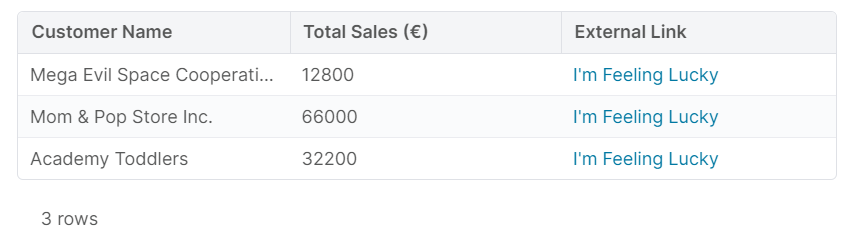
Dashboard Chart Table with External Links Groovy
ResultMatrix tableWithExternalLink(
        List<Map> data,
        Map<String, String> labels
) {
    def table = api.newMatrix()

    def allLabels = labels + [externalLink: 'External Link']

    table.withColumns(allLabels.keySet())

    def rows = data.collect { dataRow ->
        // Add a field to the data set
        dataRow + [
                externalLink: externalLink(
                        "https://duck.com/?q=${urlEncode(dataRow.label)}",
                        "I'm Feeling Lucky"
                )
        ]
    }

    table.withRows(rows)

    // Add labels to the columns
    allLabels.each { name, label ->
        table.withColumnTranslation(name, ['': label])
    }

    return table
}

String externalLink(String href, String children){
    return """<a href="${href}">${children}</a>"""
}
Internal Links
If you want to link to a page within the Pricefx application, it is best to use ResultMatrix.linkCell(). This will ensure that the link that the end user clicks points to a valid page within the same frontend application. Otherwise, there will be issues if the URL changes.
For a full list of pages that can be targeted with ResultMatrix.linkCell(), see the reference.
Dashboard Chart Table with Internal Links Groovy
ResultMatrix tableWithCustomerDetail(
        List<Map> data,
        Map<String, String> labels
) {
    def table = api.newMatrix()

    def allLabels = labels + [openCustomerDetail: 'Customer Detail']

    table.withColumns(allLabels.keySet())

    def rows = data.collect { dataRow ->
        // Add a field to the data set
        dataRow + [
                openCustomerDetail: customerDetailLink(table, dataRow.customerId)
        ]
    }

    table.withRows(rows)

    // Add labels to the columns
    allLabels.each { name, label ->
        table.withColumnTranslation(name, ['': label])
    }

    return table
}

String customerDetailLink(ResultMatrix table, String customerId){
    // If customerId is null, the customer master table screen would open
    if(customerId == null){
        throw new Exception('customerId must be provided')
    }
    return table.linkCell('Customer Detail', 'customersPage', customerId)
}
Cell Styling
Table cells can be styled, for example, to draw attention to certain rows.
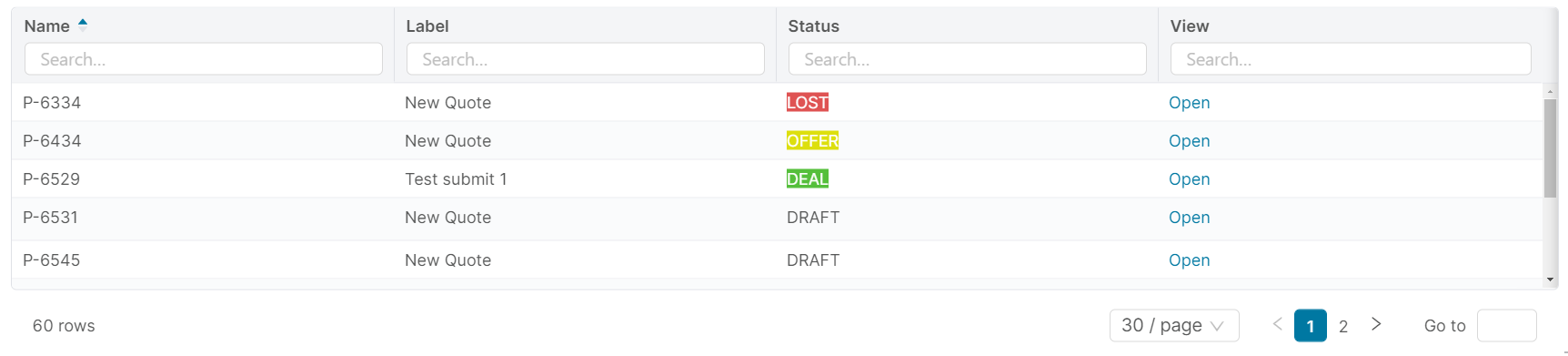
Dashboard Chart Table Quote Status Groovy
ResultMatrix quotesTable(
        String title,
        List<Quote> quotes
){

    def table = api.newMatrix()
    table.withTitle(title)

    def labels = [
            // typedId should be hidden, because it is only there to be supplied to the table action handler
            name       : 'Name',
            label      : 'Label',
            quoteStatus: 'Status',
            viewQuote  : 'View',
    ]

    def rows = quotes.collect { quote ->
        [
                typedId    : quote.typedId,
                name       : quote.uniqueName,
                label      : quote.label,
                quoteStatus: getQuoteStatusCell(table, quote.quoteStatus),
                viewQuote  : link("#/qc/quotes/${quote.typedId}", 'Open')
        ]
    }

    def columns = labels.keySet() as List<String>
    table.withColumns(columns)
    table.withRows(rows)
    table.withDisableSorting(false)
    table.withEnableClientFilter(true)

    // Add labels, in the backend referred to as "translations"
    labels.each { name, label ->
        table.withColumnTranslation(name, ['': label])
    }

    return table
}

def getQuoteStatusCell(ResultMatrix table, String quoteStatus) {
    def colors = libs.Library_CSS.Color
    switch (quoteStatus) {
        case 'DEAL':
            return table.styledCell(quoteStatus, colors.CONTRAST_TEXT, colors.SUCCESS)
        case 'OFFER':
            return table.styledCell(quoteStatus, colors.CONTRAST_TEXT, colors.WARNING)
        case 'LOST':
            return table.styledCell(quoteStatus, colors.CONTRAST_TEXT, colors.ERROR)
        default:
            return table.styledCell(quoteStatus)
    }
}
def quotes = quoteUtils.getByYear(year)

return quotesTable("Quotes $year", quotes)
Row Actions
End users can be allowed to perform actions on the rows. These actions are strictly limited – they must correspond to a single REST API call.
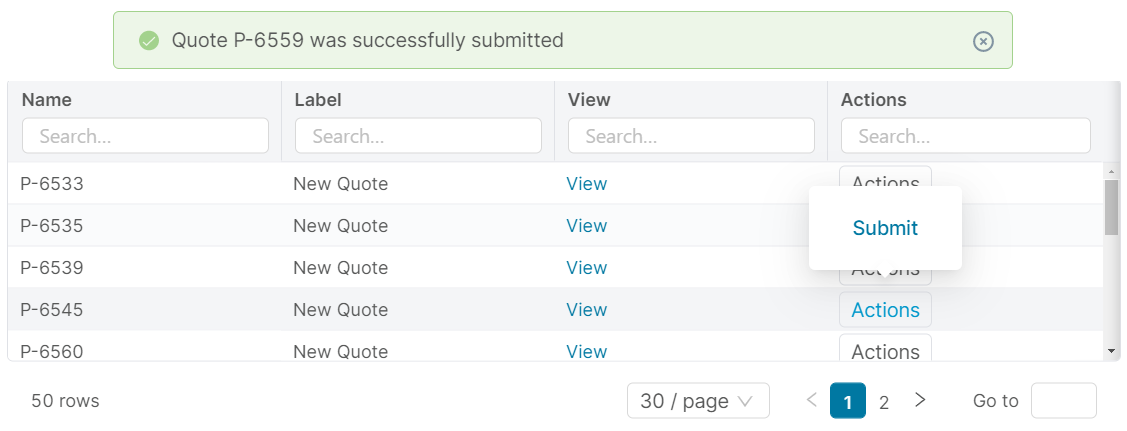
Dashboard Chart Table Row Actions Groovy
ResultMatrix quotesTable(
        String title,
        List<Map> quotes
){

    def table = api.newMatrix()
    table.withTitle(title)

    def labels = [
            // typedId should be hidden, because it is only there to be supplied to the matrix action handler
            name       : 'Name',
            label      : 'Label',
            viewQuote  : 'View',
            actions  : 'Actions',
    ]

    def rows = quotes.collect { quote ->
        [
                name       : quote.uniqueName,
                label      : quote.label,
                viewQuote  : link("#/qc/quotes/${quote.typedId}", 'View'),
                actions  : table.cells('Actions', submitAction(table, quote)),
        ]
    }

    def columns = labels.keySet() as List<String>
    table.withColumns(columns)
    table.withRows(rows)
    table.withDisableSorting(false)
    table.withEnableClientFilter(true)

    // Add labels, in the backend referred to as "translations"
    labels.each { name, label ->
        table.withColumnTranslation(name, ['': label])
    }

    return table
}

ResultMatrix.ResultMatrixBackEndCell submitAction(ResultMatrix table, Map quote){
    return table.backEndAction(
            'Submit',
            "/clicmanager.runjob/${quote.typedId}/submit", // Must have leading forward slash
            null,
            "Quote ${quote.uniqueName} was successfully submitted",
            "Failed to submit ${quote.uniqueName}"
    )
}

String link(String href, String children) {
    return """<a href="$href">${children}</a>"""
}
Dashboard Chart Examples Table Row Actions
def quotes = quoteUtils.getDraftsByYear(year)

return quotesTable("Quote Drafts $year (Row Action)", quotes)
Row Selection Actions
End users can be allowed to perform actions on selected rows. When one or more rows are selected, a set of action buttons are made available (at the bottom of the table). When one of these buttons is clicked, a callback logic is invoked by the frontend application. This logic must have the default logic nature. An alert will pop up on the screen, indicating whether the execution was successful.
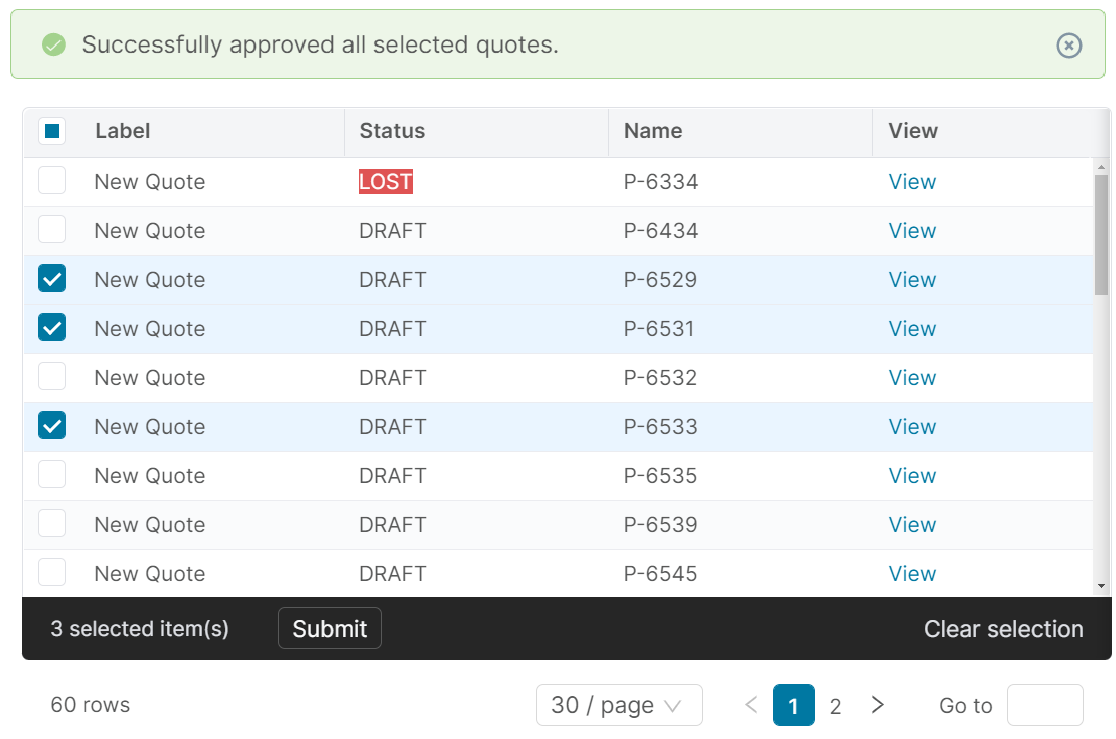
Dashboard Chart Table Row Selection Actions
ResultMatrix quotesTable(
        String title,
        List<Quote> quotes
){

    def table = api.newMatrix()
    table.withTitle(title)

    def labels = [
            // typedId should be hidden, because it is only there to be supplied to the matrix action handler
            name       : 'Name',
            label      : 'Label',
            viewQuote  : 'View',
    ]

    def rows = quotes.collect { quote ->
        [
                typedId    : quote.typedId,
                name       : quote.uniqueName,
                label      : quote.label,
                viewQuote  : link("#/qc/quotes/${quote.typedId}", 'View')
        ]
    }

    def columns = labels.keySet() as List<String>
    table.withColumns(columns)
    table.withRows(rows)
    table.withDisableSorting(false)
    table.withEnableClientFilter(true)

    table.rowSelectionBackEndAction('quotes')
            .withLogicName('Handler_SubmitQuotes')
            .withColumns('typedId')
            .withButtonLabel('Submit')
            .withSuccessMessage('Successfully submitted all selected quotes.')
            .withFailureMessage('Failed to submit all selected rows.')

    // Add labels, in the backend referred to as "translations"
    labels.each { name, label ->
        table.withColumnTranslation(name, ['': label])
    }

    return table
}

String link(String href, String children) {
    return """<a href="$href">${children}</a>"""
}
Set up a bound partition with the name 'thisPartition' that points to the same partition you are using, and add the callback logic.
// Expects the input to have a property 'quotes'
// that is a list of maps with one property 'typedId'
def typedIds = input.quotes.collect { it.typedId as String }

typedIds.each { typedId ->
    submitQuote(typedId)
}

return

void submitQuote(String typedId){
    api.boundCall(
            'thisPartition',
            "clicmanager.runjob/$typedId/submit",
            '',
    )
}