
Available from version 15.2 as a beta feature. Attribute extensions are now only “enabled” for Price Setting meaning that some functionality may not be available yet, like, for example, exporting and importing via Import Manager, mass editing, export to XLSX, etc. See the list of known issues and risks below.
You can now exceed the standard limit of 100 attributes in a Price List or Live Price Grid by storing additional calculation results in attribute extensions—extra columns that have no character limit. While filtering and sorting are supported on attribute extension fields, use regular attributes for filters and sorts whenever possible for best performance.
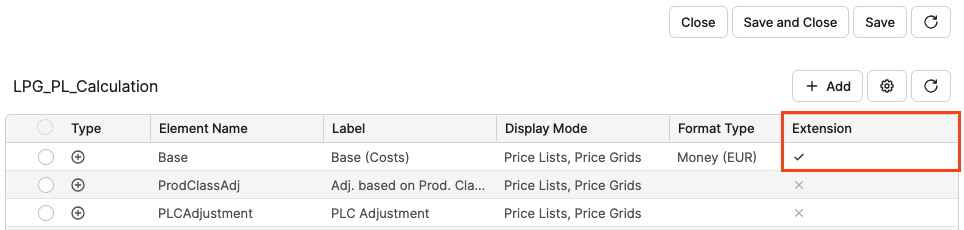
To configure storing logic element’s results in an attribute extension:
-
Go to the generic logic that you intend to use for calculating your Price Lists / Live Price Grid.
-
For each logic’s element whose result you want to store in an attribute extension, set the value in the Extension column to True.
Known Issues and Potential Risks
This section outlines key risks and possible problems with implementing attribute extensions for Price Lists and Live Price Grids.
Data Integrity and Calculation Consistency
-
Changing attribute types (standard ↔ extension) can create duplicated or “zombie” columns if recalculations do not fully clean up prior structures. Validate that all obsolete columns are removed after changes and reprocessing.
-
Logic that relies on
api.currentItemor similar context‑dependent code may behave unexpectedly when the underlying context is not attribute extension mapped, potentially leading to inconsistent results across recalculation paths.
User Experience and Communication
-
The UI does not always clearly differentiate standard attributes and attribute extensions and users may be unsure which attributes count toward the 100‑column limit. This can cause confusion when the frontend allows selecting more than 100 attributes, but the backend silently skips any columns beyond the limit.
-
Customers expecting legacy behavior may see apparent regressions when some columns are skipped (>100) without explicit feedback. Communicate constraints and expected behavior clearly before rollout.
Edge Cases and Incomplete Handling
-
Some transitions—such as reverting an attribute from extension back to standard—may not be fully supported in all cases and can leave data in an inconsistent state. Validate these scenarios in a non‑production environment before adopting them broadly.