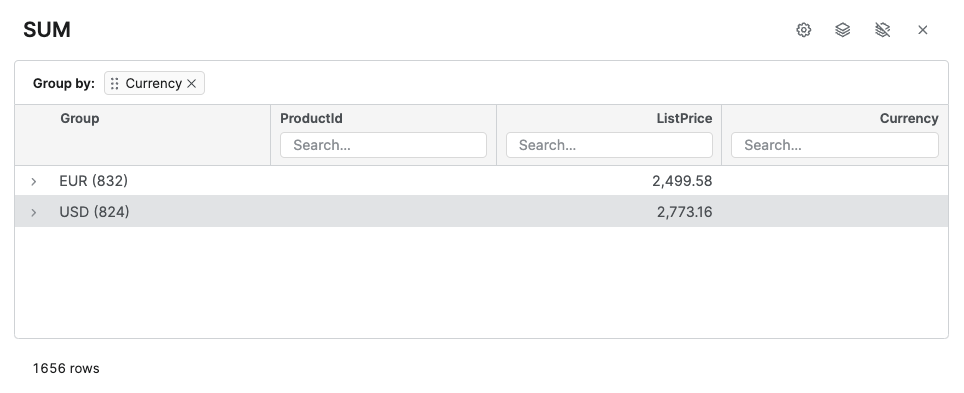
By utilizing the aggregation and grouping features, you can establish groups within the Result Matrix and perform aggregation operations on these groups, such as SUM, COUNT, etc.
Supported Aggregations
-
AVG
-
COUNT
-
MAX
-
MIN
-
SUM
Definition
Groovy
def groupByData = api.newMatrix()
             // Definition of result matrix (columns, rows).
             .withColumns('TextColumn1', 'TextColumn2', 'NumericColumn3', 'NumericColumn4')
             .withRows(rows)
             // Property `.withGroupBy` defines that the `TextColumn1` and `NumericColumn3` are used for group by (The order is important).
             .withGroupBy(['TextColumn1', 'NumericColumn3'])
             // Property `.withColumnAggregation` defines the values for subtotal rows that will be calculated as SUM.
             // Values are based on the group by definition (`NumericColumn3`). This definition is optional.
             // When not used, like e.g. for `TextColumn1`, there will be no aggregation calculated for `TextColumn1`.
             .withColumnAggregation('NumericColumn3', SUM)
             // Property `.calculateGroupByData` is an end statement for group definition.
             // This statement is only used together with `.withColumnAggregation`.
             .calculateGroupByData()
Static import is required to use a predefined enum with aggregation types.
Groovy
import static net.pricefx.server.dto.calculation.ResultMatrixGrouping.AggregateFunctionType
import static net.pricefx.server.dto.calculation.ResultMatrixGrouping.AggregateFunctionType.AVG
import static net.pricefx.server.dto.calculation.ResultMatrixGrouping.AggregateFunctionType.COUNT
import static net.pricefx.server.dto.calculation.ResultMatrixGrouping.AggregateFunctionType.MAX
import static net.pricefx.server.dto.calculation.ResultMatrixGrouping.AggregateFunctionType.MIN
Examples
Grouping Example
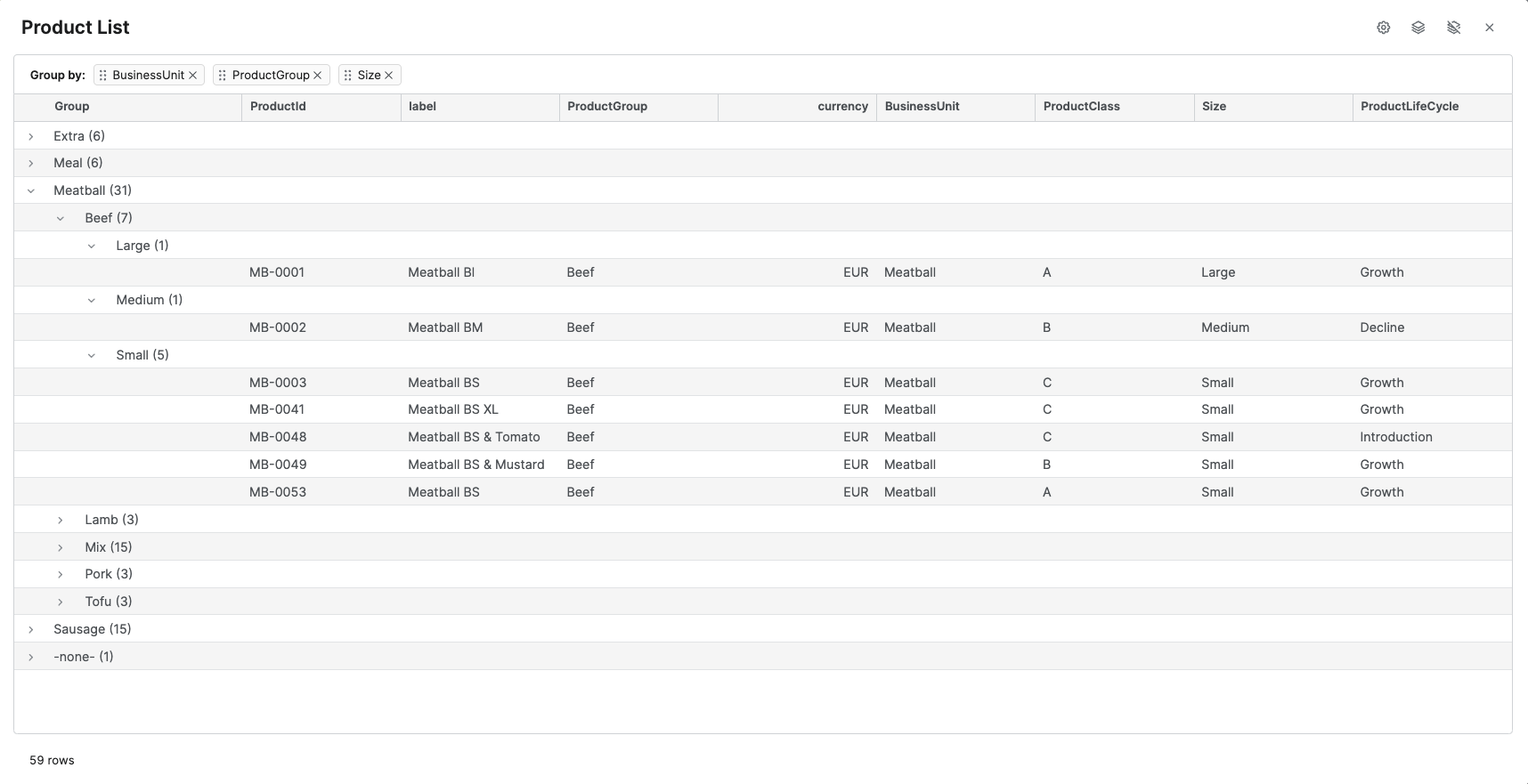
In the following example, we retrieve the data from the Products table and group them by the Business Unit, Product Group, and Size columns.
Code
Groovy
import net.pricefx.common.api.FieldFormatType

def productList = null

List<String> fields = ["ProductId", "label", "ProductGroup", "currency", "BusinessUnit", "ProductClass", "Size", "ProductLifeCycle" ]

productList = api.find("P", 0, api.getMaxFindResultsLimit(), "ProductId", fields)

def columnFormats = [
        "ProductId": FieldFormatType.TEXT,
        "label": FieldFormatType.TEXT,
        "ProductGroup": FieldFormatType.TEXT,
        "currency": FieldFormatType.MONEY_EUR,
        "BusinessUnit": FieldFormatType.TEXT,
        "ProductClass": FieldFormatType.TEXT,
        "Size": FieldFormatType.TEXT,
        "ProductLifeCycle": FieldFormatType.TEXT,
]

def rows = productList

def resultMatrix = api.newMatrix()
        .withColumnFormats(columnFormats)
        .withRows(rows)
        .withGroupBy(['BusinessUnit'])
        .withGroupBy(['ProductGroup'])
        .withGroupBy(['Size'])

return resultMatrix
Result
Aggregation Example
In the following example, we retrieve the data from the Product Extensions table. We apply group by Currency column and then aggregate SUM on ListPrice column.
Code
Groovy
import net.pricefx.common.api.FieldFormatType

import static net.pricefx.server.dto.calculation.ResultMatrixGrouping.AggregateFunctionType
import static net.pricefx.server.dto.calculation.ResultMatrixGrouping.AggregateFunctionType.SUM

def listPriceItems = null

def filter = [
        Filter.equal("name", "ListPrice"),
]

List<String> fields = ["ProductId", "ListPrice", "Currency"]

def listPriceItems = api.find("PX3", 0, api.getMaxFindResultsLimit(), "ProductId", fields, *filter)

def rows = listPriceItems

def columnFormats = [
        "ProductId": FieldFormatType.TEXT,
        "ListPrice": FieldFormatType.MONEY,
        "Currency" : FieldFormatType.MONEY,
]

def resultMatrix = api.newMatrix()
        .withEnableClientFilter(true)
        .withColumnFormats(columnFormats)
        .withRows(rows)
        .withGroupBy(['Currency'])
        .withColumnAggregation('ListPrice', SUM)
        .calculateGroupByData()

return resultMatrix
Result