
The Price Checks module verifies if a product margin is within a suitable range. For dependent price lists, it also checks the delta between the parent price and the dependent price in a dependent PL/PG.
Module Elements
|
Technical name |
Label |
Available in Parent PG/PL |
Available in Dependent PG/PL |
Description |
|---|---|---|---|---|
|
MinimumMargin |
Minimum Margin |
Yes |
Yes |
The minimum margin specified for the product. |
|
ListPriceCorridor |
List Price Corridor |
No |
Yes |
Delta between the parent price (*) and final list price. On parent price, refer to Element Data Sources > List Price Corridor section below. |
|
AdjustedPriceCorridor |
Adjusted Price Corridor |
No |
Yes |
Delta between the adjusted parent price and final list price. On parent price, refer to Element Data Sources > Adjusted Price Corridor section below. |
|
MinimumMarginPrice |
Minimum Margin Price |
Yes |
Yes |
A price calculated based on |
This module contains also Margin Alert Lookup which means that you can configure the MarginAlertsForPriceLists lookup and there is an additional "MarginFlag" element.
Element Data
Values for price checks are configured in respective price parameter tables or calculated results.
-
Minimum Margin – MinMargin CP table
From table with naming convention: <<dependency>>MinMargin.
Examples: MinMargin, AsiaMinMargin, GlobalMinMargin,… -
List Price Corridor (Dependent PG/PL only)
The value is taken from the final list price of the referred parent PG/PL.
To set the referred parent PG/PL for a dependency level, see DependencyConfiguration CP. -
Adjusted Price Corridor (Dependent PG/PL only)
The value is taken from the final list price of the referred parent PG/PL with the dependent adjustment applied.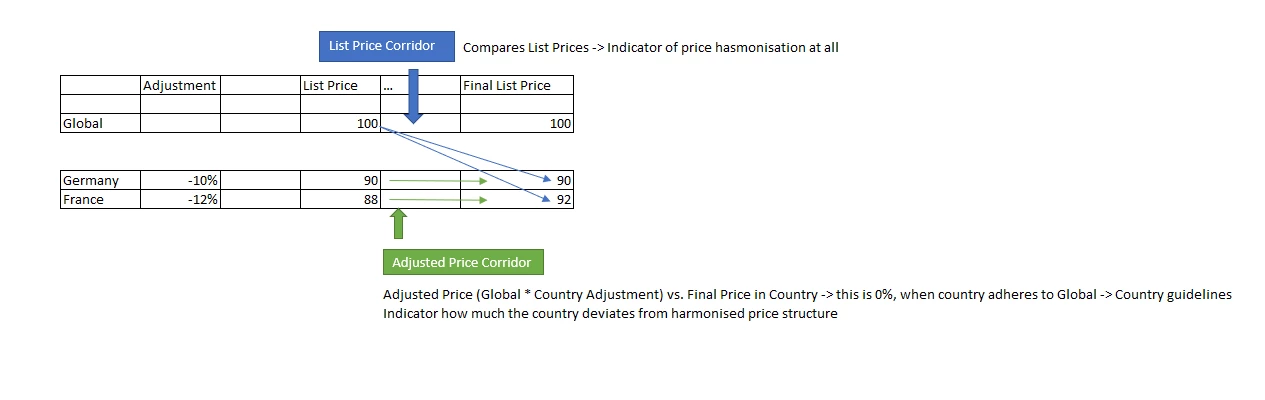
To set the dependent adjustment, fill the data in the corresponding <<dependency>>DependencyLevelAdjustment Price Parameter table.
-
Minimum Margin Price – The value is calculated with the formula:
-
At Gross pricing mode: result = Cost / (1 - MinimumMargin)
-
At Gross/Net pricing mode: result = Cost / (1 - Discount - MinimumMargin + MinimumMargin * Discount)
-
Checking Mechanism
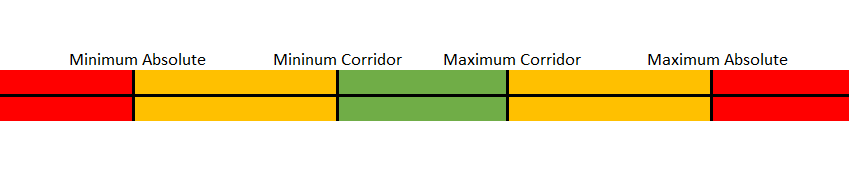
The List Price Corridor and Adjusted Price Corridor elements will be colored based on the corridor ranges which they fall into.
-
When the element value is inside the Corridor range, it will be green.
-
Minimum Corridor <= value <= Maximum Corridor
-
-
When the element value is inside the Absolute range, it will be yellow.
-
Minimum Absolute <= value < Minimum Corridor
-
Maximum Corridor < value <= Maximum Absolute
-
-
When the element value is outside the Absolute range, it will be red.
-
value < Minimum Absolute
-
value > Maximum Absolute
-
-
When the element value is zero, it will be blue.
Configuration
Set Module Status
Set the module status in the Configuration Wizard > Price Checks.
Set Minimum Margin
To specify the minimum margin for product segments, do it in the corresponding <<dependency>>MinMargin CP table.
Examples: MinMargin, AsiaMinMargin, GlobalMinMargin,…
Set List Price Corridor
To validate the delta between the parent price and the final list price of a product, the corresponding boundaries are taken from the ListPriceCorridor CP table.
Set Adjusted Price Corridor
To validate the delta between the adjusted parent price and the final list price of a product, the corresponding boundaries are taken from the AdjustedPriceCorridor CP table.