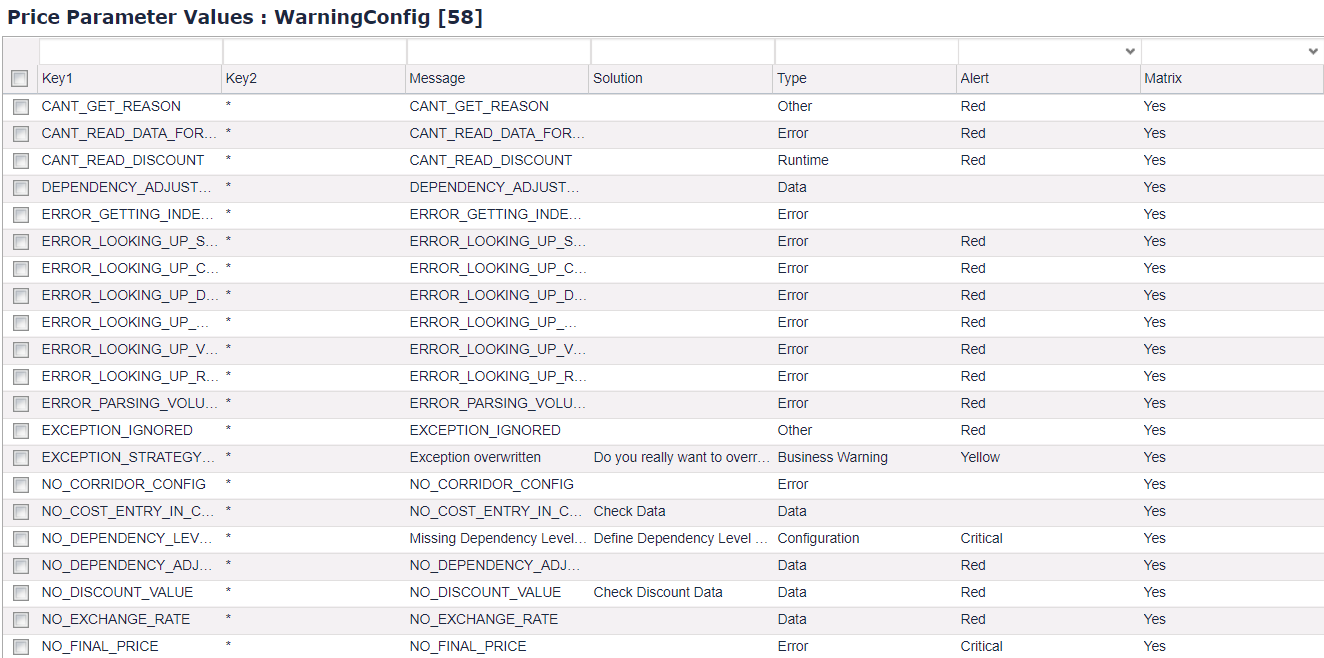
This price parameter defines how each warning raised by the package is classified and where it is displayed.
|
Column Name |
Values |
Description |
|---|---|---|
|
Key1 |
{error code} |
Code of the warning, e.g. "NO_DIMENSIONS". The full list of error codes with their default configuration is bootstrapped into this price parameter during the package deployment. |
|
Key2 |
|
Defines which dependency this configuration is for. There should be a fallback for each error code by leaving an entry with an asterisk. This field may be ignored if every dependency shares same warning handling. |
|
Message |
Any text |
Message displayed to the user describing what went wrong, e.g. "Price parameter called 'PriceSettingDimensions' does not exist or is empty." |
|
Solution |
Any text |
Solution displayed to the user describing how to fix the issue. It is shown only in a ResultMatrix. |
|
Type |
Any text |
Type of the issue displayed to the user. It is shown only in a ResultMatrix, e.g. "Business issue". |
|
Alert |
|
Defines how the warning will be classified: on the element level or with an increasing severity. We advise against using the critical alert too often, as it overrides the color for the whole item. It does not quite fit with the corridor configuration from the price checks module. |
|
Matrix |
|
Defines if the warning will be registered in a ResultMatrix. Default value: Yes |
|
Warning |
|
Defines if the warning will be registered in the default Warnings column. Default value: Yes |
Example: