
With the introduction of configurable lookups, users now have the freedom to customize how they conduct lookups, but the data must still be provided in a specific format.
This requirement is fulfilled by the approach outlined.
-
It is up to the user to choose:
-
Source table type
-
Source table name
-
Source table columns
-
Secondary keys
-
Additional custom filters
-
Data sorting
-
ValidAfter or ValidFrom-ValidTo support
-
Warnings/errors if there is no data
-
Usage of dependency levels fallbacks
-
-
PSP requires:
-
Lookup of specific feature to be defined at all.
-
In “selectedFields”, data should be mapped to specific Groovy names.
-
Example for basic cost:
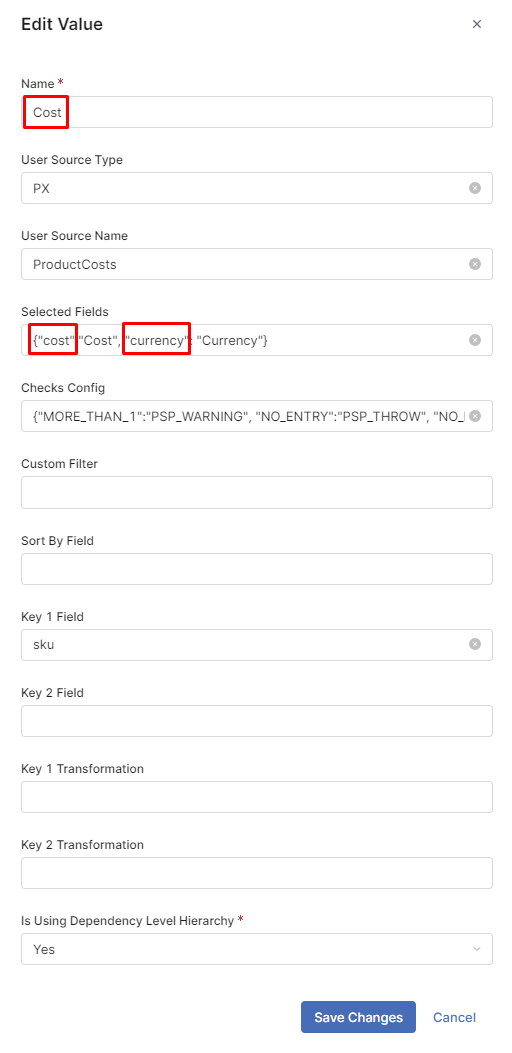
Description per feature
-
Base Cost:
-
LookupName: Cost
-
Mandatory fields:
-
cost
-
-
Optional fields:
-
currency
-
-
-
Advanced Cost:
-
Advanced Cost table should point at a specific lookup name
-
Mandatory fields of specific lookup name:
-
cost
-
-
Optional fields of specific lookup name:
-
currency
-
-
-
Actual Price (only if looked up from the data, not PG/PL)
-
Mandatory fields:
-
price
-
-
Optional fields:
-
currency
-
-
-
Stock
-
Mandatory fields:
-
stock
-
-
-
RoundingRules
-
Mandatory fields:
-
lowerBound
-
upperBound
-
roundingRule
-
roundingMode
-
-
-
priceException
-
Mandatory fields:
-
value
-
-
Optional fields:
-
currency
-
-
-
strategyException
-
Mandatory fields:
-
value
-
-
As of current version, the below lookups are not configurable through a Price Parameter. The same mechanism is used, but the lookup configuration is part of the Groovy code:
-
Product Competition
-
LookupName: ProductCompetition
-
Mandatory fields:
-
competitor
-
price
-
-
Optional fields:
-
infoDate
-
priceType
-
sku
-
attributeId of column with dependency level info (if DependencyLevelHierarchy is used)
-
-
-
StrategyConditions
-
Mandatory fields:
-
order
-
condition
-
rule
-
checkException
-
ruleExplanation
-
dependencyLevel
-
-