
It is possible to encounter the following errors:
Cannot invoke method size () on null object
Where the Error Occurs
CustomerInsights_DL_Aggregation

Troubleshooting
-
Make sure the mapping fields are correct.
-
Go to Administration > Configuration > System Configuration > Advanced Configuration Options.
-
Search for the
customer-insights-acceleratoroption.
-
The columns
DateMonth,DateQuarter, andDateYearmust have data. They must not be empty because the logic reads data from these columns.
Load failed
Where the Error Occurs
CustomerInsights_DL_Aggregation
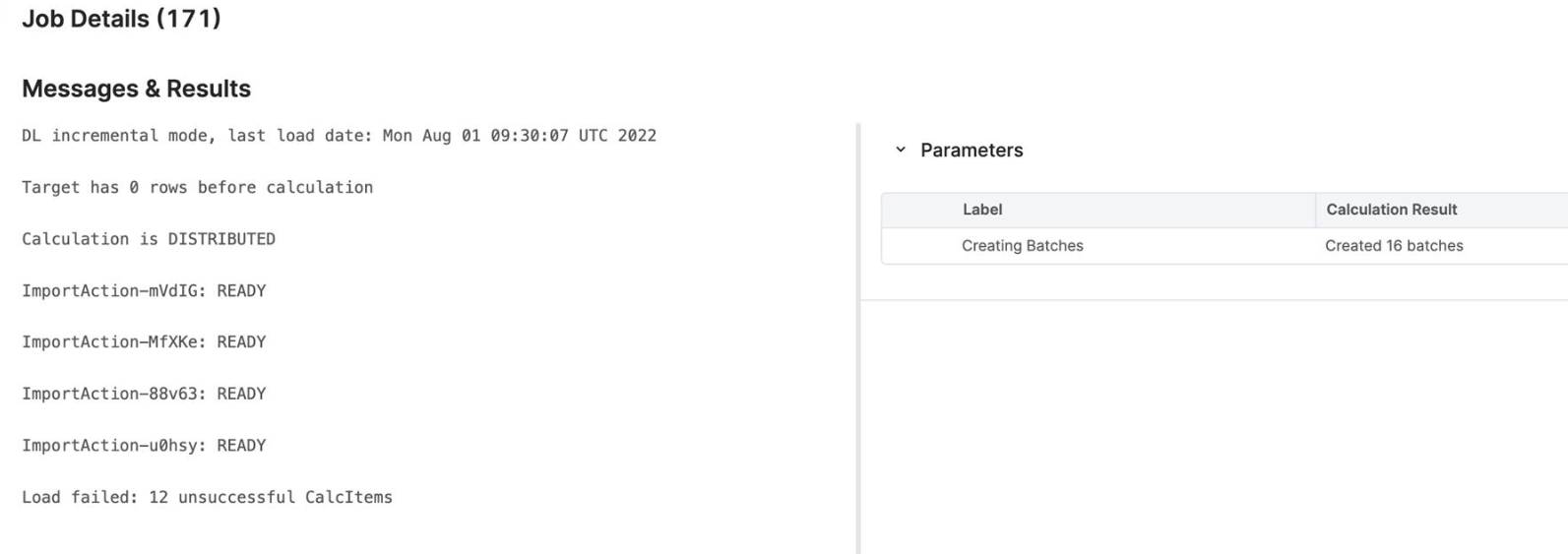
Troubleshooting
Increase the query thread pool in the partition which uses Customer Insights Accelerator (because dataload type = distributed_calculation is used and the logic does some queries.
For more details see the internal Pricefx Teams channel.
Deployment fail with error “Cannot sync data source with DataMart in PriceFx core!”
Where the Error Occurs
Deployment result of Platform Manager
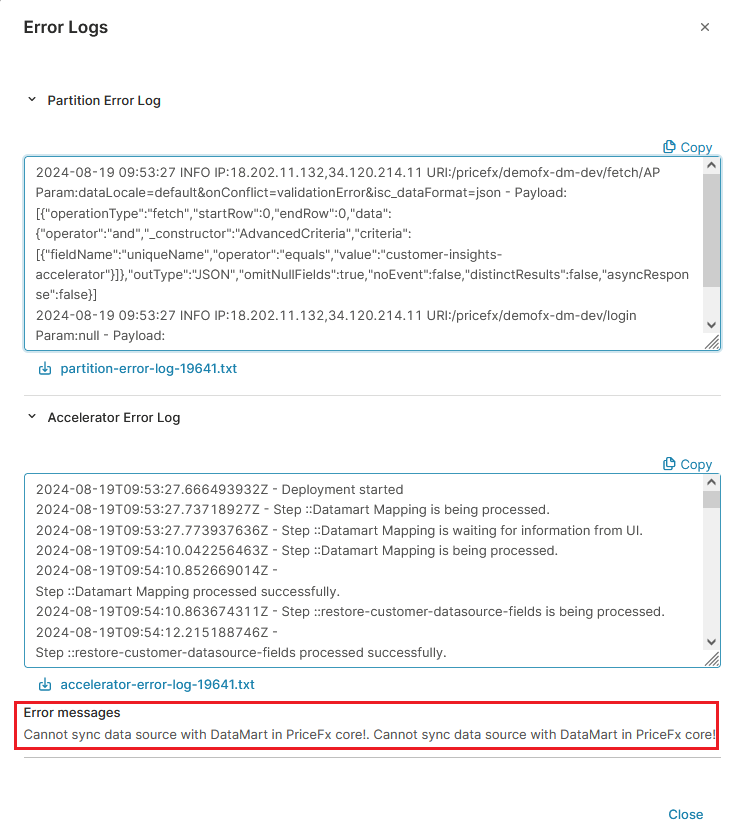
Troubleshooting
-
Check the Product and Customer master metadata in your partition.
-
Ensure that Product/Customer master columns (attributes) are not duplicated. An attribute name should not be the same as another attribute's name.
Example
attribute2 (of Product master) has name="attribute5" and attribute5 has a name (e.g: “Product class”), you should update name of attribute2 to be different with "attribute5".
You can reproduce the error in the partition by going to the Product/Customer Data Source and clicking the Sync Meta Data button.
If successful, you should not see this error in the PlatformManager anymore.
-
Ensure that all renamed columns and attributes have corresponding entries in the metadata table. If there are missing metadata records for the renamed columns, the Sync Metadata button will function correctly; however, the deployment will fail.
To create the necessary metadata, simply rename the column.
Example
When the column attribute2 from the product master is renamed to Attribute2, the system typically adds a record in the PAM table following the renaming. However, there are instances when the PAM record may not exist, such as during copy or migration processes between partitions.
Customer Details View Revenue Breakdown Chart Displays No Data for Previous Period
Where the Error Occurs
The issue occurs in the Customer Details View Dashboard, specifically within the Revenue Breakdown Chart. This problem arises due to the limit set for the last 12 months (L12M) in aggregated data, introduced in PFPCS-8476 for performance reasons. For the Revenue Breakdown to function correctly for the L12M period, access to the 24 months (L24M) data is required to compute both the current and previous periods.
Troubleshooting
Currently, the only workaround involves manually extending the data range from L12M to L24M, which resolves the issue. This requires modifying three elements across two logic files.
1. CustomerInsights (Groovy Library)
1.1 DateUtils.groovy
Path
CalculationLogic/CustomerInsights/elements/DateUtils.groovy
Add an additional L24M option to the Time Filter. Within the getPeriod() method, insert the following code:
case timePeriod.L24M:
            Date lastStartDate = addMonths(currentDate, -24)
            startDate = getMonthStartDate(lastStartDate)
            endDate = addDays(getMonthStartDate(currentDate), -1)
            break
1.2 Constant.groovy
Path
CalculationLogic/CustomerInsights/elements/Constant.groovy
We need to add the new L24M field into the TIME_PERIOD map. Use the following mapping:
L24M : "L24M",
Example
@Field Map TIME_PERIOD = [MTD    : "MTD",
                          QTD    : "QTD",
                          YTD    : "YTD",
                          YTD_WCM: "YTD Without Current Month",
                          L3M    : "L3M",
                          L6M    : "L6M",
                          L12M   : "L12M",
                          L24M   : "L24M",
                          WEEK   : "Week",
                          MONTH  : "Month",
                          QUARTER: "Quarter",
                          YEAR   : "Year"]
1.3 CalculationUtils.groovy
Path
CalculationLogic/CustomerInsights_DL_Aggregation/elements/CalculationUtils.groovy
In the getAggregationQuery() method, locate the creation of the currentPeriod map and replace the argument passed to getPeriod() from timePeriod.L12M to timePeriod.L24M.
Example
Map currentPeriod = dateUtils.getPeriod(currentDate, timePeriod.L24M)
2. Customer Insights Aggregation Data Load
Next, execute the Customer Insights Aggregation Data Load (DMDS.CI_AggregatedData). After completion, all modifications should be reflected in the Dashboards.

Use Cases Related to Data Loads (high transactions)
It may help to check out the following discussions in the internal Pricefx Teams channel:
-
Customer Insights Aggregation DL fails with a streamQuery time out
-
Accelerators, we have installed Customer Insights Package for Sullivan and…