
This guide provides a step-by-step guide for upgrading the Customer Insights Accelerator to a newer version. It emphasizes the importance of careful execution to ensure a smooth upgrade process.
Note that any custom modifications will need to be reapplied after the upgrade process.
Upgrade Steps
1. Create a Backup of All Logics
Any custom changes made to the accelerator logics will not be preserved during the upgrade. These changes must be reapplied if the code has been altered. Ensure all current logics are backed up.
1.1 Determine List of All Logics
If the Customer Insights Accelerator has been deployed using the PlatformManager use the following steps to determine the list of all logics.
-
Go to Company Parameters.
-
Enter
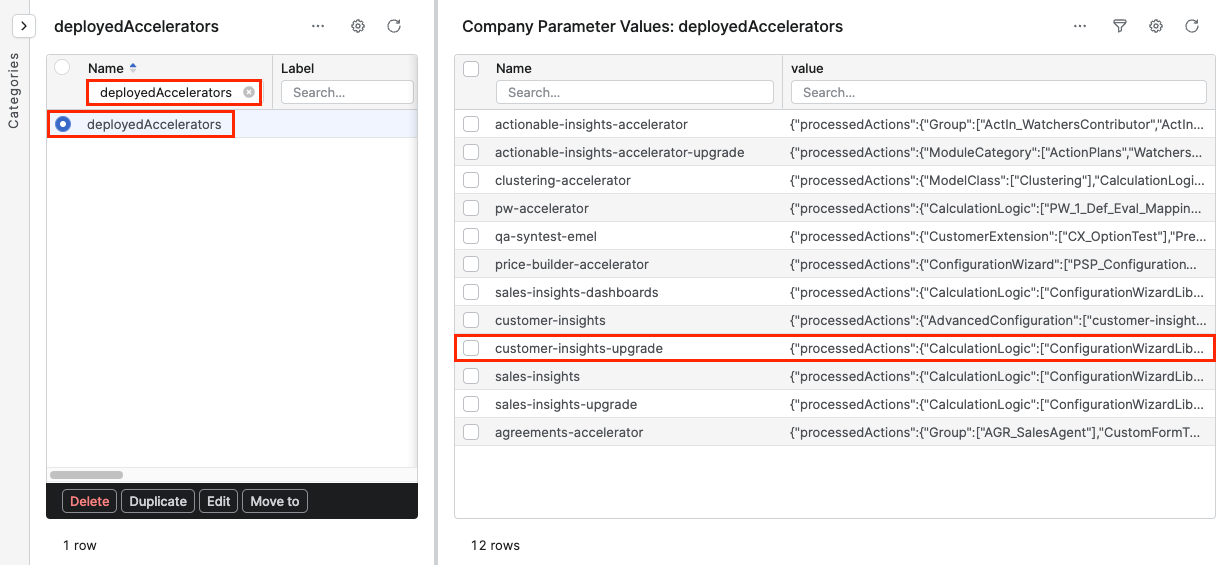
deployedAcceleratorsparameter into Name column. -
In the Company Parameter menu:
-
Enter
customer-insightsparameter into Name column. -
Copy the content from the value column.
-
Example
{
  "processedActions": {
    "CalculationLogic": [
      "ConfigurationWizardLib+2021-01-01",
      "CustomerInsights_CustomerDetails+2017-01-01",
      "CustomerInsights_DL_Aggregation+2017-01-01",
      "MonitoringLib+2019-07-01",
      "HighmapsLibrary+2019-01-01",
      "CustomerInsights_QuotingCreation+2020-01-01",
      "StopwatchLib+2019-01-01",
      "HighchartsLibrary+2000-01-01",
      "CustomerInsights+2017-01-01",
      "CustomerInsights_DimensionFilter_Configurator+2017-01-01",
      "CustomerInsights_CustomerProductsPortfolio+2017-01-01",
      "CustomerInsights_DS_CustomerClassification+2018-01-01",
      "CustomerInsights_GlobalView+2017-01-01",
      "CustomerInsights_DL_Inputs_Configurator+2020-01-01",
      "SharedLib+2010-01-01",
      "HighchartsPortletLibrary+2020-01-01",
      "SharedAccLib+2010-01-01",
      "CustomerInsights_CF_Sequencer+2020-01-01"
    ]
  },
  "templateVersion": "DEVELOP"
}
1.2 Review Git Repository
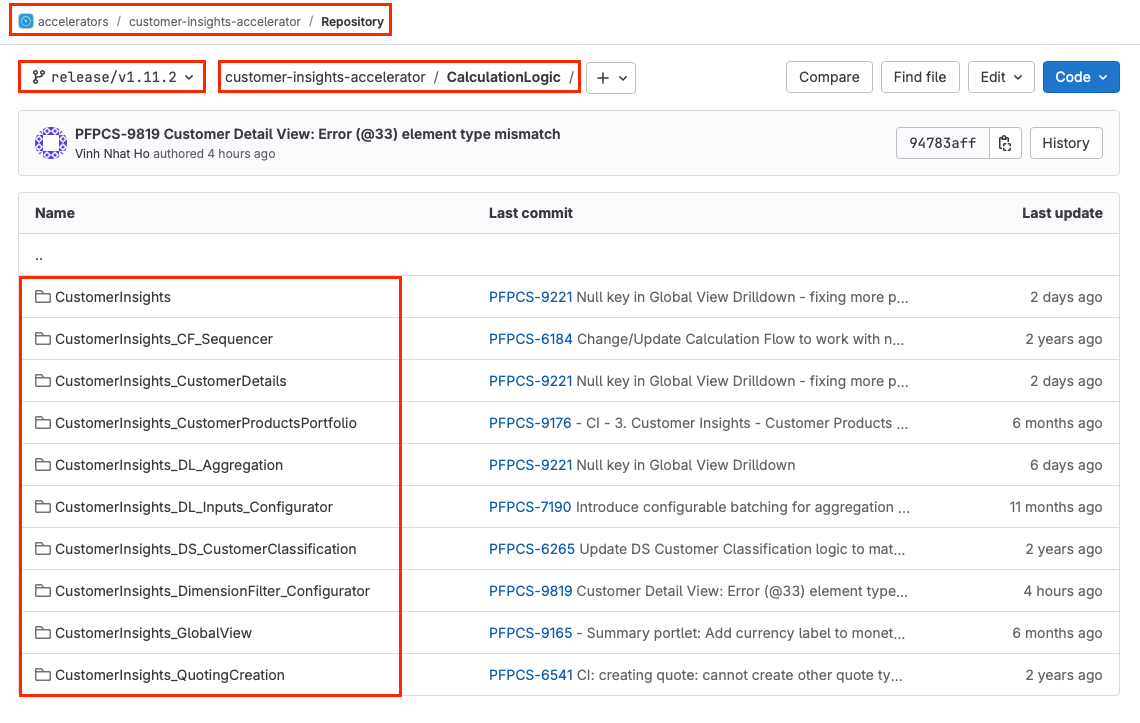
Alternatively, you can review the Customer Insights Git Repository. The logic files are stored in the CalculationLogic folder. Git tags can be browsed to examine code from previous versions.
2. Determine Current Accelerator Version
Identify the installed version of the Customer Insights Package by checking deployed Accelerators in the PlatformManager (Account > Partitions > Partition > Accelerators). Utilize the Label column to filter records specifically related to Sales Insights.
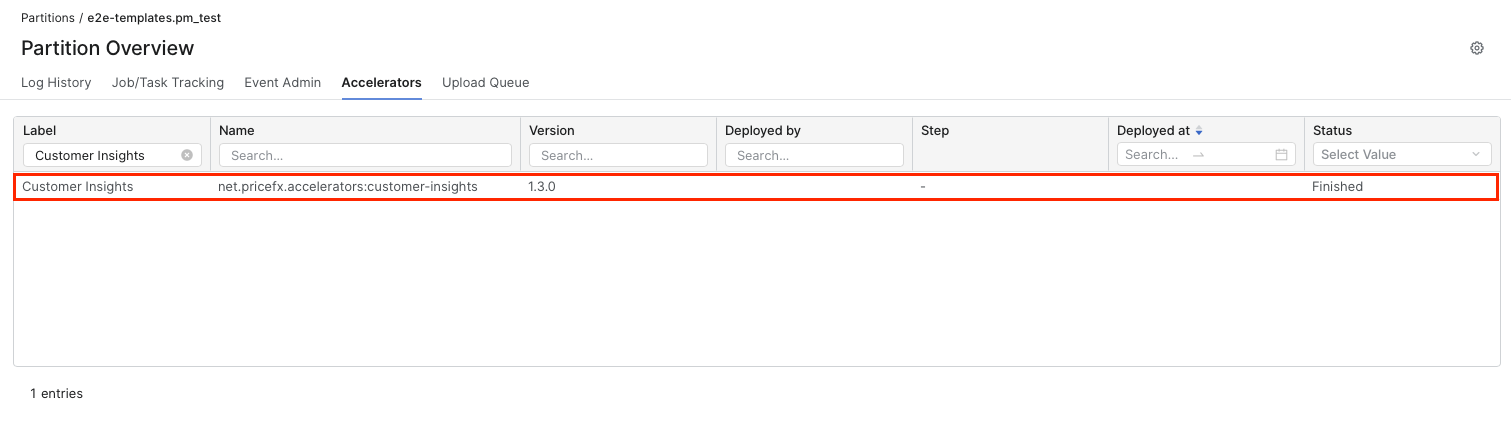
Due to the customizable nature of accelerators, the information retrieved from this table may be limited, making precise version tracking challenging.
Alternatively, check the deployedAccelerators parameter in the Company Parameters of your partition.
Example
{
        "processedActions": {
        "CalculationLogic": [
        "ConfigurationWizardLib+2021-01-01",
        "CustomerInsights_CustomerDetails+2017-01-01",
        "CustomerInsights_DL_Aggregation+2017-01-01",
        "MonitoringLib+2019-07-01",
        "HighmapsLibrary+2019-01-01",
        "CustomerInsights_QuotingCreation+2020-01-01",
        "StopwatchLib+2019-01-01",
        "HighchartsLibrary+2000-01-01",
        "CustomerInsights+2017-01-01",
        "CustomerInsights_DimensionFilter_Configurator+2017-01-01",
        "CustomerInsights_CustomerProductsPortfolio+2017-01-01",
        "CustomerInsights_DS_CustomerClassification+2018-01-01",
        "CustomerInsights_GlobalView+2017-01-01",
        "CustomerInsights_DL_Inputs_Configurator+2020-01-01",
        "SharedLib+2010-01-01",
        "HighchartsPortletLibrary+2020-01-01",
        "SharedAccLib+2010-01-01",
        "CustomerInsights_CF_Sequencer+2020-01-01"
        ],
    "Dashboard": ["HighChartLibrary_Examples"]
        },
    "templateVersion": "1.3.0"
    }
3. Review Manual Changes
Read through the upgrade notes provided for your current version up to the target version (if available). Note any changes that need to be made before the upgrade, and follow the provided instructions.
4. Run the Upgrade Package
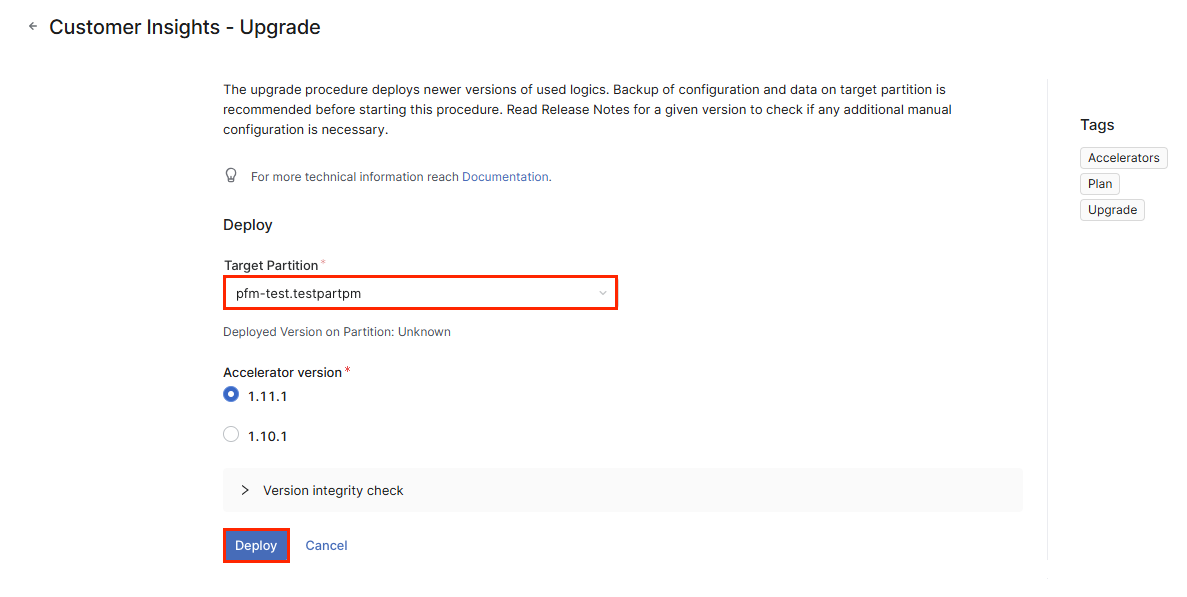
Navigate to the Marketplace in the PlatformManager, locate the Customer Insights - Upgrade Package, and execute the upgrade process by deploying the package to your partition.
5. Execute Remaining Upgrade Notes
Follow the specific upgrade notes to completion, including any required manual changes after the upgrade. Ensure no errors occur during this phase.
6. Reapply Customizations
After the upgrade, reapply any previously implemented customizations. Verify that these modifications integrate seamlessly and do not produce errors.
Important Considerations
-
Custom modifications will need to be reapplied after the upgrade.
-
The upgrade process will override all accelerator logics, while the configuration remains unchanged.
Release Specific Upgrade Notes