
1. Replace Calculated Result with Bounded Result in Condition Records
-
Navigate to Administration > Configuration > Master Data > Condition Record Sets
-
Open AGR Accelerator Default Condition Record Set
-
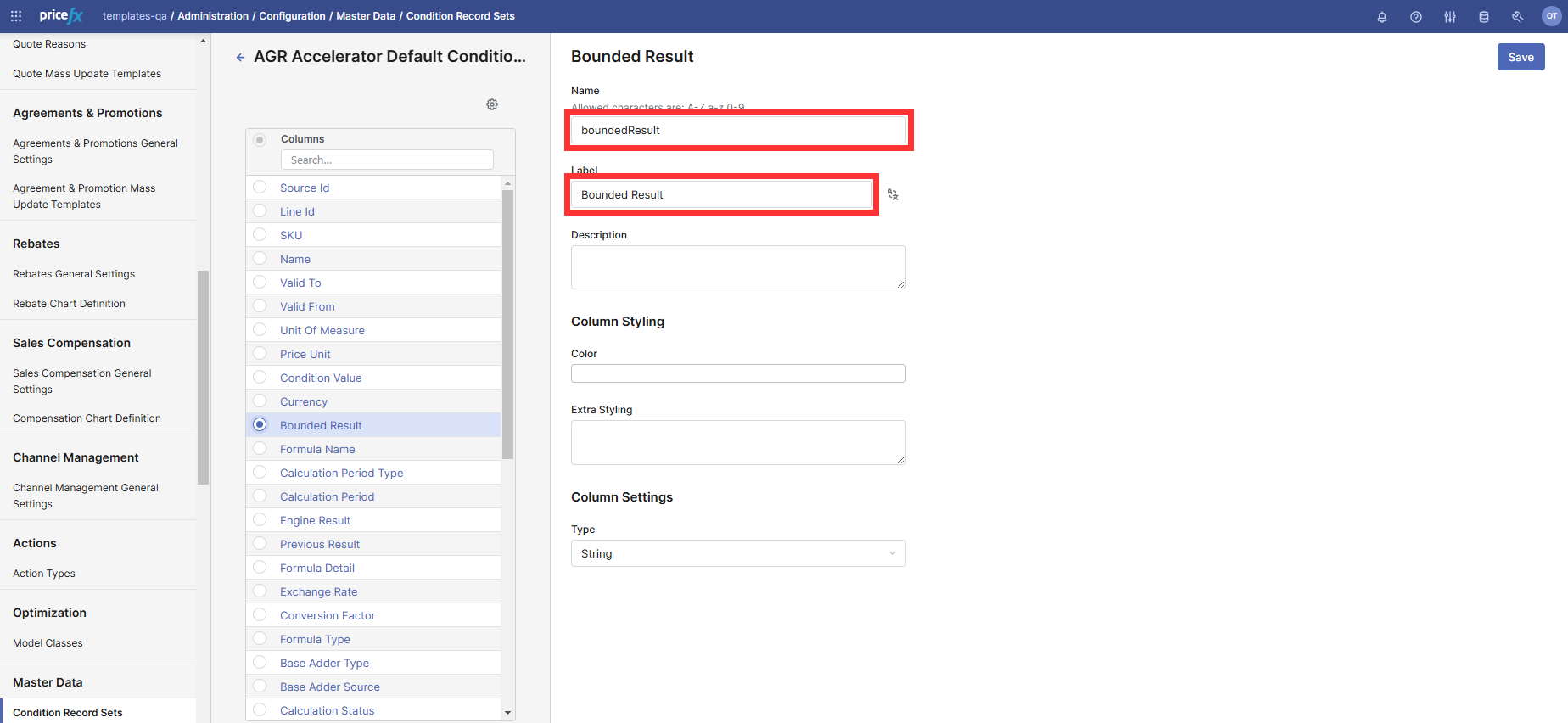
Locate Calculated Result item and replace values with the Bounded Result, see the screenshot below.
2. Assign the module to Input-Based Formula
-
Navigate to Administration > Custom Form Types
-
For the Input-Based Formula, select Agreements & Promotions in the Module column, see the screenshot below.

3. Edit the AGR_WarningConfig Company Parameters Table
-
Open AGR_WarningConfig Company Parameters table.
-
Remove the following records:
-
FORECAST_COST_PLUS_NO_VOLUME -
FORECAST_COST_PLUS_NO_COST
-
Add the following records:
-
MISSING_FORECAST_ADDER_DATA
|
Field |
Value |
|---|---|
|
Exception Code |
MISSING_FORECAST_ADDER_DATA |
|
Alert Message |
Missing Forecast Adder Type and Base Adder on the Header |
|
Solution |
|
|
Origin |
|
|
Display in Matrix |
True |
|
Alert Type |
Red |
|
Aborts Calculation |
True |
-
REVOKED_FORMULA_USED
|
Field |
Value |
|---|---|
|
Exception Code |
REVOKED_FORMULA_USED |
|
Alert Message |
Revoked Formula selected on Line Item |
|
Solution |
Select an approved Formula. |
|
Origin |
|
|
Display in Matrix |
True |
|
Alert Type |
Critical |
|
Aborts Calculation |
True |
4. Edit the AGR_FormulaBasedPricingHeader_InputDefinitions Company Parameters Table
-
Open AGR_FormulaBasedPricingHeader_InputDefinitions Company Parameters table.
-
Add the following record:
|
Lookup Key |
Input Name |
Container Input Name |
Execution Path |
Input Type |
Is Active |
Order |
|---|---|---|---|---|---|---|
|
|
|
|
|
|
✔ |
1 |
-
Adjust the existing record:
|
Lookup Key |
Input Name |
Container Input Name |
Execution Path |
Input Type |
Is Active |
Order |
|---|---|---|---|---|---|---|
|
|
|
|
|
|
✔ |
2 |
5. Edit the AGR_FormulaBasedPricing_InputDefinitions Company Parameters Table
-
Open AGR_FormulaBasedPricing_InputDefinitions Company Parameters table.
-
Change values in the following record:
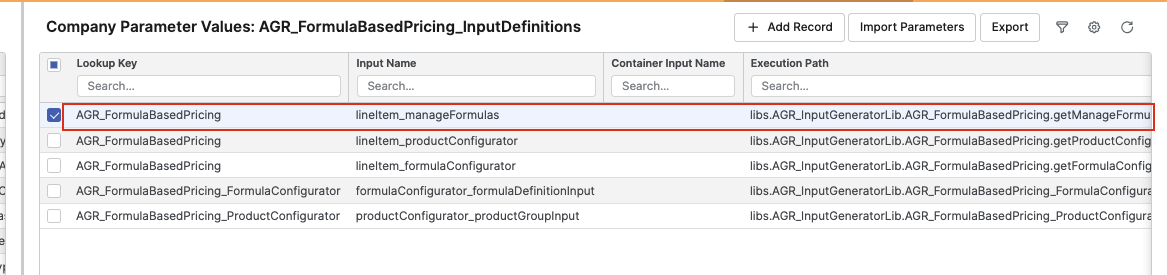
To the following values:
|
Lookup Key |
Input Name |
Container Input Name |
Execution Path |
Input Type |
Is Active |
Order |
|---|---|---|---|---|---|---|
|
AGR_FormulaBasedPricing_FormulaConfigurator |
formulaConfigurator_manageFormulas |
|
libs.AGR_InputGeneratorLib.AGR_FormulaBasedPricing_FormulaConfigurator.getManageFormulaInput |
Configurator Entry |
true |
1 |
-
Change Order of Input Name (
lineItem_formulaConfigurator) from 3 to 2:
6. Save Forecast Information in Condition Records If Needed
Since the Forecast calculation has been disabled during the recalculation of Condition Records, the recalculation will now remove Forecast outputs from the source-approved agreements and modify the calculation results to align with the last recalculation date. To retain any Forecast information, it must be saved in Condition Records.