
The Action screen displays the full detail of a single Action, including its assignment, context, detected items from a Pricefx Agent, any follow‑up Action Tasks, and (for Agents) the embedded Agent Action Review dashboard, so that users can understand and execute the work generated by Agents or other sources.
Action Header
The header at the top of the Action screen shows key identifiers and assignment fields.
-
Summary – Editable title of the Action used in lists, searches, and notifications.
-
Status – Current state of the Action. Possible values are:
-
Open – Initial status for newly created Actions.
-
Done – Action has been completed. Action can no longer be edited or deleted.
-
Blocked – There is an outstanding issue preventing completion.
-
Rejected – The assignee decided not to execute the Action. Action cannot be edited.
-
Postponed – The user decided to work on the Action later.
-
-
Type – The Action Type that defines available tabs, inputs, and outputs for the Action (for example, a generic Action type or an Agents Action template).
-
Assigned To – User responsible for completing the Action.
-
Due Date – Target completion date. Overdue Open Actions are highlighted visually in lists (exclamation icon and red date).

-
Model Object (Agents) – For Actions created by a Pricefx Agent, links the Action back to the originating Agent configuration and run, providing traceability between detected items and the model that generated them.
Context Fields
Context fields available on the Action (in header or details) describe where and why the Action was created.
-
Agents / Parent – Identify the parent document (for example Agent, Quote, Agreement, or custom object) and the specific tab where the Action was created, if applicable.
-
Originator – Identify the object (for example a Watcher, dashboard, or chart) that originally created the Action.
Description
Main work area for the assignee. Shows summary information in the side panel and the Action description and content defined by the Action Type in the main panel.
For the Agents Actions, this includes the Calculation Results section with Detection Rules, Detected Insight and Completed Action Tasks tables.
Calculation Results
The Calculation Results section summarizes which detection rule produced the Action and lists the affected items.
-
Detection Rules summary – Text line showing the series and condition that triggered the Action.
-
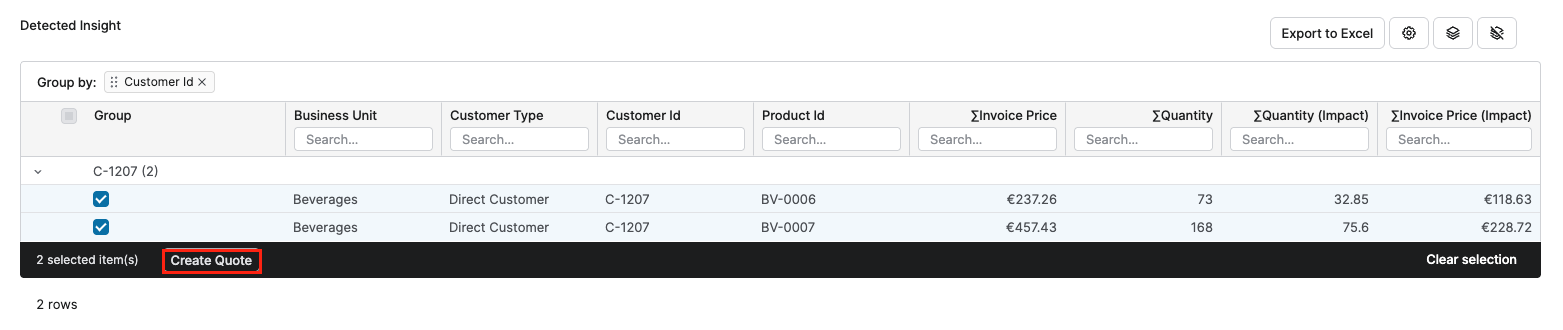
Detected Insight – The Detected Insight table lists the individual items that belong to this Action and were flagged by the Agent’s detection rules.
-
Completed Action Tasks – If the Action Tasks are configured for the Agent, additional actions are available on the Description tab so that users can trigger follow‑up workflows directly from selected detected items.
Action Task
-
Create Quote – Available when a Quote Creation Action Task is configured.
-
Users select one or more rows in the Detected Insight and click Create Quote.
-
The system groups the selected items by the
CustomerId.
-
For each customer, a new quote is created and one quote line is added per selected product. The Agent’s recommended price is written into the configured quote line price field.
-
-
Update Live Price Grid (Price Setting Accelerator Based) – Available when an Update Live Price Grid Action Task is configured.
-
Users select multiple detected items and click Update Live Price Grid.
-
A wizard opens (via context linking) to preview which Live Price Grid items will be updated and to submit the override recommendations derived from the Agent’s recommended price measure.

-
Completed Action Tasks
The Completed Action Tasks table summarizes the results of Action Tasks that have already been executed for the current Action.
Quote Creation Action Task
-
Quote ID – Clickable link to the created quote.
-
Quote Label – Quote name or label.
-
Number of Items – Number of quote lines created from selected detected items.
-
Created Date – When the quote was created from the Action.

Update Live Price Grid Action Task (Price Setting Accelerator Based)
-
Modified Live Price Grid – Name and ID of the updated Live Price Grid.
-
Product Id / Product Label – Product identifier and optional label used for readability.
-
Dependency Level – Dependency level (for example Country or Segment) used to select the correct Live Price Grid instance.
-
New Recommended Agent Price – Recommended price written by the Action Task.
-
Current Price – Current price in the Live Price Grid used for adoption tracking.
-
Link – Context link to open the Live Price Grid filtered to the specific product and dependency level.
-
Comments – Status indicating whether the current price matches the recommendation (for example Applied, Not recalculated since applying recommendation, or New price not matching recommendation).

Action Review
Displays the embedded Agent Action Review Dashboard so that users can see impact summaries and detailed analytics for the current Action directly on the Action screen.
For detailed information see Action Review Dashboard (Agents).
Dashboard
Optional tab showing other dashboards linked to the Action (for example, legacy Sales Insights or Customer Insights dashboards defined in the Action Definition step).
Notes
Free‑form internal notes attached to the Action.
Messages
Threaded conversation about the Action (for example, collaboration with colleagues).
Documents
Files related to the Action.
Attachments
Additional uploaded files or supporting documents.