
How to login using Cypress.io?
-
Needed for every Cypress.io test
-
Two types of login - Front-end and API
-
For both it is needed to update config files in the tree structure of cypress.io app
-
Open question - In API login should be problem with permissions for some action.
Precondition
-
Sucessfully instaled Cypress.io
-
Instalation is described here: Installation
-
Login is for demo QA partition: https://demo.pricefx.eu/app/
-
username: 'cypress.io',
-
partition: 'qa-training',
-
password: 'cypress'
-
-
Update config files
-
For using some commands and paths described in tests, we need to update/create some config files in folder, where cypress is installed
-
cypress.json
-
commands.js
-
users.js
-
File cypress.json
Location: Root, where cypress is installed
Root structure from clean instalation
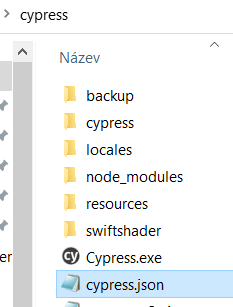
Tree structure after instalation from confluence tutorial
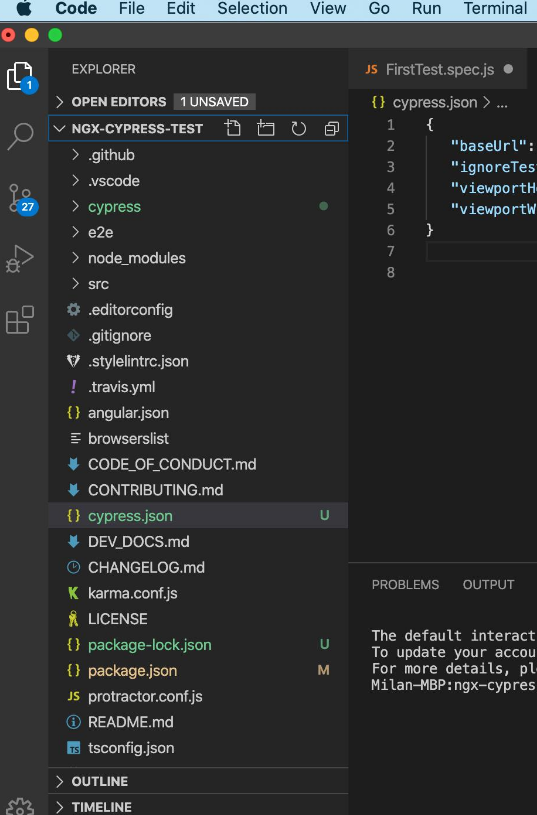
Code:
{
  "baseUrl": "https://demo.pricefx.eu/app/modules/",

  "pluginsFile": "cypress/plugins/index.js",
  "supportFile": "cypress/support/index.js",
  "fixturesFolder": "cypress/fixtures",
  "integrationFolder": "cypress/integration",
  "screenshotsFolder": "cypress/screenshots",
  "videosFolder": "cypress/videos",
  "video": true,
  "viewportWidth": 1400,
  "viewportHeight": 660,
  "defaultCommandTimeout": 10000,
  "watchForFileChanges": false,
  "chromeWebSecurity": false,

  "env": {
    "timesRepeated": 1,
    "RETRIES": 0,
    "apiUrl": "https://demo.pricefx.eu/pricefx/"
  },

  "reporter": "cypress-multi-reporters",
  "reporterOptions": {
    "configFile": "cypress/reporter-config.json"
  }
}
Download Cypress Json here.
File commands.js
Location: ….\cypress\cypress\support
Code:
import { getUser } from '../fixtures/users';

let LOCAL_STORAGE_MEMORY = {};

Cypress.Commands.add('clearLocalStorage', () => {
  localStorage.clear();
  sessionStorage.clear();
  LOCAL_STORAGE_MEMORY = {};
});

// captures the state of local storage
Cypress.Commands.add('saveLocalStorage', () => {
  LOCAL_STORAGE_MEMORY = {};
  Object.keys(localStorage).forEach(key => {
    LOCAL_STORAGE_MEMORY[key] = localStorage[key];
  });
});

// restores local storage from the backup
Cypress.Commands.add('restoreLocalStorage', () => {
  localStorage.clear();
  sessionStorage.clear();
  Object.keys(LOCAL_STORAGE_MEMORY).forEach(key => {
    localStorage.setItem(key, LOCAL_STORAGE_MEMORY[key]);
  });
});

// log in using the API
Cypress.Commands.add('login', user => {
  const { username, partition, password } = getUser(user);
  const credentialsB64 = btoa(`${partition}/${username}:${password}`);

  cy.clearLocalStorage(); // makes sure the state is clean

  cy.request({
    method: 'POST',
    url: `${Cypress.env('apiUrl')}/${partition}/login/extended`,
    headers: {
      Authorization: `Basic ${credentialsB64}`
    }
  }).then(resp => {
    expect(resp.status).to.eq(200);

    cy.getCookie('X-PriceFx-Csrf-Token').then(c => {
      localStorage.setItem(
        'pfx_auth_session',
        JSON.stringify({
          authenticated: {
            partition,
            csrfToken: c.value,
            authenticator: 'authenticator:pricefx'
          }
        })
      );
      localStorage.setItem(
        'pfx_auth_session_' + partition,
        JSON.stringify({
          authenticated: {
            partition,
            csrfToken: c.value,
            authenticator: 'authenticator:pricefx'
          }
        })
      );
    });
    cy.saveLocalStorage();
  });
});

Cypress.Commands.add('waitForSpinner', () => {
  cy.wait(500);
  cy.get('#pfx-spinner', { timeout: 60000 }).should('not.to.be.visible');
  cy.get('#criticalLoading', { timeout: 60000 }).should('not.to.be.visible');
  cy.get('.ant-spin-spinning', { timeout: 60000 }).should('not.exist');
  cy.wait(500);
});

Cypress.Commands.add('waitForTableEmber', () => {
  cy.contains('div.dataTables_info', /^Showing 1 to \d+ of \d+ entries$/, {
    timeout: 60000
  });
});

Cypress.Commands.add('waitForTableReact', () => {
  cy.contains('li.ant-pagination-total-text', /^\d+ rows?$/, {
    timeout: 60000
  });
});
Download commands here.
File users.js
-
This file is needs to be created
Location: …\cypress\cypress\fixtures
Code:
const users = {
  nameOfTheUser: {
    username: 'username',
    partition: 'partition',
    password: 'pass'
  },
  demoPartition: {
    username: 'cypress.io',
    partition: 'qa-training',
    password: 'cypress'
  }
};

export const getUser = ident => users[ident];

export const getDefaultUser = () => users[Cypress.env('user')];

export default users;
Download users here.
Tests
-
Separate tests
-
Location: ….\cypress\cypress\integration
Login via Front-end
Code:
describe('Login via FE', () => {

//after every test step is needed to login - beforeEach test step
  beforeEach(() => {
    const username = 'cypress.io';
    const partition = 'qa-training';
    const password = 'cypress';

    cy.visit('/');

    //Login page
        cy.get('#pfxui-login__username-input').type(username, {force: true});
        cy.get('#pfxui-login__partition-input').type(partition, {force: true});
        cy.get('#pfxui-login__password-input').type(`${password}{enter}`, {force: true});

    // we should be redirected to the home screen
    cy.url().should('contain', '/#/home');

  });
  //This is first test step
  it('First test step', () => {
    cy.visit('/#/md/products');
    cy.url().should('contain', '/#/md/products'); //assert
    cy.waitForSpinner();

  });

  //This is second test step
  it('Second test step', () => {
    cy.visit('/#/md/priceparameters');
    cy.url().should('contain', '/#/md/priceparameters'); //assert
    cy.waitForSpinner();

  });
});
Download LoginFE template here:
Login via API
Code:
describe('Login via API', () => {
  before(() => {
    cy.login('demoPartition');
  });

  beforeEach(() => {
    // Configure 'X-PriceFx-Csrf-Token' and 'X-PriceFx-jwt' cookies to be preserved after each test.
    Cypress.Cookies.preserveOnce('X-PriceFx-Csrf-Token', 'X-PriceFx-jwt');

    // Restore the logged in status by restoring the local storage
    cy.restoreLocalStorage().then(() => {
      cy.waitForSpinner();
    });
  });

    //This is first test step
    it('First test step', () => {
      cy.visit('/#/md/products');
      cy.url().should('contain', '/#/md/products'); //assert
      cy.waitForSpinner();

    });

    //This is second test step
    it('Second test step', () => {
      cy.visit('/#/md/priceparameters');
      cy.url().should('contain', '/#/md/priceparameters'); //assert
      cy.waitForSpinner();

  });
});
Download LoginAPI template here.