Summary: Configuration of IM error handling — retry policies, exponential backoff, error email notifications, and error message aggregation.
Configuration
Default Error Handler Properties
To change the behavior of the default error handler, put the following properties into application.properties.
|
Property |
Since |
Default |
Description |
|---|---|---|---|
|
|
|
|
Whether the |
|
|
|
|
Maximum redelivery attempts. Negative value = retry forever |
|
|
|
|
Initial redelivery delay in milliseconds |
|
|
|
|
Maximum redelivery delay in ms. Use -1 for no maximum |
|
|
|
|
Enable exponential backoff using |
|
|
|
|
Multiplier for delay between redeliveries |
|
|
|
|
Log errors even if handled |
|
|
|
|
Log level for retry attempts (TRACE, DEBUG, INFO, WARN, ERROR, OFF) |
|
|
|
|
Whether to log retry attempts |
|
|
|
|
Whether to log stack traces |
Retryable Exceptions and HTTP Status Codes
|
Property |
Since |
Default |
Description |
|---|---|---|---|
|
|
1.1.17 |
|
Comma-separated FQCNs of exceptions to retry |
|
|
1.1.17 |
|
Comma-separated HTTP status codes to retry |
|
|
1.1.17 |
|
If |
Email Notification Properties
|
Property |
Since |
Default |
Description |
|---|---|---|---|
|
|
1.1.18 |
|
Enable error email notifications |
|
|
|
|
SMTP hostname |
|
|
|
|
SMTP port |
|
|
|
|
Enable SMTP authentication |
|
|
|
|
SMTP auth username |
|
|
|
|
SMTP auth password |
|
|
|
|
Enable SSL for SMTP |
|
|
4.10.10, 5.4.0 |
|
SSL protocols for SMTP (whitespace-separated) |
|
|
|
|
Email sender address |
|
|
|
|
Email recipients (semicolon-separated) |
|
|
|
|
Email subject |
|
|
1.1.18 |
|
Velocity template for error email body |
Error Message Aggregation
|
Property |
Since |
Default |
Description |
|---|---|---|---|
|
|
1.9.0 |
|
Enable error message aggregation |
|
|
1.9.0 |
|
Check period for aggregation (seconds) |
|
|
1.9.0 |
|
Error message size for aggregation key. 0 = first line |
|
|
1.9.0 |
|
Error similarity threshold (0.0-1.0). 1.0 = exact match |
|
|
1.9.0 |
|
Summary email subject |
|
|
1.9.0 |
|
Max different error types stored in memory |
Applying Error Handler to Camel Context
Use the defaultErrorHandler bean reference as the Camel context attribute:
<camelContext xmlns="http://camel.apache.org/schema/spring" useMDCLogging="true" errorHandlerRef="defaultErrorHandler">
Custom Error Email Template
-
Create a Velocity template:
Hello error template of exchange ${exchange.exchangeId}

with body ${body}

and headers ${headers}

caused by ${exchange.properties.CamelExceptionCaught}
-
Configure:
integration.route-error-handling.enable-sending-mail=true
integration.route-error-handling.email.emailContentTemplate=file:///path/to/my-template.vm
Convention for Email Configuration
-
PROD partitions:
mailTo=<IE email>;integration@pricefx.eu -
QA/DEV partitions:
mailTo=<IE email> -
mailFrom convention:
integration_<pfx.partition>@pricefx.eu
Understanding Retry Behavior
Which Errors Are Retried?
By default, IM retries these exception types:
-
RecoverableException— transient Pricefx API errors -
ConnectTimeoutException— network timeout connecting to host -
ConnectException— connection refused
And these HTTP status codes:
-
409— Conflict (concurrent load/flush in progress) -
503— Service Unavailable (server temporarily down) -
504— Gateway Timeout
All other errors are not retried and fail immediately. To add custom retryable exceptions or status codes, use the retry.exceptions and retry.httpStatus properties.
Retry Timeline Example
With default settings (10 retries, 2s initial delay, 2.0 multiplier, 300s max):
|
Attempt |
Delay |
Cumulative |
|---|---|---|
|
1 |
2s |
2s |
|
2 |
4s |
6s |
|
3 |
8s |
14s |
|
4 |
16s |
30s |
|
5 |
32s |
62s |
|
6 |
64s |
~2 min |
|
7 |
128s |
~4 min |
|
8 |
256s |
~8 min |
|
9 |
300s (max) |
~13 min |
|
10 |
300s (max) |
~18 min |
After all retries are exhausted, the error handler either sends an email (if enabled) or the route fails.
Retry vs. Fail Fast
|
Scenario |
Recommendation |
|---|---|
|
|
Retry — transient network issue |
|
|
Retry — another operation in progress |
|
|
Retry — server restarting |
|
|
Do not retry — fix the request |
|
|
Do not retry — fix credentials |
|
|
Do not retry — fix the target |
|
|
Do not retry — fix configuration |
|
|
Do not retry — fix the source data |
Route-Level Error Handling
onCompletion for Cleanup
Use onCompletion to run cleanup logic regardless of success or failure:
<route id="import-with-cleanup">
<from uri="file:..."/>
<to uri="pfx-api:loaddata?objectType=P&mapper=myMapper"/>
<!-- Only on success -->
<onCompletion onCompleteOnly="true">
<log message="Import succeeded"/>
</onCompletion>
<!-- Only on failure -->
<onCompletion onFailureOnly="true">
<log message="Import failed: ${exception.message}" loggingLevel="ERROR"/>
</onCompletion>
</route>
doTry / doCatch for Specific Error Handling
<route id="import-with-catch">
<from uri="file:..."/>
<doTry>
<to uri="pfx-api:loaddata?objectType=P&mapper=myMapper"/>
<doCatch>
<exception>java.net.ConnectException</exception>
<log message="Connection failed, will retry later" loggingLevel="WARN"/>
<!-- Move file back for reprocessing -->
</doCatch>
<doCatch>
<exception>java.lang.IllegalStateException</exception>
<log message="Configuration error: ${exception.message}" loggingLevel="ERROR"/>
<!-- Move file to error folder -->
</doCatch>
</doTry>
</route>
See Also
-
Troubleshooting — common runtime errors and solutions
-
Debugging — debug logging and exchange inspection
-
Properties — all
integration.route-error-handling.*properties
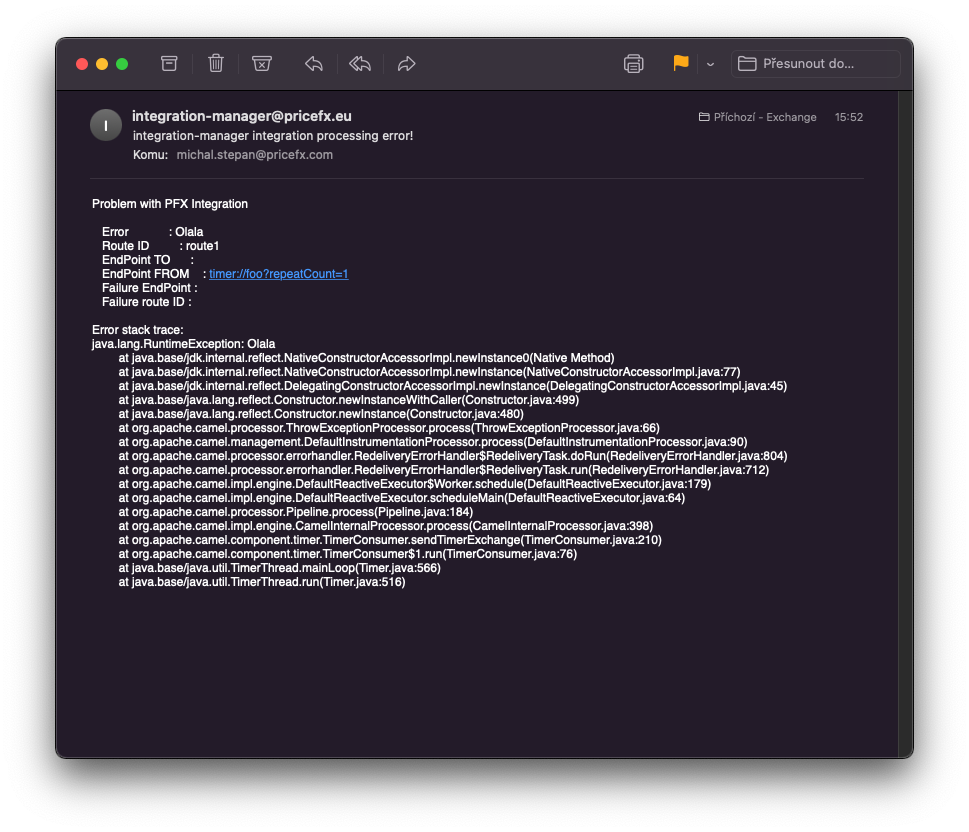
TLS Example
Properties setup:
integration.route-error-handling.enabled=true
integration.route-error-handling.maximumRedeliveries=3
integration.route-error-handling.enableSendingMail=true
integration.route-error-handling.email.mailTo=michal.stepan@pricefx.com
integration.route-error-handling.email.smtpHost=mail.pricefx.eu
integration.route-error-handling.email.smtpPort=587
integration.route-error-handling.email.smtpAuth=true
integration.route-error-handling.email.smtpAuthUsername=xxx
integration.route-error-handling.email.smtpAuthPassword=xxx
integration.route-error-handling.email.smtpTls=true
Route:
        <route >
            <from uri="timer:foo?repeatCount=1"/>
            <throwException message="Olala" exceptionType="java.lang.RuntimeException"/>
            <log message="Finito"/>
        </route>
Route contains failure and throws exception. The processing is retried 3 times. If the processing is still not successful, email is sent via mail.pricefx.eu TLS: