
The following areas might be a source of issues when starting to use the version Rampur 13.x, so please make yourself familiar with this section.
Unable to Refresh/Deploy Datamart with Calculated Foreign Key
Using a calculated field to join tables was never supported (as documented in Datamarts).
However, in specific scenarios before version Rampur 13.0, there may have been cases where such a setup worked by pure coincidence. In Rampur 13.0, these use cases no longer work.
Workaround
Create a Data Load to calculate and store this key in the Datasource. (In specific cases, another workaround is available but can only be enabled by Pricefx staff. Contact Pricefx Support for details.)
Background Information
We refresh a Datamart by joining all its Data Source tables and merging these rows into the Datamart table. The value of a calculated field in a Datamart can be determined when running a query (SELECT) on the Datamart. This can only be done when the data is already loaded into the Datamart, i.e., after a Datamart Refresh. This implies that you cannot rely on the value of the calculated field to perform the Refresh. This might compromise the integrity of the data in your Datamart.
DS Data Push Returns an Error “Maximum number of rows exceeded”
When you have a Data Load that populates a Data Source with data, there is a limit to the number of rows that can be processed (defined in the configuration property datamart.dataLoad.maxRowsPerBatch, which is set to 100 000 by default).
-
In previous versions, the validation of this limit was skipped for DMDataFeeds.
-
Now the validation is back in place.
Workaround
Split the input data into smaller jobs that fit within the 100 000 rows limit. Alternatively, in a dedicated customer environment, you may want to consider asking Pricefx Support to double this limit.
Filters on Meta-Attributed Entities
See the topic described in Upgrade to Clover Club 12.x Troubleshooting which may also be relevant when upgrading to 13.0.
direct2ds=true and Updating DS Records Cause Locking Issues
We do not recommend using direct2ds=true. It loads data directly into the DS, causing performance issues and potential locking as row counts grow. Since version 13.0, indexing is automatically triggered after each load to prevent this. For more details, please refer to How to Configure a Distributed Data Source or Datamart | Upgrade to 13.0.
Unable to Truncate/Refresh Datamart Table
The following section describes an issue encountered while truncating or refreshing a Datamart table, specifically related to a unique index error.
Error Message
Error executing sql statement: ERROR: could not create unique index "dmt_quotedetails_104_dmdl_key"
  Detail: Key (attribute1)=(Q-124538) is duplicated.
  Where: parallel worker  (auto-commit: true)
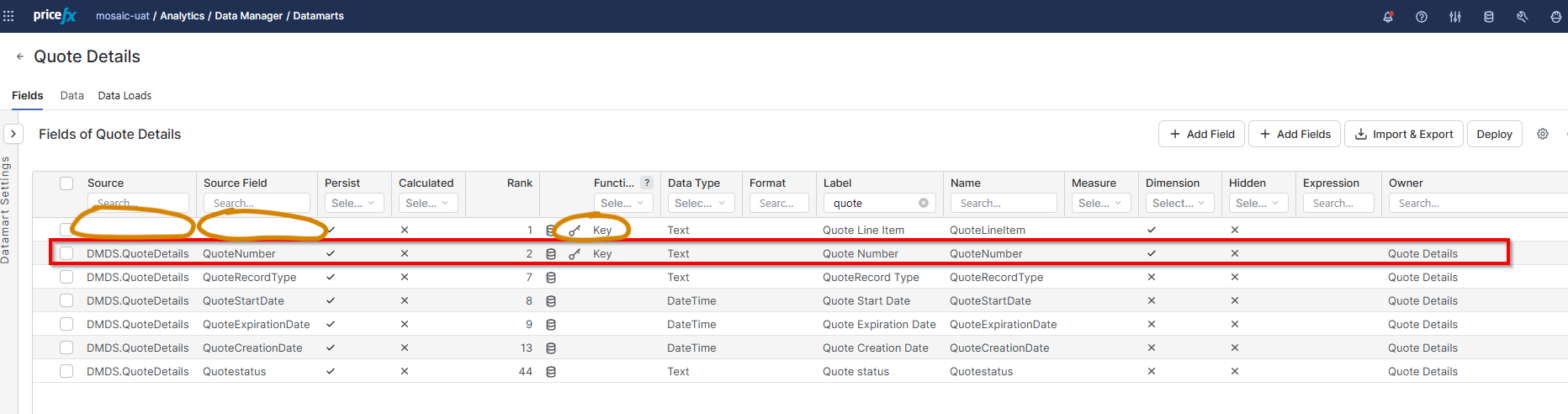
This issue can occur when some of the Datamart's Key fields are not correctly linked to the Datamart's source Data Source. To verify this is the cause and identify the problematic fields, navigate to the Datamart definition and make the Source column visible. Then, filter the Function column to display only Key fields. In the Datamart Settings, if a Source Data Source is specified, ensure that all Key fields are set to use that same Source.
Solution
In order to fix this problem, it is possible to edit the Import & Export Definitions stored in the JSON file using the Import & Export feature. The key in the source field should be set to DMDS.<sourcename>.
"source": "DMDS.<sourcename>",
"sourceField": "<fieldname>",
The value of the corresponding sourceField key should match both its own name and the name of the key field found in the Source Data Source.
Example
"name": "QuoteLineItem",
"source": "DMDS.QuoteDetails",
"sourceField": "QuoteLineItem",
Additional Context
This problem was already discovered in PFUN-27701. However this ticket did not provide fix for the issue. Ticket was closed with explanation how to manually fix the problem. So far it seems to be a corner case (2 occurences) and implementing an automatic fix has some associated regression risks.