
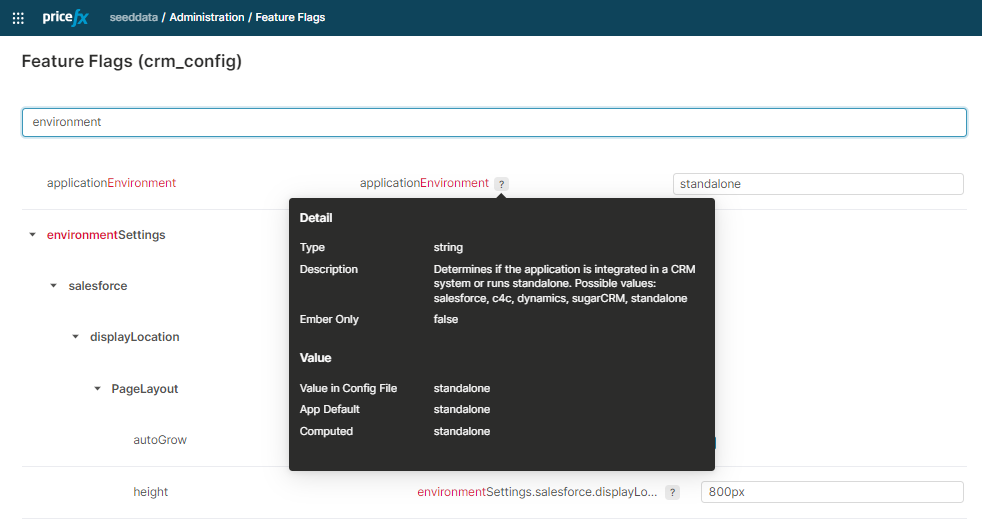
The following list serves as a reference of all available feature flags in Pricefx. Their detailed and most up-to-date description is available directly in the application:
|
Full Flag Name |
Description |
|---|---|
|
apiUrl |
Only change when the app is deployed behind a proxy. Default value: /pricefx/. |
|
APP |
|
|
APP.name |
|
|
APP.version |
|
|
appCuesEnabled |
Enable or disable Appcues tool. Default value: true. Possible values: true, false. |
|
applicationEnvironment |
Determines if the application is integrated in a CRM system or runs standalone. Possible values: salesforce, c4c, dynamics, standalone |
|
calculationResults.hiddenGroupPrefix |
Using this flag, define a prefix that will identify hidden groups in Calculation Results. Elements belonging to a Result Group with that prefix will not be displayed in the quote calculation results. Useful for cases when you need to send data to the UI but do not want users to see it. |
|
calculationResults.showExpandedResults |
If the calculation logic groups the calculation results, they are all expanded by default. If you want them to be collapsed, disable this flag. Default value: enabled |
|
configurator.priceEntityAfterSave |
If enabled, the whole Quote or Contract is recalculated after changes in a Configurator are saved. Default value: disabled |
|
configurator.showUndoClearButtonsInlineConfigurator |
Determines if Undo and Clear buttons are visible in inline configurator. Default value: hidden |
|
contractButtonsConfiguration.showAssignAccount |
Deprecated. If enabled, the Assign Account button is displayed. Default value: disabled |
|
contractButtonsConfiguration.showAssignOpportunity |
Deprecated. If enabled, the Assign Opportunity button is displayed. Default value: disabled |
|
contractButtonsConfiguration.showAssignOpportunityOnApproved |
Deprecated. If enabled, Assign Opportunity button is displayed on approved contract. Default value: disabled |
|
contractButtonsConfiguration.showAttachmentsButton |
Deprecated. If enabled, the Attachments button is displayed. Default value: enabled |
|
contractButtonsConfiguration.showCreateOpportunity |
Deprecated. If enabled, the Create Opportunity button is displayed. Default value: disabled |
|
contractButtonsConfiguration.showDuplicateButton |
Deprecated. If enabled, the Duplicate button is displayed. Default value: enabled |
|
contractButtonsConfiguration.showExportToExcelButton |
Deprecated. If enabled, the Export XLSX button is displayed. Default value: enabled |
|
contractButtonsConfiguration.showExportToPdfButton |
Deprecated. If enabled, the Export PDF button is displayed. Default value: enabled |
|
contractButtonsConfiguration.showExportToWordButton |
Deprecated. If enabled, the Export DOCX button is displayed. Default value: enabled |
|
contractButtonsConfiguration.showNewRevisionButton |
Deprecated. If enabled, the Create New Revision button is displayed. Default value: enabled |
|
contractButtonsConfiguration.showRecalculateButton |
Deprecated. If enabled, the Recalculate button is displayed. Default value: enabled |
|
contractButtonsConfiguration.showRevokeButton |
Deprecated. If enabled, the Revoke button is displayed. Default value: enabled |
|
contractButtonsConfiguration.showSaveButton |
Deprecated. If enabled, the Save button is displayed. Default value: enabled |
|
contractButtonsConfiguration.showSubmitButton |
Deprecated. If enabled, the Submit button is displayed. Default value: enabled |
|
contractButtonsConfiguration.showWorkflowButton |
Deprecated. If enabled, the Workflow tab is displayed. Default value: enabled |
|
contractDateInPastValidation |
If enabled, a verification if the contract expiry date is not in the past is performed. |
|
contractEditor.showLineItemLookup |
The showLineItemLookup flag enables you to hide the contract item search field. Default value: enabled |
|
contractHeaderConfiguration.showAssignAccount |
If enabled, Assign Account action is displayed. Default value: disabled |
|
contractHeaderConfiguration.showAssignOpportunity |
If enabled, Assign Opportunity action is displayed. Default value: disabled |
|
contractHeaderConfiguration.showAssignOpportunityOnApproved |
|
|
contractHeaderConfiguration.showCreatedByName |
If enabled, the Created By field is displayed in the header. Default value: enabled |
|
contractHeaderConfiguration.showEndDate |
If enabled, the End Date field is displayed in the header. Default value: enabled |
|
contractHeaderConfiguration.showLastUpdateDate |
If enabled, the Last Update Date field is displayed in the header. Default value: enabled |
|
contractHeaderConfiguration.showSignatureStatus |
If enabled, the Signature Status field is displayed in the header. Default value: enabled |
|
contractHeaderConfiguration.showStartDate |
If enabled, the Start Date field is displayed in the header. Default value: enabled |
|
contractHeaderConfiguration.showStatus |
If enabled, the Status field is displayed in the header. Default value: enabled |
|
contractHeaderConfiguration.showUserGroups |
If enabled, the User Group Edit/View field is displayed in the header. Default value: enabled |
|
contractHeaderConfiguration.showWorkflowStatus |
If enabled, the Workflow Status field is displayed in the header. Default value: enabled |
|
contractItemInput.nameField |
Name of Contract object field, whose value will be displayed to the user, when they search on Items tab when searching for adding new line item. |
|
contractItemInput.valueField |
Name of Contract object field, whose value will be displayed to the user, when they search on Items tab when searching for adding new line item. |
|
contracts.showBackToList |
If enabled, the arrow icon, allowing users to navigate from a Contract detail page back to the list of Contracts, is displayed. Default value: enabled |
|
contracts.showCalculationDate |
Shows/hides the Calculation Date text field on the Contract Header tab. Default value: true |
|
contracts.showContractEndDate |
Shows/hides the End Date text field on the Contract Header tab. Default value: true |
|
contracts.showContractExternalRef |
Shows/hides the External Reference text field on the Contract Header tab. Default value: true |
|
contracts.showContractGroups |
Shows/hides (editable) fields "User Group (Edit)" and "User Group (View)" on the Contract Header tab. Default value: true |
|
contracts.showContractStartDate |
Shows/hides the Start Date text field on the Contract Header tab. Default value: true |
|
contracts.showCustomerInput |
Deprecated – do not use. |
|
customerInput.idField |
Name of Customer object field, whose value will be displayed to the user in brackets, when they click on Customer input and the dropdown with list of customers shows. This value will then become a value of the Customer input field, which can be read in the logic. |
|
customerInput.valueField |
Name of Customer object field, whose value will be displayed to the user, when they click on Customer input and the dropdown with list of customers shows. |
|
customHelpUrl |
URL to Custom Help Button in Header menu. |
|
customLogoutURL |
Determines which page will be shown after user do the logout. It is used only when useCustomLogoutURL feature flag is enabled. It must be the valid URL f.e. https://www.pricefx.com |
|
dashboard.showPortletAlerts |
If enabled, shows warnings and errors raised by the dashboard logic in Dashboard portlets. |
|
dashboard.useReactDashboard |
Deprecated – use useReactFor.dashboards instead. |
|
disableHtmlInjection |
If enabled, all HTML injection is disabled by stripping all HTML tags from affected fields before storing/rendering them. |
|
dynamics.opportunityAssociatedValue |
|
|
ember-component-css.terseClassNames |
|
|
enableLogoutAlert |
If enabled, then an alert is shown to user after logout telling him to close the browser window to finish signing out. Default value: disabled |
|
environment |
Deprecated – do not use. |
|
environmentSettings.salesforce.displayLocation.PageLayout.autoGrow |
If enabled, the size of the canvas app is automatically adjusted to the size of the content. |
|
environmentSettings.salesforce.displayLocation.PageLayout.height |
Sets the default height of the canvas app. |
|
environmentSettings.salesforce.displayLocation.Visualforce.autoGrow |
|
|
environmentSettings.salesforce.displayLocation.Visualforce.height |
|
|
eventTracking |
Front end event tracking. Default value: true. Possible values: true, false. |
|
exportApplicationGlobal |
|
|
extraFormats.dateMoment |
|
|
extraFormats.datePicker |
|
|
extraFormats.number.decimalSeparator |
|
|
extraFormats.number.groupSeparator |
|
|
extraFormats.timeMoment |
|
|
extraFormats.timePicker |
|
|
feIntegration.active |
Enable Pricefx UI (Unity) to be manipulated via calls of postMessage() method. This could be needed when you embed Pricefx into another web application or vice versa, and that other web app needs to communicate with Pricefx front-end. |
|
locale.autodetectLanguage |
If enabled, the language setting in the web browser is automatically detected and used for the application. |
|
locale.autodetectLocale |
If enabled, the locale setting in the web browser is automatically detected and used for the application. |
|
locale.intlCode |
Sets the default locale – determines date/time and number formatting. Possible values: en-gb, en-us, ... |
|
locale.intlCodeUI |
Flag Computation Steps |
|
locale.pfxCode |
Language – determines the app language (including overrides from the backend). Possible values: en, de, fr, ... |
|
locale.pfxCodeUI |
Flag Computation Steps |
|
mainMenuExclude |
In the JSON format, you can specify which items of the application's main menu not to display. For example, to hide the Contracts tab, set the flag's value to ["contracts.index"]. For a list of allowed values see routeId Values to Use in Feature Flags. |
|
mainMenuExcludePriceAnalyzer |
If enabled, hide "Price Analyzer" from the main header menu. Default value: disabled |
|
modulePrefix |
Deprecated – do not use. |
|
partition |
|
|
productIdField |
Deprecated – do not use. |
|
productIdPlaceholder |
Deprecated – do not use. |
|
productInput.idField |
Name of Product object field, whose value will be displayed to the user in brackets, when they click on Product input and the dropdown with list of customers shows. This value will then become a value of the Product input field, which can be read in the logic. |
|
productInput.nameField |
Name of Product object field, whose value will be displayed to the user, when they search on Items tab when searching for adding new line item. |
|
productInput.valueField |
Name of Product object field, whose value will be displayed to the user, when they click on Product input and the dropdown with list of products shows. |
|
qaAppCuesEnabled |
Enable or disable Appcues tool for QA purposes (enable to test Appcues at the QA partitions like (test, demo, seeddata)). When we have production env then this setting is bypassed. Default value: false. Possible values: true, false. |
|
qaEventTracking |
Front end event tracking for QA purposes (enable to test eventTracking at the QA partitions like (test, demo, seeddata)). When we have production env then this setting is bypassed. Default value: false. Possible values: true, false. |
|
quoteButtonsConfiguration.showAssignAccount |
Deprecated. If enabled, the Assign Account button is displayed. Default value: disabled |
|
quoteButtonsConfiguration.showAssignOpportunity |
Deprecated. If enabled, the Assign Opportunity button is displayed. Default value: disabled |
|
quoteButtonsConfiguration.showAssignOpportunityOnApproved |
Deprecated. If enabled, Assign Opportunity button is displayed on approved quote. Default value: disabled |
|
quoteButtonsConfiguration.showAttachmentsButton |
Deprecated. If enabled, the Attachments button is displayed. Default value: enabled |
|
quoteButtonsConfiguration.showConvertToDealButton |
Deprecated. If enabled, the Convert to Deal button is displayed. Default value: enabled |
|
quoteButtonsConfiguration.showCreateOpportunity |
If enabled, the Create Opportunity button is displayed allowing you to create opportunity for selected quotes. Default value: disabled. Can be configured via interceptor’s https://developer.pricefx.eu/pricefx-api/javascriptdoc/develop/variables/Interceptor_Methods.quotesDetailOpportunityCreate.html method. |
|
quoteButtonsConfiguration.showEmailCalculableButton |
Deprecated. If enabled, the Email Quote/Contract/Agreement button is displayed. Default value: enabled |
|
quoteButtonsConfiguration.showExportToExcelButton |
Deprecated. If enabled, the Export XLSX button is displayed. Default value: enabled |
|
quoteButtonsConfiguration.showExportToPdfButton |
Deprecated. If enabled, the Export PDF button is displayed. Default value: enabled |
|
quoteButtonsConfiguration.showExportToWordButton |
Deprecated. If enabled, the Export DOCX button is displayed. Default value: enabled |
|
quoteButtonsConfiguration.showNewQuoteButton |
Deprecated. If enabled, the New Quote button is displayed. Default value: enabled |
|
quoteButtonsConfiguration.showNewRevisionButton |
Deprecated. If enabled, the Create New Revision button is displayed. Default value: enabled |
|
quoteButtonsConfiguration.showPriceButton |
Deprecated. If enabled, the Recalculate button is displayed. Default value: enabled |
|
quoteButtonsConfiguration.showRecalculateChanges - Deprecated |
|
|
quoteButtonsConfiguration.showSaveButton |
Deprecated. If enabled, the Save button is displayed. Default value: enabled |
|
quoteButtonsConfiguration.showSubmitButton |
Deprecated. If enabled, the Submit button is displayed. Default value: enabled |
|
quoteButtonsConfiguration.showWorkflowButton |
Deprecated. If enabled, the Workflow tab is displayed. Default value: enabled |
|
quoteDateInPastValidation |
If enabled, a verification if the quote expiry date is not in the past is performed. |
|
quoteEditor.showProductLookup |
The showProductLookup flag enables you to hide the product search field on the Items tab. Default value: enabled |
|
quoteHeaderConfiguration.showAssignAccount |
If enabled, Assign Account action is displayed. Default value: disabled |
|
quoteHeaderConfiguration.showAssignOpportunity |
If enabled, Assign Opportunity action is displayed. Default value: disabled |
|
quoteHeaderConfiguration.showAssignOpportunityOnApproved |
|
|
quoteHeaderConfiguration.showCreatedByName |
If enabled, the Created By field is displayed in the header. Default value: enabled |
|
quoteHeaderConfiguration.showEffectiveDate |
If enabled, the Effective Date field is displayed in the header. Default value: enabled |
|
quoteHeaderConfiguration.showExpiryDate |
If enabled, the Expiry Date field is displayed in the header. Default value: enabled |
|
quoteHeaderConfiguration.showLastUpdateDate |
If enabled, the Last Update Date field is displayed in the header. Default value: enabled |
|
quoteHeaderConfiguration.showSignatureStatus |
If enabled, the Signature Status field is displayed in the header. Default value: enabled |
|
quoteHeaderConfiguration.showStatus |
If enabled, the Status field is displayed in the header. Default value: enabled |
|
quoteHeaderConfiguration.showUserGroupEditView |
If enabled, the User Group Edit/View label is displayed in the top section of Header tab. Default value: enabled |
|
quoteHeaderConfiguration.showUserGroups |
|
|
quoteHeaderConfiguration.showWorkflowStatus |
If enabled, the Workflow Status field is displayed in the header. Default value: enabled |
|
quotes.partialDealsDisabled |
Deprecated – do not use. |
|
quotes.partialDealsEnabled |
If enabled then it is possible to select individual line items and convert them to a Deal. It is possible to convert only the whole quote to a Deal by default. |
|
quotes.showBackToList |
If enabled, the arrow icon allowing users to navigate from a Quote detail page back to the list of Quotes, is displayed. Default value: enabled |
|
quotes.showCustomerInput |
Shows/hides the (editable) "Customer" field on the Quote Header tab. There is a System Configuration setting to add the customer input. It can be overridden by this feature flag to hide the input (e.g. in case of extra configuration for a CRM integration). When the System Configuration is set to true (or had never been set before), this feature flag setting to TRUE will not have an effect. |
|
quotes.showQuoteExpiryDate |
If enabled, shows the (editable) "Expiry Date" field on the Quote Header tab. Default value: enabled |
|
quotes.showQuoteExternalRef |
If enabled, shows the (editable) "External Reference" field on the Quote Header tab. Default value: enabled |
|
quotes.showQuoteGroups |
Shows/hides the (editable) "User Group (Edit)" and "User Group (View)" fields on the Quote Header tab. Default value: enabled |
|
quotes.showQuoteTargetDate |
If enabled, shows the (editable) "Effective Date" field on the Quote Header tab. Default value: enabled |
|
rebateAgreement.showBackToList |
If enabled, the arrow icon, allowing users to navigate from a Rebate Agreement detail page back to the list of Rebate Agreements, is displayed. Default value: enabled |
|
rebateAgreement.showRebateAgreementCalculationDate |
Shows/hides the Calculation Date text field on the Rebate Agreement Header tab. Default value: true |
|
rebateAgreement.showRebateAgreementEndDate |
Shows/hides the End Date text field on the Rebate Agreement Header tab. Default value: true |
|
rebateAgreement.showRebateAgreementExternalRef |
Shows/hides the External Reference text field on the Rebate Agreement Header tab. Default value: true |
|
rebateAgreement.showRebateAgreementGroups |
Shows/hides (editable) fields "User Group (Edit)" and "User Group (View)" on the Rebate Agreement Header tab. Default value: true |
|
rebateAgreement.showRebateAgreementPayoutDate |
Shows/hides the Payout Date text field on the Rebate Agreement Header tab. Default value: true |
|
rebateAgreement.showRebateAgreementStartDate |
Shows/hides the Start Date text field on the Rebate Agreement Header tab. Default value: true |
|
rebateAgreementButtonsConfiguration.showAttachmentsButton |
Deprecated. If enabled, the Attachments button is displayed. Default value: enabled |
|
rebateAgreementButtonsConfiguration.showCreateOpportunity |
Deprecated. If enabled, the Create Opportunity button is displayed. Default value: disabled |
|
rebateAgreementButtonsConfiguration.showExportToExcelButton |
Deprecated. If enabled, the Export XLSX button is displayed. Default value: enabled |
|
rebateAgreementButtonsConfiguration.showExportToPdfButton |
Deprecated. If enabled, the Export PDF button is displayed. Default value: enabled |
|
rebateAgreementButtonsConfiguration.showExportToWordButton |
Deprecated. If enabled, the Export DOCX button is displayed. Default value: enabled |
|
rebateAgreementButtonsConfiguration.showNewRevisionButton |
Deprecated. If enabled, the Create New Revision button is displayed. Default value: enabled |
|
rebateAgreementButtonsConfiguration.showRecalculateButton |
Deprecated. If enabled, the Recalculate button is displayed. Default value: enabled |
|
rebateAgreementButtonsConfiguration.showSaveButton |
Deprecated. If enabled, the Save button is displayed. Default value: enabled |
|
rebateAgreementButtonsConfiguration.showSubmitButton |
Deprecated. If enabled, the Submit button is displayed. Default value: enabled |
|
rebateAgreementButtonsConfiguration.showWorkflowButton |
Deprecated. If enabled, the Workflow tab is displayed. Default value: enabled |
|
rebateAgreementDateInPastValidation |
If enabled, a verification if the rebate agreement expiry date is not in the past is performed. |
|
rebateAgreementHeaderConfiguration.showCreatedByName |
If enabled, the Created By field is displayed in the header. Default value: enabled |
|
rebateAgreementHeaderConfiguration.showEndDate |
If enabled, the End Date field is displayed in the header. Default value: enabled |
|
rebateAgreementHeaderConfiguration.showSignatureStatus |
If enabled, the Signature Status field is displayed in the header. Default value: enabled |
|
rebateAgreementHeaderConfiguration.showStartDate |
If enabled, the Start Date field is displayed in the header. Default value: enabled |
|
rebateAgreementHeaderConfiguration.showStatus |
If enabled, the Status field is displayed in the header. Default value: enabled |
|
rebateAgreementHeaderConfiguration.showUserGroups |
If enabled, the User Group Edit/View field is displayed in the header. Default value: enabled |
|
rebateAgreementHeaderConfiguration.showWorkflowStatus |
If enabled, the Workflow Status field is displayed in the header. Default value: enabled |
|
rebateAgreementInput.idField |
Name of Agreement object field, whose value will be displayed to the user in brackets, when they click on Agreement input and the dropdown with list of agreements shows. This value will then become a value of the Agreeement input field, which can be read in the logic. |
|
rebateAgreementInput.valueField |
Name of Agreement object field, whose value will be displayed to the user, when they click on Agreement input and the dropdown with list of agreements shows. |
|
rebateAgreementItemInput.nameField |
Name of Agreement object field, whose value will be displayed to the user, when they search on Items tab when searching for adding new line item. |
|
rebateAgreementItemInput.valueField |
Name of Agreement object field, whose value will be displayed to the user, when they search on Items tab when searching for adding new line item. |
|
rebateManagerEditor.showLineItemLookup |
The showLineItemLookup flag enables you to hide the rebate agreeement item search field. Default value: enabled |
|
rootPage |
Determines which page will be shown as the start page. The value is the ID of page that will be loaded (e.g. Quotes, Dashboards, Specific dashboard, Contracts). Default value: home. For a list of allowed values see routeId Values to Use in Feature Flags. |
|
rootPageParams |
Defines the content of the root (start) page in the JSON format. Default value: []. Parameters that are required by the URL for the rootPage – e.g., the unique name of a dashboard. Order matters. Example: rootPage : 'dashboard.detail'; rootPageParams = ["QuoteDefaultDashboard"]; The indicated dashboard is displayed as the start page. For more details see RootPage and RootPageParams. |
|
rootURL |
Deprecated – do not use. |
|
salesforce.accountAssociatedArrayObjectInput |
|
|
salesforce.accountAssociatedObjectOutput |
|
|
salesforce.accountAssociatedValue |
|
|
salesforce.accountAssociationField |
|
|
salesforce.accountLayoutQuoteStatusFilter |
|
|
salesforce.opportunityAssociatedValue |
|
|
salesforce.opportunityAssociationField |
|
|
salesforce.useCRMCustomerGroupFilter |
Used for filtering customer group at CRM environment. Default value: false |
|
serverAPIs.defaultRecordsLimit |
Determines how many records should backend return in a list. Default value: 300. |
|
serverConnectionChecker.intervalSecs |
|
|
serverConnectionChecker.maxConsecutiveFailures |
|
|
showApplicationTypeSelectionTabs |
Deprecated – do not use. |
|
showContractHeaderText |
If enabled, the Header Text panel in the contract detail view is visible. Default value: enabled |
|
showDashboardManager |
Available from version 16.0 Experimental Feature If enabled, the Dashboard Manager menu item is visible in the main menu, and the Manage Dashboards user role is available in User Admin, allowing users to create and manage user-created dashboards. If disabled, the Dashboard Manager menu item is hidden in the main menu, and the Manage Dashboards user role is hidden in User Admin.
|
|
showHelp |
Shows or hides the Help icon. Default value: enabled |
|
showMobileVersion |
Deprecated – do not use. |
|
showQuoteExpiryLabel |
Deprecated – do not use. |
|
showQuoteHeaderText |
If enabled, the Messages text box in the quote detail view is visible. Default value: enabled |
|
showRebateAgreementHeaderText |
If enabled, the Messages text box in the rebate agreement detail view is visible. Default value: enabled |
|
showSwitchToClassicUserMenuLink |
If enabled, "Switch to Classic UI" link in user menu is displayed. Default value: disabled |
|
sugarCRM.accountAssociatedValue |
|
|
sugarCRM.accountAssociationField |
|
|
sugarCRM.opportunityAssociatedValue |
|
|
sugarCRM.opportunityAssociationField |
|
|
sugarCRM.quoteAccountReferenceField |
field in the quote used to store reference to CRM Account object. Used for filtering quotes at the Account page |
|
sugarCRM.quoteOpportunityReferenceField |
field in the quote used to store reference to CRM Opportunity object. Used for filtering quotes at the Opportunity page |
|
sugarCRM.useAccountAssociatedField |
|
|
tableView.filterShownInputsUsingViewState |
Deprecated – do not use. |
|
tableView.showProductImages |
Deprecated – use Enables product images for Quote line items in the Simple Table view. If selected, the product image will be displayed as the first column. Default value: disabled. |
|
tableView.showQuote |
Deprecated – do not use. |
|
throttleGetUserWait |
Deprecated – do not use. |
|
timeFormat |
Sets the default time format for the partition. |
|
type |
Used internally. Default value: prod. Possible values: test, dev. |
|
uploadMaxFileSize |
The maximum total size of all uploaded files (in megabytes). Default value: 5 MB |
|
useCustomLogoutURL |
If enabled, then we use custom URL when user logout from the system. Default value: disabled |
|
useReactFor.advancedFilter |
If enabled, React advanced filter will be used. |
|
useReactFor.contractDetail |
If enabled, new contract detail will be used. |
|
useReactFor.contractList |
If enabled, new contract list will be used. |
|
useReactFor.dashboards |
If enabled, new dashboard will be used. |
|
useReactFor.quoteDetail |
If enabled, new quote detail will be used. |
|
useReactFor.quoteList |
If enabled, new quote list will be used. |
|
useReactFor.rebateAgreementDetail |
If enabled, new rebate agreement detail will be used. |
|
useReactFor.rebateAgreementList |
If enabled, new rebate agreement list will be used. |
|
useSalesforceCss |
Deprecated – do not use. |