
This article describes how to search logs displayed in PlatformManager by using Kibana Query Language (KQL). PlatformManager stores and exposes log data through the ELK stack (Elasticsearch, Logstash, Kibana). The log viewer provides a search bar that uses KQL, allowing you to filter log entries quickly and efficiently.
KQL documentation is available at:
https://www.elastic.co/docs/explore-analyze/query-filter/languages/kql
Terminology
-
ELK: The underlying log storage and processing stack (Elasticsearch, Logstash, Kibana).
-
KQL: The query language used in Kibana and PlatformManager log search fields.
-
PlatformManager Logs: A simplified interface that exposes ELK data and accepts KQL queries.
Log Search Locations in PlatformManager
You can use KQL in the search bar on the following log screens:
-
Debug Logs
-
Activity Log
-
Run History
Links to docs: How to Search Logs Using KQL (Kibana Query Language) | See Also
Each log provides fields such as sourceName, timestamp, message, and workflow-related identifiers. The set of available fields differs by log type.
Entering a Query
-
Open a log page (for example Event Orchestration > Logs > Debug Logs).
-
Select the Query Search field above the table.
-
Enter a KQL expression.
-
Press Enter to apply the filter.
Example Queries
Filter by Workflow or Scheduler Name
entityName: "MyWorkflow"
Filter by Message Content
message: "error"
Multiple search terms:
message: ("timeout" OR "failed")
Filter by Source (a partition)
sourceName: "CompanyPartition"
Multiple Conditions
entityName: "Event_SCHEDULER" AND message: "completed"
Search by ID
destinationId: "12345"
Date Filtering
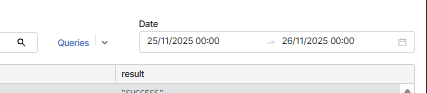
Use the date and time selector in the UI. The selector takes a date and a time to the second, in the format DD/MM/YYYY HH:mm:ss.
-
When you pick a date without a time, the range starts at
00:00:00and ends at23:59:59. -
The end of the range includes the whole second you select. A range ending at 13:05:59 still returns a log entry written at 13:05:59.500.
-
Click OK to apply the range.
Second-level precision helps when a partition writes thousands of entries within the same minute. Every log screen listed in Log Search Locations in PlatformManager uses this selector.
Saving and Reusing Queries
If the page supports query management:
-
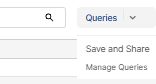
Queries > Save and Share to save the current query and share via provided email address.
-
Queries > Manage Queries to update or delete saved entries.
Saved queries can be reused.
Tips for Effective KQL Use
-
Use double quotation marks for exact matches.
-
Use parentheses to control operator precedence.
-
Combine conditions with
and,or, andnot. -
Avoid broad unbounded searches (for example
message:*) to prevent large result sets. -
KQL does not support regex.