
Model Classes are the central configuration point of the Optimization module. They allow you to:
-
Build custom and use-case specific features where users can proceed from one step to another.
-
Run potentially complex calculations (as in the Analytics module).
-
Interactively explore calculation results as in the Dashboards module.
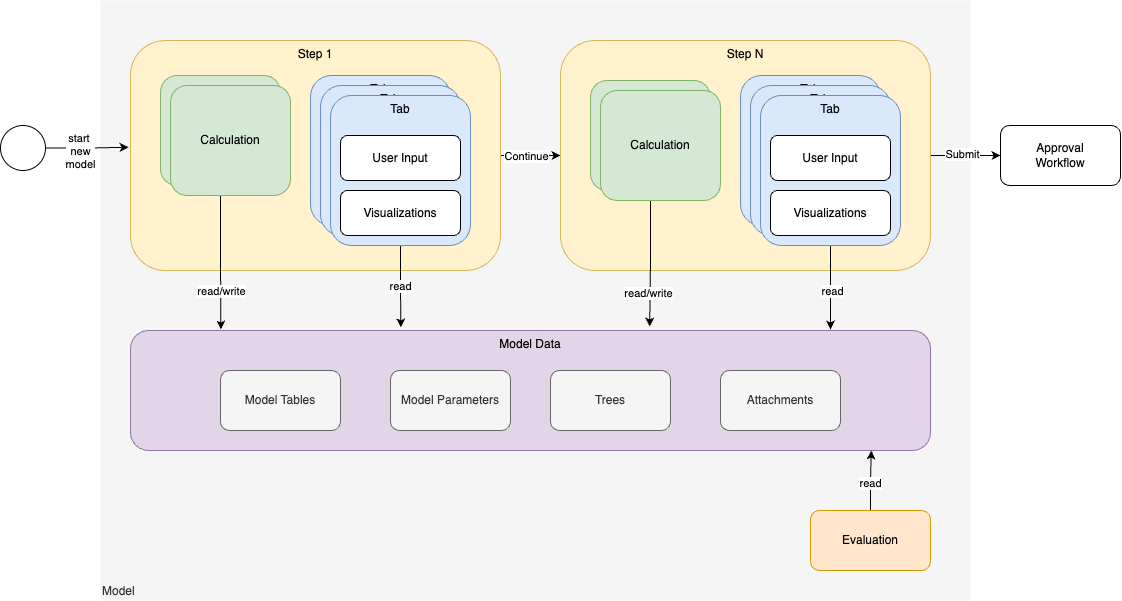
A Model Class is:
-
the definition of the structure and the behavior of its instances which are called Model Objects.
-
made of sequential steps the user goes through. In each step, the user has the possibility to run a calculation and then, in multiple tabs, to manipulate interactive dashboards allowing them to explore the results of the calculation.
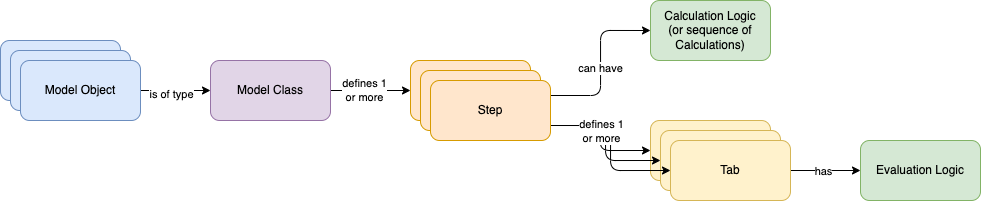
Model Class Definition – The number, naming of steps and tabs, as well as references to their logics, are defined by the Configuration Engineer using a JSON definition stored in the Model Class in order to build any user experience they desire; see Model Class (MC).
Model Logics – The calculations and tabs contents are defined using Groovy Model Logics; see https://pricefx.atlassian.net/wiki/spaces/KB/pages/3862823061.
Model Objects – Have tables and attachments that can be manipulated by the user and calculations; see Model Object (MO).
Calculation Engines/Images – Calculations can start the execution of remote language-specific calculations using Job Trigger Calculations; see Job Trigger Calculations.