
One of the action you can add to ResultMatrix is a button which will navigate users to another page to perform an action with the list of items selected from the matrix.
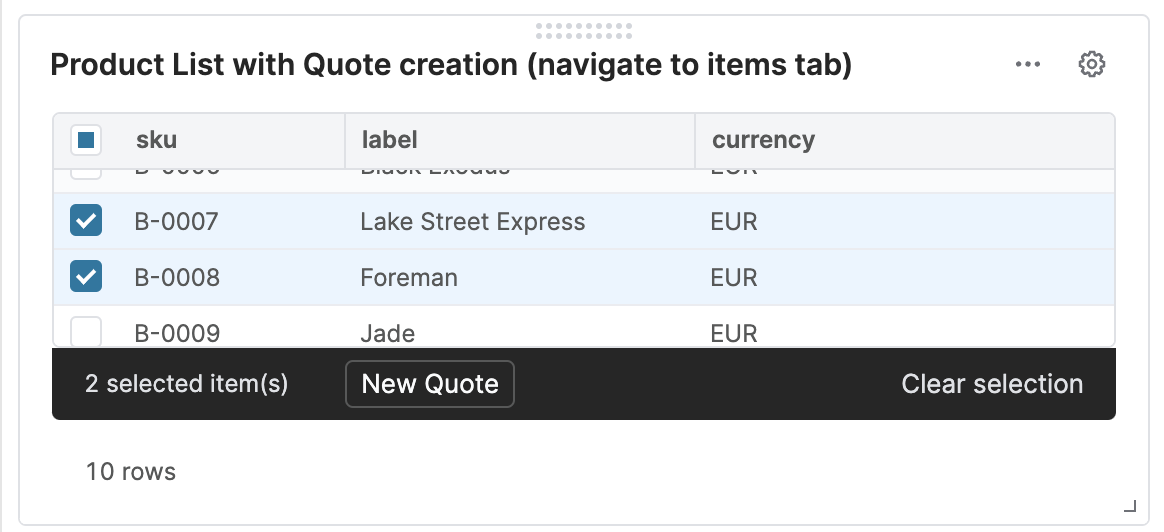
To perform the action, there has to be a definition of the action – it is either a deep link or a context link. The BackEndAction logic is called to retrieve the definition.
Logic API
-
Logic Nature: generic (null)
-
Logic Type: Calculation/Pricing
-
-
Execution Types
-
Standard – Logic is only executed via normal execution.
-
-
Information provided to the logic
-
Inputs:
-
InputMatrix input with a list of items selected in the ResultMatrix. The name of this input is set when calling the rowSelectionBackEndAction() method.
-
The ResultMatrix can also pass additional inputs to this logic, via calling the method BackEndAction.addFormulaInput().
-
-
-
Expected logic execution outcome
-
The first visible element (with Display Mode = Everywhere) is expected to return a Map with definition of the action link. It can be either deep link or context link. See the code sample below.
-
If the logic fails with an exception:
-
The exception from the logic is displayed as an error notification.
-
Redirection to another page will not happen.
-
The frontend can display an error which was set via withFailureMessage(). This message will override the exception message returned from the logic.
-
-
In the logic you can use yellowAlert(), redAlert(), or criticalAlert() to display notifications.
-
criticalAlert() will cancel redirection to another page.
-
-
Code Samples
Example of BackEndAction logic:
def products = api.inputMatrix('productsDataSet', 'sku')

return [
  targetPage     : AppPages.QC_NEW_QUOTE,
  targetPageState: [
    targetPageItems: products.collect { it -> return it.sku },
    targetPageTab: 'items'
]
Example of a logic to build the Result Matrix which creates the action button calling the BackEndAction logic:
def products= api.find("P", 0, 10, null, ["sku", "label", "currency"])

def resultMatrix = api.newMatrix().withColumnFormats([
        "sku"  : FieldFormatType.TEXT,
        "label":FieldFormatType.TEXT,
        "currency": FieldFormatType.TEXT
]).withRows(products);

resultMatrix.rowSelectionBackEndAction("productsDataSet")
        .withLogicName("BackEndActionLogic")
        .withColumns("sku")
        .withButtonLabel("New Quote")

return resultMatrix
Example of result matrix with multiple buttons, error handling and passing additional parameters.
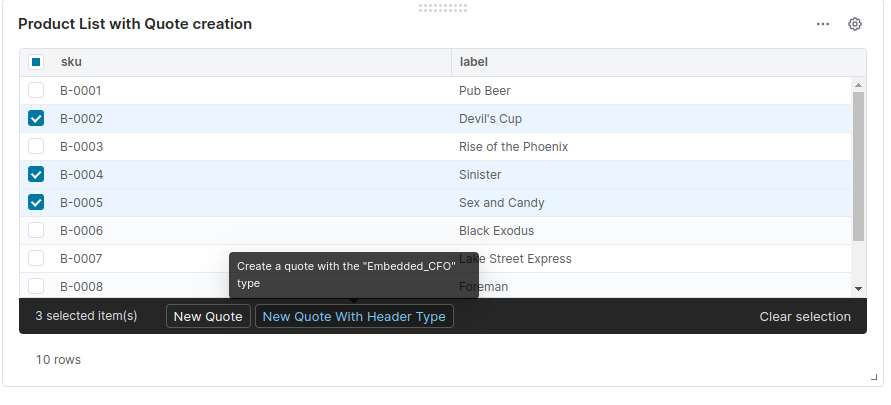
Result matrix:
def products = api.find("P", 0, 10, null, ["sku", "label", "currency"])

def resultMatrix = api.newMatrix().withColumnFormats([
  "sku"     : FieldFormatType.TEXT,
  "label"   : FieldFormatType.TEXT
]).withRows(products);

resultMatrix.rowSelectionBackEndAction("selectedProducts")
  .withLogicName("BackEndActionLogic_Example2")
  .withColumns("sku")
  .withButtonLabel("New Quote")

resultMatrix.rowSelectionBackEndAction("selectedProducts")
  .withLogicName("BackEndActionLogic_Example2")
  .withColumns("sku")
  .withButtonLabel("New Quote With Header Type")
  .withButtonTooltip('Create a quote with the "Embedded_CFO" type')
  .withFailureMessage('Error message displayed if the logic throws an exception')
  .withSuccessMessage('Success message')
  .addFormulaInput('quoteType', 'Embedded_CFO')
  .addFormulaInput('quoteLabel', "New Embedded_CFO quote!")

return resultMatrix;
Code of BackEndActionLogic_Example2:
// Selected rows in result matrixdef items = api.inputMatrix('selectedProducts', 'sku')

// Quote type passed in .addFormulaInput('quoteType', 'Embedded_CFO')def quoteType = api.input('quoteType')

// Quote label passed in .addFormulaInput('quoteLabel', "New Embedded_CFO quote")def quoteLabel = api.input('quoteLabel')

if (quoteType) {
  return [
    targetPage     : AppPages.QC_NEW_QUOTE,
    targetPageState: [
      targetPageFields: [
        label: quoteLabel,
        expiryDate: "2023-12-24"      ],
      targetPageEntityType: quoteType,
      targetPageItemsInputs: items,
      targetPageTab: 'items'    ]
  ]
} else {
  [
    targetPage     : AppPages.QC_NEW_QUOTE,
    targetPageState: [
      targetPageItemsInputs: items,
      targetPageTab: 'items'    ]
  ]
}