
Available from version 15.0
We have introduced a new method that allows users to mark Condition Record Items as superseded. Instead of deleting Condition Record Items in cases of complete overlap and overlap from right, these records are moved from CRCI to CRCIH (the Historical Tables for Conditional Record Items). This approach preserves the history of price changes for purposes such as auditing and reporting.
Condition Records Flow
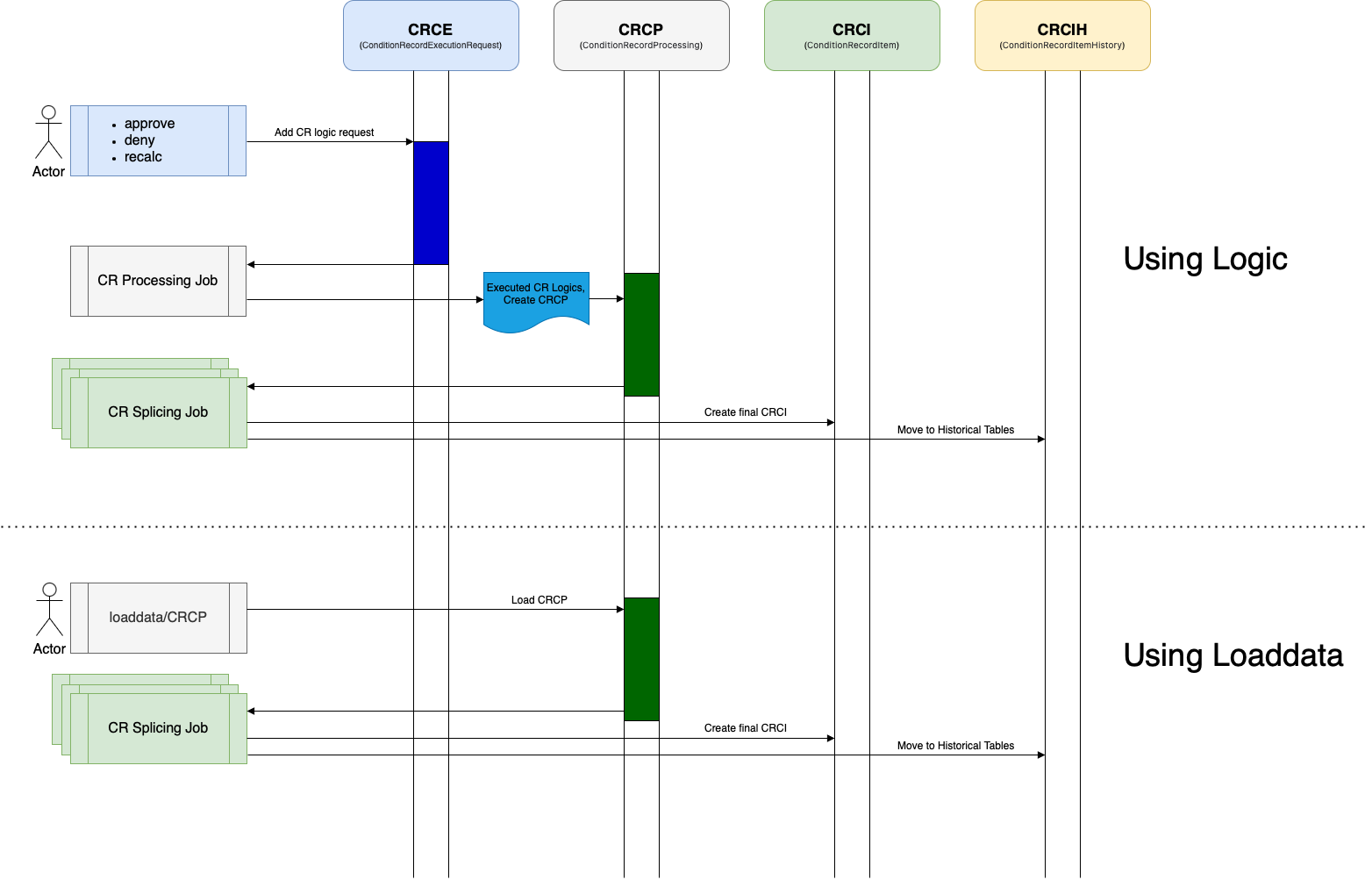
with Splicing Option
When the method withSplicingOption() is used independently, complete overlaps and overlaps from right result in the deletion of the initial records. The withSplicingOption() method offers the following three splicing options:
-
.reset()– Sets the attribute value to NULL. -
.set()– Sets the attribute to a specified value. -
.setSupersedingOn()– Historical Tables for Conditional Record Items are used (set Superseding On).
Example
conditionRecordHelper.addOrUpdate([
                "key1": "someKey1",
                "validFrom": "2024-06-01",
                "validTo": "2024-06-30",
                "conditionRecordSetId": 7,
                "conditionValue": 30,
                "unitOfMeasure": "barrels",
                "currency": "EUR",
                "attribute1": "initial value",
                "attribute2": "initial value",
                "attribute3": "initial value",
                "attribute4": "initial value"
                ])

                conditionRecordHelper.withSplicingOption().set("attribute1", "new value").set("attribute3", "other new value").reset("attribute4")
                conditionRecordHelper.withSplicingOption().set("integrationStatus", 7)
Without Splicing Options Applied
|
Valid From |
Valid To |
Condition Value |
Unit of Measure |
Currency |
Attribute 1 |
Attribute 2 |
Attribute 3 |
Attribute 4 |
|---|---|---|---|---|---|---|---|---|
|
16/6/24 |
30/06/2024 |
30 |
barrels |
EUR |
initial value |
initial value |
initial value |
initial value |
With Splicing Options Applied
|
Valid From |
Valid To |
Condition Value |
Unit of Measure |
Currency |
Attribute 1 |
Attribute 2 |
Attribute 3 |
Attribute 4 |
|---|---|---|---|---|---|---|---|---|
|
16/6/24 |
30/06/2024 |
30 |
barrels |
EUR |
new value |
initial value |
other new value |
NULL |
Example with LoadData
{
  "data": {
    "header": [
      "key1",
      "validFrom",
      "validTo",
      "conditionRecordSetId",
      "attribute1"
    ],
    "data": [
      [
        "107",
        "2023-08-31",
        "2026-06-30",
        7,
        "some value 1"
      ], [
        "117",
        "2024-10-31",
        "2027-03-30",
        7,
        "some value 1.7"
      ]
    ],
    "options": {
        "conditionRecords": {
            "splicing": {
                "setFields": {
                    "attribute1": "new value baby",
                    "attribute3": "new value too baby"
                    },
                "resetFields": ["attribute4", "attribute6"]
            }
        }
    }
  }
}
For more information about Splicing options for LoadData see Insert Bulk Data (REST API Documentation).
set Superseding On
When the method withSplicingOption() is used in conjunction with setSupersedingOn(), the initial records are moved to the Historical Tables for Conditional Record Items. This option must be enabled for the entire job, which involves creating new Condition Record Items. During the execution of the splicing job, the initial Condition Record Items will not be deleted; instead, they will be moved to the Historical Tables for Conditional Record Items.
To enable this behavior, use the following parameter:
conditionRecordHelper.withSplicingOption().setSupersedingOn()
Set Superseded Records Options
-
setSupersedingOn()– When this option is not used, default behavior is applied and condition records are deleted. -
setSupersedingOn()– When this option is used, condition records are moved fromCRCItoCRCIH(the Historical Tables for Conditional Record Items).
Superseded records are displayed in the application under the Status column, with the following designations:
-
Active
-
Superseded
Example
conditionRecordHelper.addOrUpdate([
key1: "MB-0001",
validTo: "2054-01-01",
validFrom: "2026-01-01",
conditionRecordSetId: 2,
conditionValue: 30,
unitOfMeasure: "barrels",
currency: "EUR",
//integrationStatus: 1,
attribute1: "attr1",
attribute2: "attr2",
attribute3: "attr3",
attribute4: "attr4",
])
conditionRecordHelper.withSplicingOption().setSupersedingOn()
In this example, we have approved the Price List (2147491032.PL) with a Condition Record logic in the Workflow. The Valid From and Valid To dates have been modified, and the previous values have been superseded.
|
typedId |
Sales Organisation |
Status |
Valid To |
Valid From |
Unit Of Measure |
Condition Value |
Currency |
Attribute 1 |
Attribute 2 |
Attribute 3 |
Attribute 4 |
Created |
Created By |
Created By Object |
Last Update Date |
Last Updated By |
Last Updated By Object |
|---|---|---|---|---|---|---|---|---|---|---|---|---|---|---|---|---|---|
|
2.CRCIH4 |
MB-0002 |
common_superseded |
01/01/2054 |
01/01/2026 |
barrels |
30 |
EUR |
attr1 |
attr2 |
attr3 |
attr4 |
15/05/2025 12:05 |
2147483684 |
2147491032.PL |
15/05/2025 12:47 |
2147483684 |
|
|
2.CRCI4 |
MB-0001 |
|
01/01/2054 |
01/01/2026 |
barrels |
30 |
EUR |
attr1 |
attr2 |
attr3 |
attr4 |
15/05/2025 11:48 |
2147483684 |
2147491031.PL |
15/05/2025 11:53 |
2147483684 |
2147491032.PL |
|
3.CRCIH4 |
MB-0002 |
common_superseded |
31/12/2026 |
01/01/2026 |
barrels |
30 |
EUR |
attr1 |
attr2 |
attr3 |
attr4 |
15/05/2025 12:05 |
2147483684 |
2147491032.PL |
15/05/2025 12:54 |
2147483684 |
|
|
4.CRCIH4 |
MB-0002 |
common_superseded |
01/01/2054 |
01/01/2027 |
barrels |
30 |
EUR |
attr1 |
attr2 |
attr3 |
attr4 |
15/05/2025 12:46 |
2147483684 |
2147491032.PL |
15/05/2025 12:54 |
2147483684 |
|
|
6.CRCI4 |
MB-0002 |
|
01/01/2060 |
01/01/2020 |
barrels |
30 |
EUR |
attr1 |
attr2 |
attr3 |
attr4 |
15/05/2025 12:53 |
2147483684 |
2147491035.PL |
15/05/2025 12:54 |
2147483684 |
|
Example with LoadData
{
  "data": {
    "header": [
      "key1",
      "validFrom",
      "validTo",
      "conditionRecordSetId",
      "attribute1"
    ],
    "data": [
      [
        "107",
        "2023-08-31",
        "2026-06-30",
        7,
        "some value 1"
      ], [
        "117",
        "2024-10-31",
        "2027-03-30",
        7,
        "some value 1.7"
      ]
    ],
    "options": {
        "conditionRecords": {
            "splicing": {
                "setFields": {
                    "attribute1": "new value baby",
                    "attribute3": "new value too baby"
                    },
                "resetFields": ["attribute4", "attribute6"],
                "supersedeRecords": true
            }
        }
    }
  }
}
For more information about Splicing options for LoadData see Insert Bulk Data (REST API Documentation).