
This document describes the prerequisites, configuration steps, and features for integrating Pricefx with an ISV rebate management application. The integration consists of two main parts: configuration within PlatformManager, and setting up the Pricefx application to add ISV menu items and use links to the ISV application in the Groovy configuration.
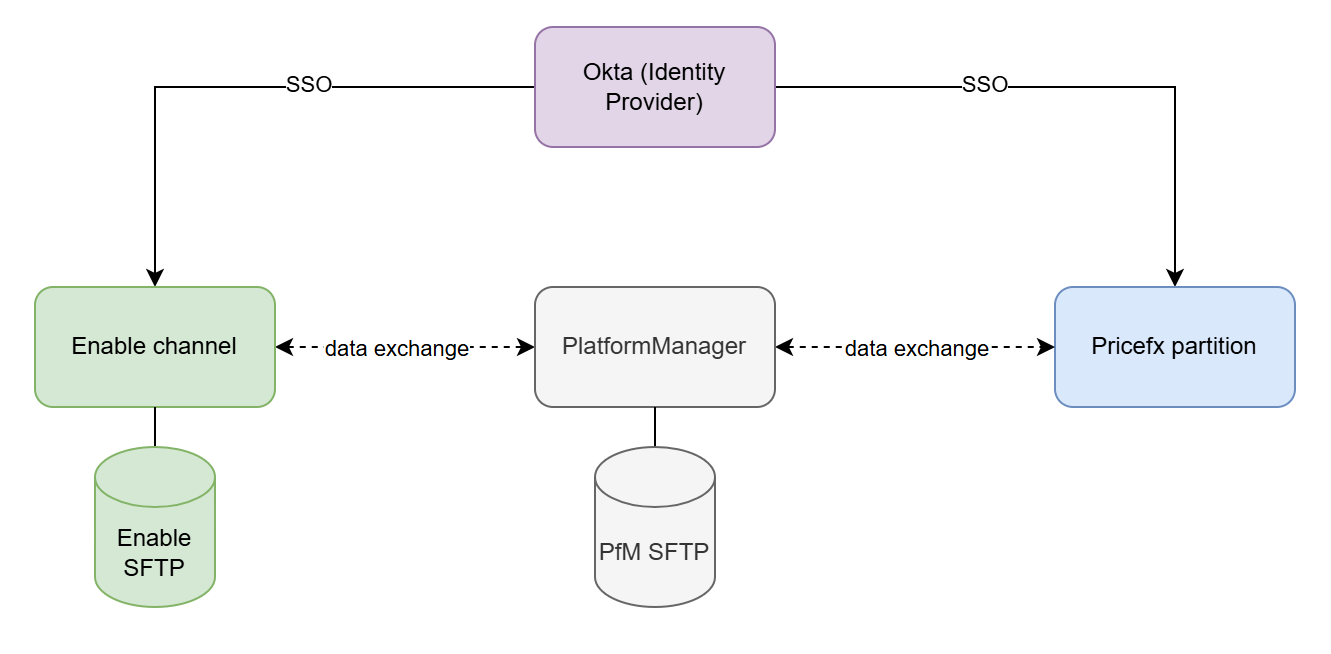
Configuring the integration requires completing the prerequisites, followed by setting up the PlatformManager. This includes configuring the ISV connection, mapping data between the ISV application and Pricefx, and setting up links. Once done, you can add menu items in Pricefx that direct users to the ISV application or utilize the links within Groovy scripts in your Pricefx configuration.
Prerequisites
Before you begin, ensure the following prerequisites are met:
Salesfx Configuration
The fields' values must be filled in within Salesfx (Salesforce). This serves as a single source of truth to be used for ISV Connection details in PlatformManager. This configuration can then be easily updated on the Pricefx partition (Advanced Configuration Options) via PlatformManager (ISV Connection settings > Vendor tab > Resend to Partition button).
Required fields in Salesfx (the Enable Information section):
-
Enable Channel ID
-
Enable Base URL - Trading Programs
-
Enable Base URL - Collaborator
-
Enable SFTP URL
-
Enable SFTP Port
-
Enable SFTP Username
Single Sign-On (SSO)
SSO must be enabled for both the ISV application and Pricefx, allowing users to seamlessly navigate between the platforms without the need to re-authenticate.
Note: The integration supports various identity providers (IdPs) such as Okta, Azure AD, and others to manage authentication.
After completing the prerequisites, you can proceed with configuring PlatformManager and Pricefx by following these steps:
1. PlatformManager: Create ISV Connection
To connect Pricefx and the ISV application, follow the steps in the How to Create ISV Connection article.
2. PlatformManager: Configure ISV Data Mapping
The mapping process facilitates data exchange between Pricefx and the ISV application in both directions. For detailed instructions on configuring Data Mapping, refer to the How to Configure ISV Data Mapping article.
Deeplinks Configuration
⚠️ Customization of deep links is intended to be performed by PlatformManager administrators only and will rarely be needed.
Navigation between Pricefx and the ISV application is facilitated through deep links, enabling direct access to relevant pages and seamless usage of links within the Groovy API.
For more details about deeplinks, refer to the How to Customize Deeplinks for ISV Integration article.
Proxy for Deeplinks to Pricefx
To simplify URL construction for navigating between the ISV application and Pricefx, a proxy layer has been introduced, providing the link generation to the Pricefx application. See ISV Proxy Links.
3. Pricefx: Add Menu Items
Add ISV menu items in the Pricefx module menu and integrate these items into the existing or new main menu folders. For more details see How to Add Enable Integration to the Module Menu.
4. Pricefx: Groovy API
You can use the Groovy API to dynamically create links to various locations in the ISV application. See How to Use Links to Enable in Groovy article to learn how to work with links to the ISV application within the Pricefx Groovy API.