
Whenever you need to improve performance of repetitive reading of the same data, the caching principles help a lot. Note: We speak here about application server caching, not DB caching.
In Pricefx this applies to all tasks, which process a long list of lines/rows, for example:
-
Price List calculation
-
Live Price Grid calculation
-
Data Enrichment tasks:
-
Calculated Field Set
-
Calculation Dataload
-
-
Quotes with many lines
Generally you can cache any kind of data, for example:
-
Query result of a DS/DM query
-
List of rows from Company Parameter
-
List of rows from Product Extension
Principles of Speed Optimization
-
Plan the code and measure the performance on the EXPECTED volume of data.
-
Always ask customer about the current and expected (in the future) amount of lines to process.
-
Generate simple mock data lines to get real performance measurements.
-
Testing with 5 lines will NOT give you a good idea.
-
Each process has certain time "overhead", which could look quite big when you compare it to the time spent on 5 lines but could be minor, when compared to time spent on 10,000 rows.
-
-
Start with the biggest issues based on measurement.
-
Measure the current performance.
-
Use the Performance Log/Trace.
-
Consider also measuring of the time spent in blocks of code, not only the whole elements.
-
-
Start with optimization of the code, which takes the longest time.
-
The usual suspect is repetitive data reading but it could be also in inefficient code.
-
-
Principles of Caching
Scenario:
Your line/row logic is executed many times and each time it needs to read data from the same table and
-
the query either always returns completely the same result,
-
or you’re reading from the same table using different filters but the table is so small that it’s ok to read it completely into memory.
In such a case you can cache the data:
-
You want to ensure to read the data only once (the first time you need them)
-
and store the data in a List or in a Map in the cache.
-
-
The next time you need the data, you will read them from the cache.
|
Feature \ Cache |
api.local |
api.global |
Shared Cache |
|---|---|---|---|
|
Accessible via |
binding/variable |
binding/variable |
function |
|
Stored Data Types |
any object |
String only |
|
|
Content Scope |
only during execution of Logic for 1 item |
shared across executions of Logic for more items on one Node. Additionally also across certain Header and Line logics. |
shared across Nodes and processes |
|
Storage |
memory |
noSQL in-memory database |
|
|
TTL (TimeToLive) |
no limit, but cache survives only until the end of single logic execution |
no limit, but cache survives only until the end of the process (e.g. end of pricelist items calculation) |
15 mins |
|
Speed |
fast |
slower |
|
In-memory Cache api.global
The content of the api.global binding variable "survives" between the subsequent calls of your row/line logic during the execution of the process, so you can use it for caching in, for example:
-
Price List line item logic
-
Live Price Grid line item logic
-
Quote line item logic
-
CFS row logic
-
DL "row" logic
During the distributed calculations (Price List, LPG, CFS), the process is executed across several server Nodes, each sub-process calculating small part of the lines/rows. Each sub-process has its own api.global content, i.e., it’s not shared across the sub-processes. So, if you’re running a PL calculation distributed across e.g., 3 Nodes, the system will hold the 3 instances of api.global in total in the memory.
api.global
-
This binding/variable is available in every type of Logic.
-
It behaves as a Map, so you can use usual ways to access the values via keys.
-
It keeps all the values during the whole process, i.e., in between all the calls to the same line/row Logic.
-
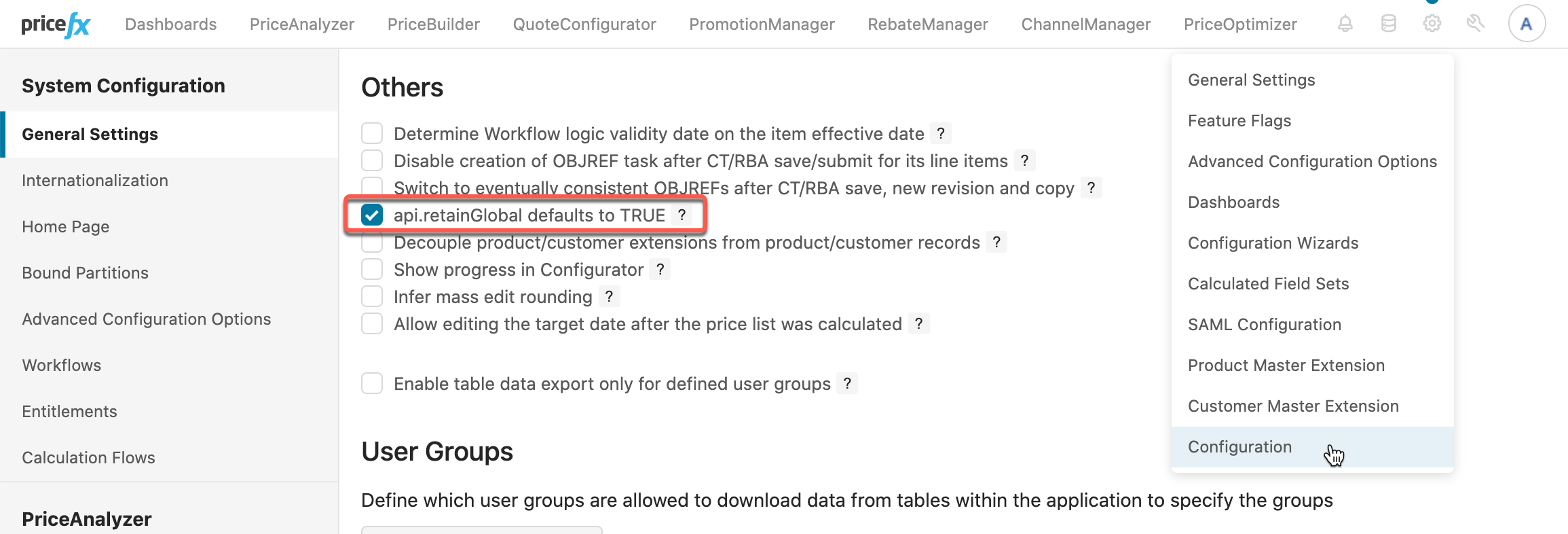
In former Pricefx versions, the "global" nature of the variable had to be switched on by a statement
api.retainGlobal = true, otherwise it actually behaved the same as binding/variableapi.local. You can find this statement in many former projects. -
In the recent versions of Pricefx, there’s a configuration setting, which causes the
api.globalto work in the "global" way, even without using the special statement.-
Also, all newly created partitions have this setting ON by default.
-
Code Samples Using api.global
def getAllFreightSurcharges() {
    return api.namedEntities(
                   api.findLookupTableValues("FreightSurcharge")  //❸
    )
}

def getCachedAllFreightSurcharges() {
    final key = "FreightSurchargeDataCacheKey"

    if (api.global.containsKey(key)) {  //❶
        return api.global[key]          //❷
    }

    def data = getAllFreightSurcharges()

    api.global[key] = data              // ❹

    return data                         //❺
}
❶ Check, if the data were already stored in the cache under the given key.
❷ If it’s already in the cache, return immediately a reference to it.
❸ Read the data from the table.
❹ Store the data into cache.
❺ Return the data.
Shared Cache
The shared cache is a distributed key-value store (distributed cache). The main benefit of Shared Cache is that it’s shared across logics and across Nodes.
-
So, for example, if a Price List is running in Distributed mode, the logics running on different nodes can share data.
-
Another use case could be that some process will write data into it and later some scheduled task will pick up the value and process.
Features:
-
It can store only String - If you need to store something else, you need to convert to JSON.
-
Shared across Nodes and processes
-
Data stored in DB (usually powered by Redis).
-
-
Has TTL (Time To Live) - The data are not stored there forever, the usual limit is 15 mins.
def getAllMarginAdjustments() {
    return api.namedEntities(
                   api.findLookupTableValues("MarginAdjustment")  //❸
               )
}

def getCachedAllMarginAdjustments() {
    final key = "MarginAdjustmentsDataCacheKey"

    if ((stringData = api.getSharedCache(key)) != null) {  //❶
        return api.jsonDecodeList(stringData)              //❷
    }

    def data = getAllMarginAdjustments()

    api.setSharedCache(key, api.jsonEncode(data))                // ❹

    return data                         //❺
}
❶ Check, if the data are available in the cache.
❷ If it’s already in the cache, decode the data rows from JSON and return it. As you’re constantly decoding the JSON, if this mechanism would be used frequently inside of a process on one Node, it would be good to consider caching of the decoded value in api.global.
❸ Read the data from the table.
❹ Store data into cache.
❺ Return the data.
For details, see: api.setSharedCache(), api.getSharedCache().
Monitoring Performance
Each process (PL, CFS, DL, …) has a Performance Trace, where you can see:
-
The total amount of time spent in each Element of your logic.
-
How many times was each Element executed.
If you will run your logic only for e.g., 5 lines, then the summary of time of those 5 executions could be highly influenced by the caching which happened during 1st execution of the Logic. So we recommend test the time on more lines - e.g., 100 and more.
To see the Performance Tracking:
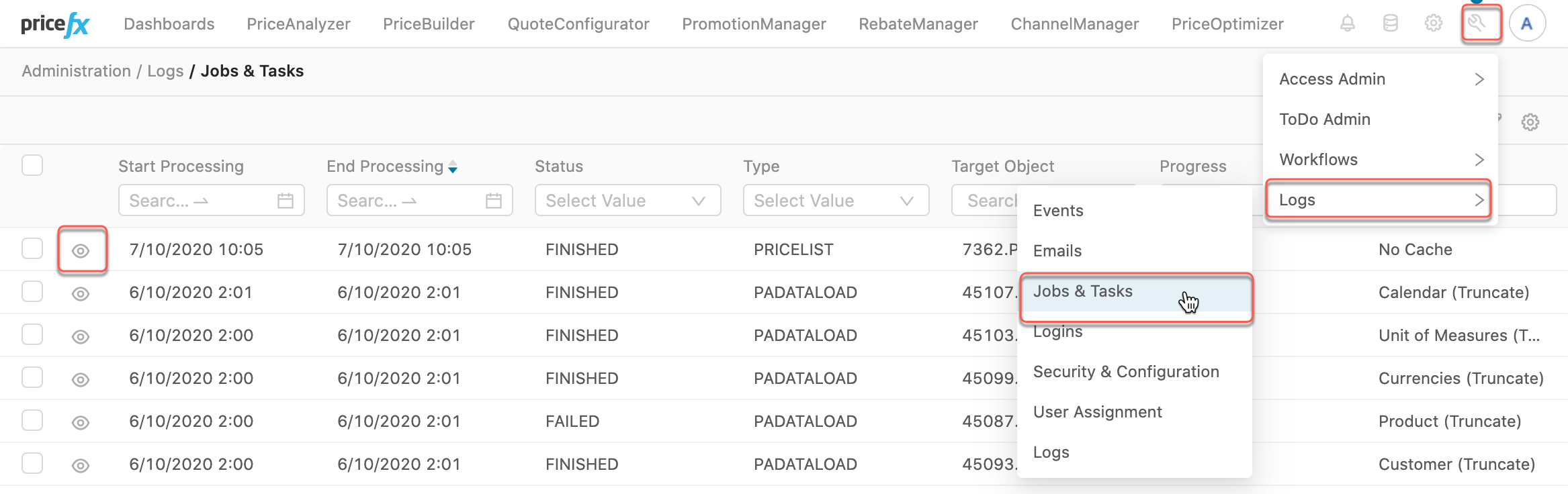
-
Navigate to Administration › Logs › Jobs&Tasks.
-
Find the process, which you’re interested in, e.g., a Price List. You can find it by filtering by Type, Target Object, Name, etc.
-
Then click on the "eye" symbol of the process.
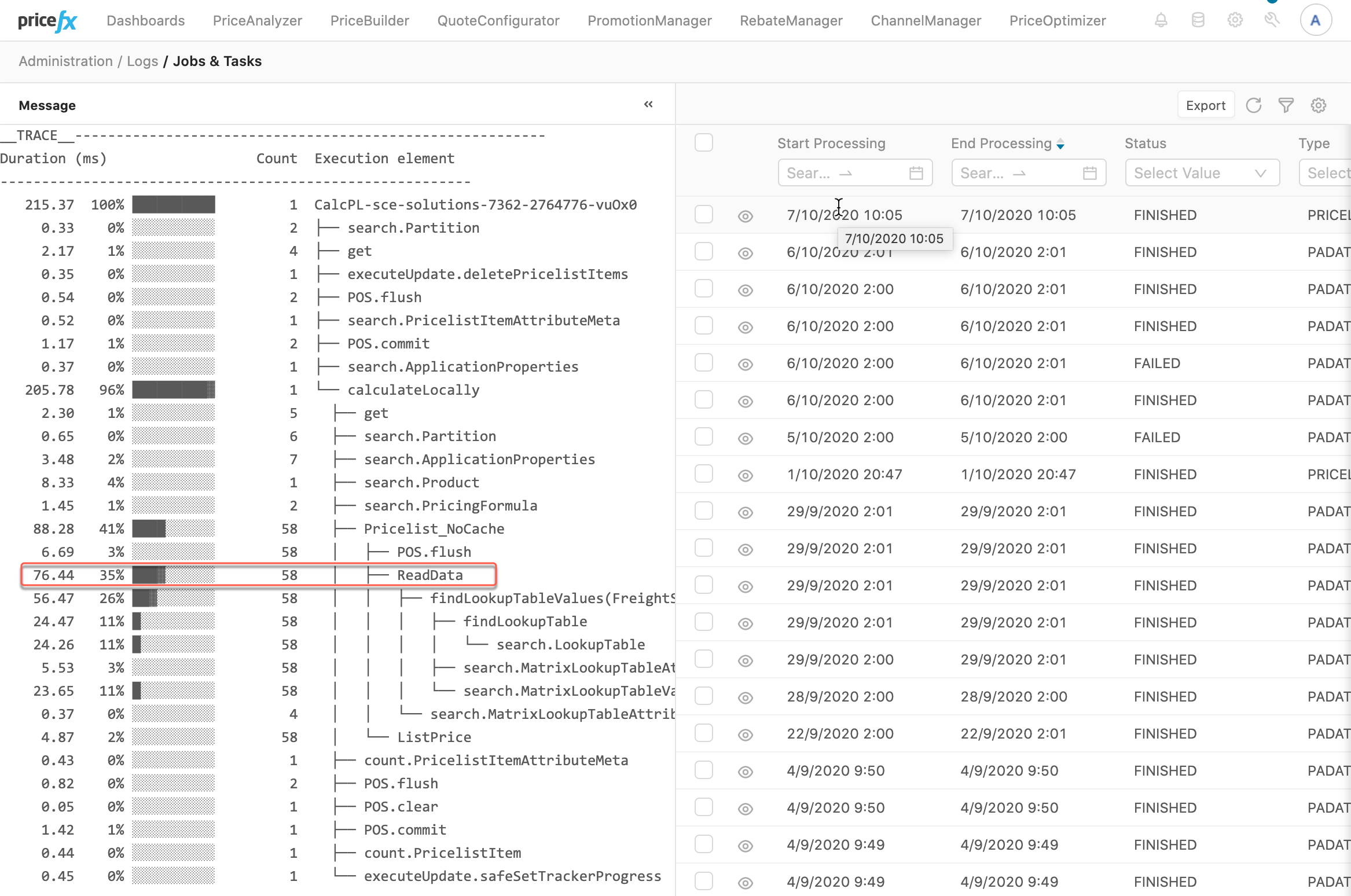
You notice that:
-
The "ReadData" element
-
was executed 58 times,
-
all together it took 76.44ms,
-
which was 35% of time of the Pricelist calculation process.
-
-
The function api.findLookupTableValues() was called 58x.
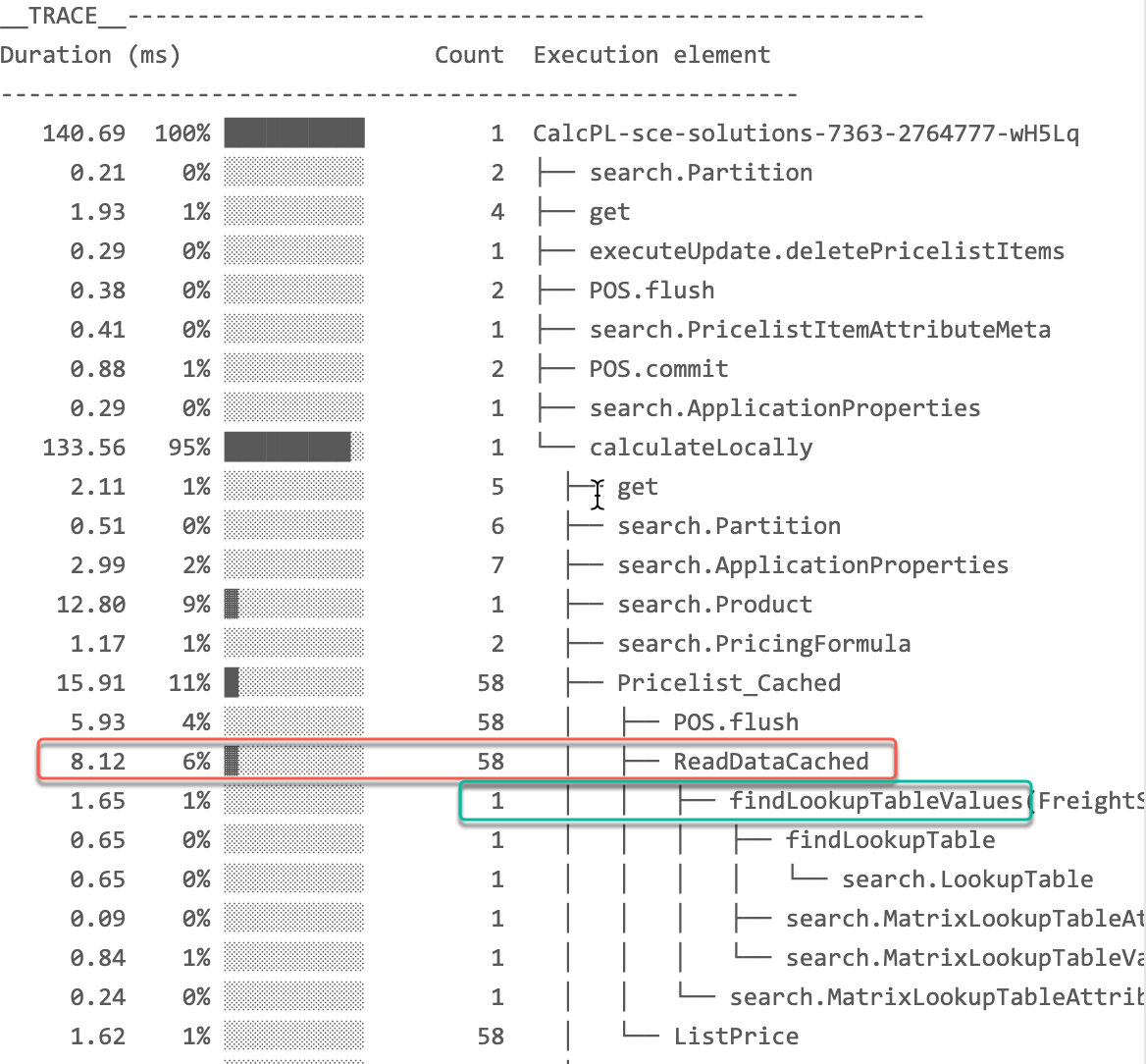
In this Cached version of the same Price List (we used api.global for caching), you can see 2 improvements:
-
The element total execution is only 8.12ms.
-
The function
api.findLookupTableValueswas called only 1x !.
References
Knowledge Base
Documentation
Groovy API