
The main place for package configuration is an Advanced Configuration option named SC_AdvancedConfiguration. Option values are configured mostly during a package deployment process (refer to installation) and can be adjusted later here. Some options can be overridden on a Condition Type or Line Item level where the lower level has a priority.
The following table shows a list of all configuration parameters stored in SC_AdvancedConfiguration:
|
Name |
Description |
Values |
|
|---|---|---|---|
|
sourceType |
Type of source data. |
Select one of these options:
|
|
|
sourceName |
Name of the source used to query and allocate the compensation value. |
|
|
|
pricingDateFieldName |
Contains a pricing date in the Source Name. |
|
|
|
customerIDFieldName |
Contains a customer ID in the Source Name. |
|
|
|
productIDFieldName |
Contains a product ID in the Source Name. |
|
|
|
productNameFieldName |
Contains a product name. It is used for the Transaction List report only. |
|
|
|
baselineFieldName |
The field name of a Value Base field is used to calculate the base value. In most cases, it will be a revenue or margin field; in some cases it can be volume. This depends on the used Condition Type. |
|
|
|
invoicePriceFieldName |
Contains an Invoice Price in the Source Name. It is used for the Adjustments |
|
|
|
quantityFieldName |
Contains a Quantity in the Source Name. It is used for the Adjustments |
|
|
|
marginFieldName |
Contains a Margin in the Source Name. It is used for the Adjustments |
|
|
|
sellerIDFieldName |
Contains an identification of a sales agent. |
|
|
|
currencyFieldName |
Contains the main Source Name (DM or DS) currency. |
|
|
|
payoutDays |
Number of days after the end date of the payment period when the payout happens. |
|
|
|
paymentPeriod |
Sets a frequency of payouts. The user can specify it also on a Line Item level. |
Select one of these options:
|
|
|
quotaFor |
The target defined on the line item is evaluated for each payment period (see paymentPeriod) or for the whole plan duration. |
Select one of these options:
|
|
|
depositScheme |
Parameter providing guidance on compensation accumulation across payment periods. |
If "quotaFor" is "Plan duration", you need to define how to calculate the compensation value:
|
|
Example of SC_AdvancedConfiguration:
|
Explanation of selected parts of the configuration above:
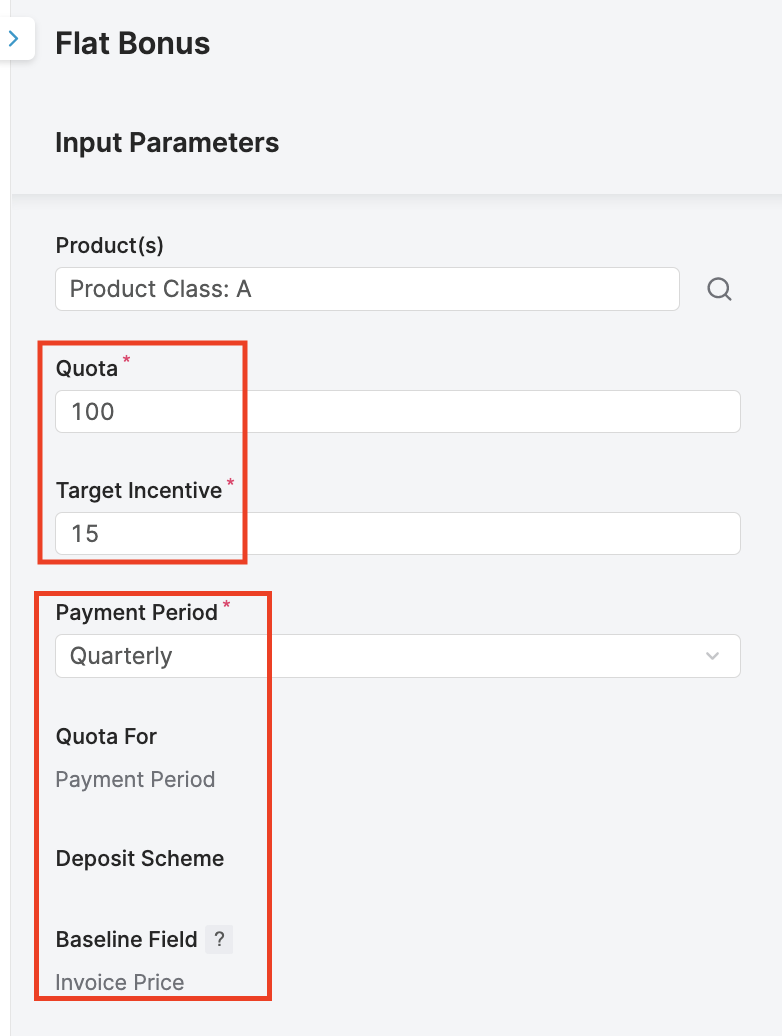
Example 1:
"payoutDays": 2,
"paymentPeriod": "Quarterly",
"quotaFor": "Payment Period",
"depositScheme": ""
The layout on the line item of a Compensation Plan (see details in Create Compensation Plan (Sales Compensation)) based on the configuration:
-
Quota input (100) and Target Incentive (15) are understood as per Payment Period input (in this case, it is Quarterly by default, you can select another input such as Monthly, Semi-Annually, or Annually).
-
Then, you compare those inputs with your baseline value in the Source Name, Source Type (e.g. SC_TransactionData DM) for each payment period (Q1, Q2, Q3, Q4) and calculate the compensation based on the condition type you selected.
-
End of each payment period (Q1, Q2, Q3, Q4), the payout date is planned to pay for the sales agent at the second day (2) later, excluding the weekends.
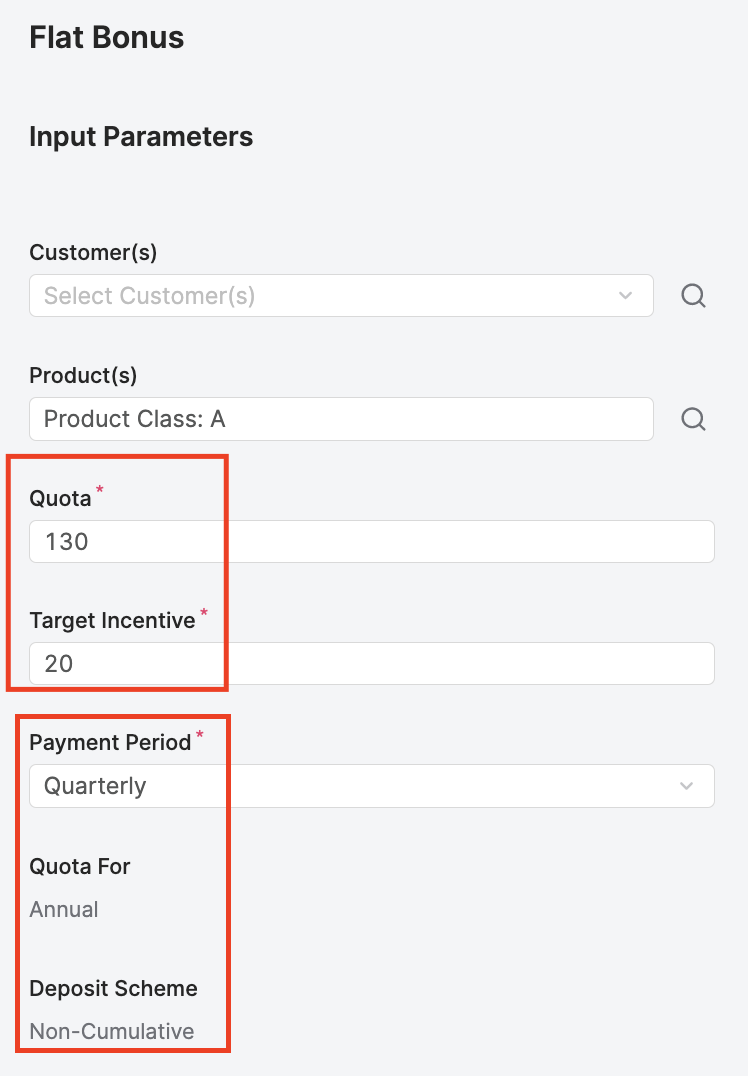
Example 2:
"payoutDays": 4,
"paymentPeriod": "Quarterly",
"quotaFor": "Plan duration",
"depositScheme": "Non-Cumulative"
-
Quota For is Plan Duration → Quota input (130) and Target Incentive (20) are understood as a whole compensation plan duration (it should be the Start Date - End Date input on the Compensation Plan)."
(see details in Create Compensation Plan (Sales Compensation)). -
You compare those inputs with your cumulated baseline value in the Source Name, Source Type (e.g. SC_TransactionData DM) for payment period (Q1, Q2, Q3, Q4).
-
For calculation details for this case see Condition Types & Calculation Examples (Sales Compensation).
-
End of each payment period (Q1, Q2, Q3, Q4), the payout date is planned to pay for the sales agent at the fourth day (4) later, excluding the weekends.
Summary
There are 3 different calculation ways:
-
Quota For: Payment Period
-
Quota For: Plan Duration – Deposit Scheme: Non-Cumulative
-
Quota For: Plan Duration – Deposit Scheme: Cumulative