
In order to update the SD from a version before 13.0 to a version 13.0++ you need to change a few things. We changed the way how strategies / blockly workspace is stored.
There are some noticeable changes:
-
Strategy Selection is removed from SD. It needs to be done in the Company Parameter directly
-
Strategies can have “Status” and there is a “Version History”
-
Deployed Strategies / Lookups cannot be deleted for audit reasons
-
There is only a “name”, not a Label/Name concept. Name cannot have special characters
-
SD advanced configuration now expects datatype “string” instead of previously “String”
User Roles
Strategy Designer now comes with specific User Roles:
-
Price Setting → View Strategy Designer
-
Price Setting → Manage Strategy Designer
-
Price Setting → Administer Strategy Designer
Change in the advanced property:
The advanced property for Strategy Designer has to be renamed to “strategyDesigner”.

Most probably it is called “pfxExternalApp_visual_configuration_strategy_designer” in your older version.
The JSON is a bit different now. Your JSON will probably look like this:
{
  "name": "strategy-designer",
  "label": "Strategy Designer",
  "url": "https://apps.pricefx.com/visual-configuration/1-0-1/#/strategy-designer",
  "businessRole": "StrategyDesigner",
  "configuration": {
    "advancedConfigurationStateEntry": "visual_configuration_strategy_designer_state",
    "strategyDefinitionTable": "StrategyDefinition",
    "strategySelectionTable": "GlobalStrategySelection",
    "priceSettingDimensionsTable": "PriceSettingDimensions",
    "priceListLogicName": "IndependentPriceListLogic",
    "groovyLibraryName": "CustomPricingStrategies"
  }
}
You need to “unwrap” the “configuration” part only. The rest is not needed anymore.
It has to look like this now:
{
	"groovyLibraryName": "CustomPricingStrategiesLib",
	"customBlocksGroovyLibraryName": "StrategyDesignerCustomBlocks",
	"excludedParameters":[],
	"deploymentLogicName": "StrategyDesignerFillPPTables",
	"livePreviewDependencyLevel": "Global",
	"dependencyConfigurationTable": "DependencyConfiguration",
	"priceListLogicName": "IndependentPriceListLogic"
}
Don´t worry about the exact content. It might differ a bit depending on what version of PSP you have deployed.
Additional Parameters “String” → “string”
If you have configured additional parameters of type “String”, you need to change the type from “String” to “string”.
"additionalParameters": {

        "ValidFromString": {

            "label": "Valid From (String)",

            "type": "string"

        },
Import the Strategies / Lookups to JCS
If you browse to SD now the strategies will be “lost”. Don´t worry, they are not lost, the new SD just does not look at the right place.
First, you need to locate the AP “visual_configuration_strategy_designer_state”. This is a JSON representation of all your lookups and strategies.
It should look like this:
{
  "strategies": [
    {
      "label": "StrategyTest",
      "name": "StrategyTest",
      "storageStatus": "DRAFT",
      "json": {
        "blocks": {
          "languageVersion": 0,
          "blocks": [
            {
              "type": "strategy_custom",
              "id": "root",
              "x": 5,
              "y": 5,
              "deletable": false,
              "extraState": {
                "variablesConnected": false
              },
              "fields": {
                "NAME": "Strategy",
                "VARIABLES_VISIBLE": false
              },
              "inputs": {
                "PRICE": {
                  "block": {
                    "type": "math_arithmetic",
                    "id": "B}NpVix*#A1M+cTbCe5l",
                    "fields": {
                      "OP": "ADD"
                    },
                    "inputs": {
                      "A": {
                        "block": {
                          "type": "var_productCost",
                          "id": "%i}};R39_dFKCWe%!}wT"
                        }
                      },
                      "B": {
                        "block": {
                          "type": "use_data_lookup",
                          "id": "H4.Xt9HBbNmh+wSH_}=t",
                          "extraState": {
                            "selectedDataLookup": "AdvancedLookupTest",
                            "selectedField": "attribute1",
                            "outputType": "Number",
                            "selectedOperator": "avg"
                          },
                          "fields": {
                            "OPERATOR": "avg",
                            "FIELD": "attribute1",
                            "DATA_LOOKUP": "AdvancedLookupTest"
                          }
                        }
                      }
                    }
                  }
                }
              }
            }
          ]
        }
      }
    }
  ],
  "customLookups": [
    {
      "label": "AdvancedLookupTest",
      "name": "AdvancedLookupTest",
      "storageStatus": "ACTIVE",
      "json": {
        "blocks": {
          "languageVersion": 0,
          "blocks": [
            {
              "type": "data_lookup",
              "id": "root",
              "x": 5,
              "y": 5,
              "deletable": false,
              "extraState": {
                "typeCode": "PX",
                "filterToggled": true,
                "sortToggled": false,
                "rangeLookupEnabled": false,
                "valueLookupEnabled": false,
                "filterAdded": true,
                "sortAdded": false,
                "tableName": "ProductCosts"
              },
              "fields": {
                "type_code": "PX",
                "table_name": "ProductCosts",
                "apply_filter": true,
                "apply_sort": false
              },
              "inputs": {
                "input_filter": {
                  "block": {
                    "type": "and_or_dynamic",
                    "id": "/mR/%2D`C+*In3CPJ_a#",
                    "fields": {
                      "OPERATOR": "and"
                    },
                    "inputs": {
                      "VALUE": {
                        "block": {
                          "type": "data_lookup_condition_PX_ProductCosts",
                          "id": "IeGpIH?$J,Sd*#yno$x?",
                          "fields": {
                            "FIELD": "sku",
                            "OPERATOR": "equal"
                          },
                          "inputs": {
                            "VALUE": {
                              "block": {
                                "type": "p_sku",
                                "id": "!VEKv79:W4Qzl9F3f3MJ"
                              }
                            }
                          }
                        }
                      }
                    }
                  }
                }
              }
            }
          ]
        }
      }
    }
  ]
}
You need to copy this JSON, and use the “Import” functionality in Strategy Designer:
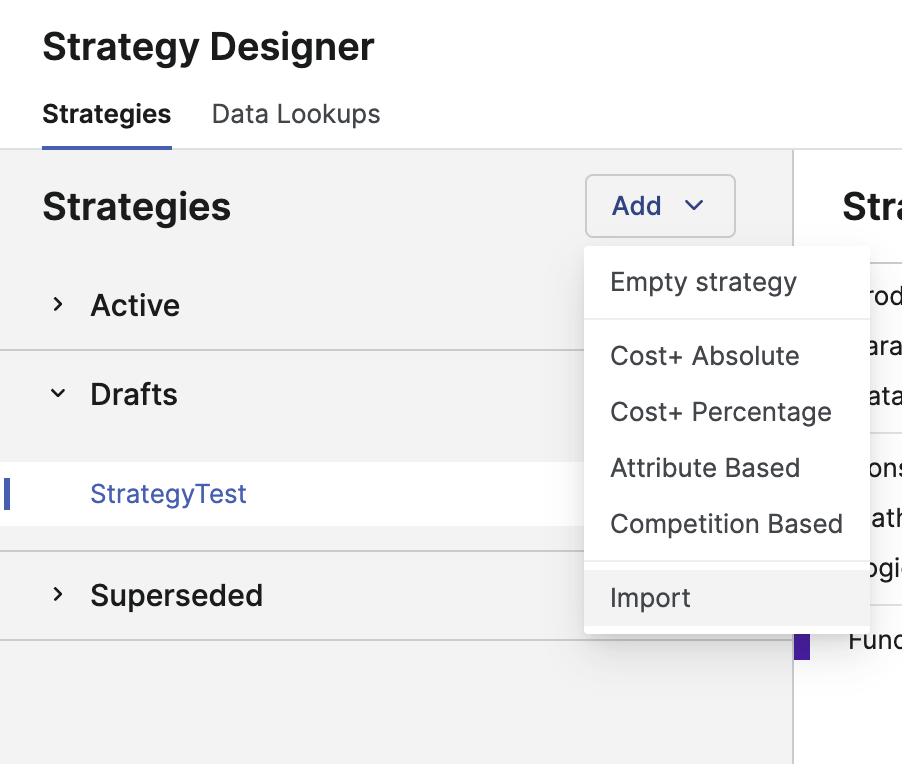
After the import your Lookups & Strategies should be available again. You can deploy them now 🙂