
This CPQ Outputs Configuration is obsolete from version 2.0.
The CPQ Outputs Configuration is used to define configurations for a CPQ output.
Details
|
Name |
Description |
|---|---|
|
Name |
Name of the output to configure. |
|
User group |
Defines a user group for the output. |
Configuration Wizard
Configuration wizard makes the output configuration easier by providing a user interface for selecting an output and configurations. The CPQ Package defines a logic for the configuration wizard and configuration wizard executor. You need to define the configuration wizard in Administration > Configuration Wizards Admin where you add a new wizard. After the wizard is created, you can use it to set up the output configuration:
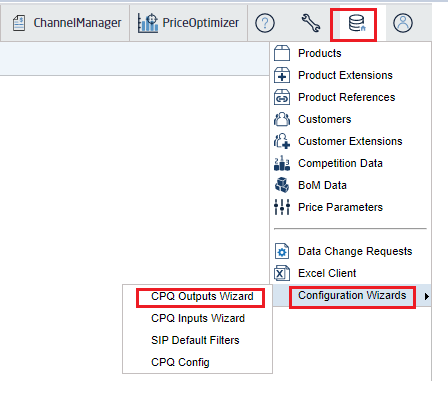
The wizard interface helps create/update/delete output configurations:
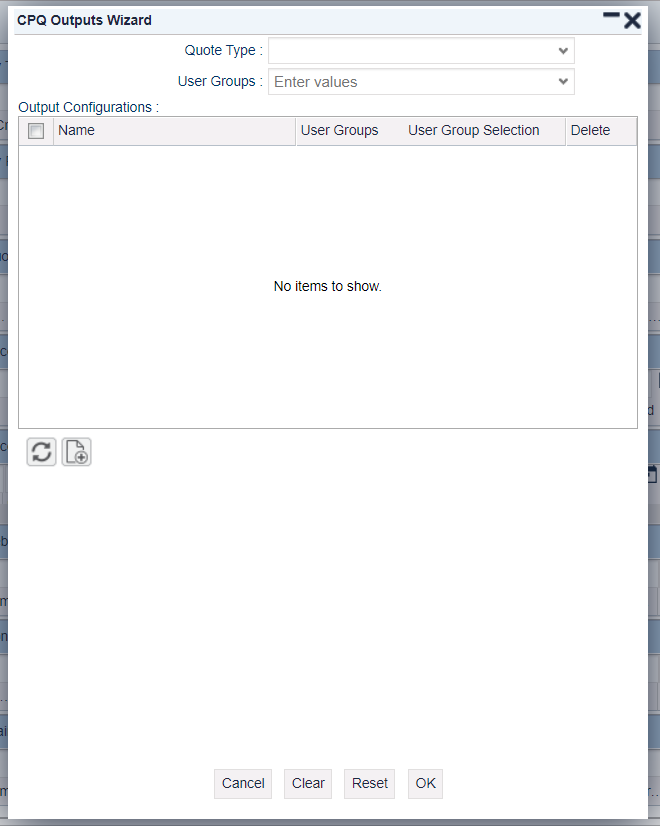
Options:
-
Quote Type – If the CPQ logic is provided under another quote type rather than the default one, you need to select the correct quote type.
-
User Group – Select a user group to apply.
-
Output Configurations – List of configured outputs.
-
Name – Name of the CPQ output (a dropdown where you can select).
-
User Group – If you need to define a user group for that particular output.
-
User Group Selection – Defines if you want to merge or override the user group selected above.
-
Merge – Merges the user groups from the User Group input and the one defined in the row.
-
Override – Skips the user group defined in the row and uses the values from the User Group input.
-
Leave empty – Does nothing, uses the value in the row.
-
-
Delete – Defines if you want to delete the configurations.
-