This section details the ModelClass and logics that the Clustering Accelerator deploys. For each step, its aim, outputs, and the main reasons to modify the logics are explained.
In this section:
Clustering Model Class
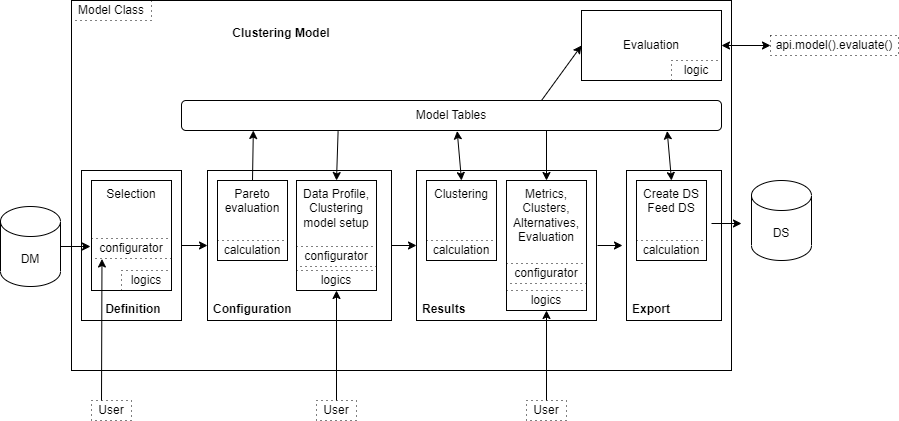
The Clustering ModelClass organizes a list of logics to create the model architecture. It is a JSON file that refers to some logics and it is transformed into an optimized UI in the Pricefx platform.
The general architecture of the Negotiation Guidance Model Class is:
It defines four steps
Definition – Sets the scope of the transactions.
Configuration – Sets the parameters for the clustering.
Results – Looks at the outputs of the clustering, the properties of the clusters and eventually how to change the configuration toward a better clustering.
Export – Copies the result of the clustering into a Data Source.
Library
The logic is Clustering_Library.
Aim of the logic
Clustering_Library is used in nearly all the other logics deployed by the Accelerator and defines a set of functions needed specifically for this Accelerator, but also some constants used to easily change the user interface wording. There are the following elements:
Parameters – Contains a function to check the type of the columns when exporting some tables.
Configurators – Groups the methods to deal with formatting user inputs.
It is accessed via the calls on libs.Clustering_Library.XXX in the code.
Common reasons to modify the logic
If there is another kind of input to deal with.
Definition Step
There is no calculation logic in this step, and there is one tab with related evaluation logics: Clustering_defnition_eval and Clustering_defnition_eval_configurator.
Aim of the logics
These logics provide the user inputs to define the source data and map it, and to define what kind of metric will be used later in the clustering process.
Outputs of the evaluation
A table of the filtered transactional data that will be used for the clustering.
Common reasons to modify the logics
Some other mappings are needed or would be retrieved.
Some customized metrics that will require specific developments.
Define pre-set filters.
Add a chart to better understand the data. (Caution: it can take long, as the data are not yet stored in the model.)
Model Configuration Step
Contains one calculation logic Clustering_configuration_calc that executes when accessing this step and one tab split in two panels, one for user inputs, the other for evaluation.
Calculation: PriceDrivers
The logic is Clustering_configuration_calc.
Aim of the logic
Aggregates the transactions at the levels selected by the user in the Definition step and computes the Pareto distributions of the two levels selected.
Outputs of the calculation
Model tables of the aggregated data.
Common reasons to modify the logic
Add a chart to better understand the data.
Setup Panel
The logic is Clustering_configuration_configurator.
Aim of the logic
It collects user’s inputs for:
Reducing the scope of the clustering to the main items based on their Pareto’s ranking.
Setting clustering algorithm parameters (linkage metric, number of clusters…).
Setting post processing parameters (extension on cluster affectation to out of scope items).
Customizing clusters' names and Data Source’s name.
Outputs of the evaluation
User inputs.
Common reasons to modify the logic
There could be different parameters to customize the clustering or eventually you can add other clustering algorithms.
EvaluationPanel
The logic is Clustering_configuration_dimensions.
Aim of the logic
Exposes to the user some information about the final scope of the clustering:
Pareto distribution of the items to be clustered (group-by).
Pareto distribution of the items used for qualifying the clusters (based-on).
Scope impact of thresholds set by the user.
Outputs of the evaluation
Displayed Pareto diagrams.
Overview before/after the scope setting.
Common reasons to modify the logic
There could be different parameters to customize the scope of the clustering and their impact should be exposed here.
Result Step
Contains one calculation logic Clustering_clustering_calc that is executed when accessing this step and one tab split in four tabs: Overview, Details (Group by), and Details.
Overview
The logics are Clustering_result_matrix and Clustering_result_pca.
Aim of the logics
This dashboard provides the results of the clustering based on the thresholds in some meaningful portlets. It presents the data of the clusters, how they are composed, the business they represent and how different/close they are (see PCA plot).
Outputs of the evaluation
Like any evaluation logic, there is no real output, it displays a dashboard.
Common reasons to modify the logics
To display other charts or to provide meaningful information in a different way.
Details (Group by)
The logic is Clustering_expense_matrix.
Aim of the logic
This dashboard provides the results of the clustering through the clustered items (group-by). If the cardinality of the product group-by per based-on is low enough, a heatmap shows the group-bys ordered by the clusters they have been assigned to.
Outputs of the evaluation
Like any evaluation logic, there is no real output, it displays a dashboard.
Common reasons to modify the logic
To display other charts or to provide meaningful information in a different way.
Details
The logic is Clustering_metrics.
Aim of the logic
This dashboard provides clustering alternatives that are explored by adjusting the maximum distance between clustered items. The clustering produces a hierarchical tree, and adjusting the distance parameter allows you to select a growing number of clusters as you go from the trunk to the leaves.
Outputs of the evaluation
Like any evaluation logic, there is no real output, it displays a dashboard.
Common reasons to modify the logic
To display other charts or to provide meaningful information in a different way.
Export Step
Contains two calculation logics Clustering_export_createDS and Clustering_export_feedDS.
Aim of the logics
They simply copy the main model table to a Data Source whose name is customizable by the user.